
xshell
Project manager by xshell for browsing past projects and sessions, enabling quick terminal resumption or in-app execution.
What is xshell?
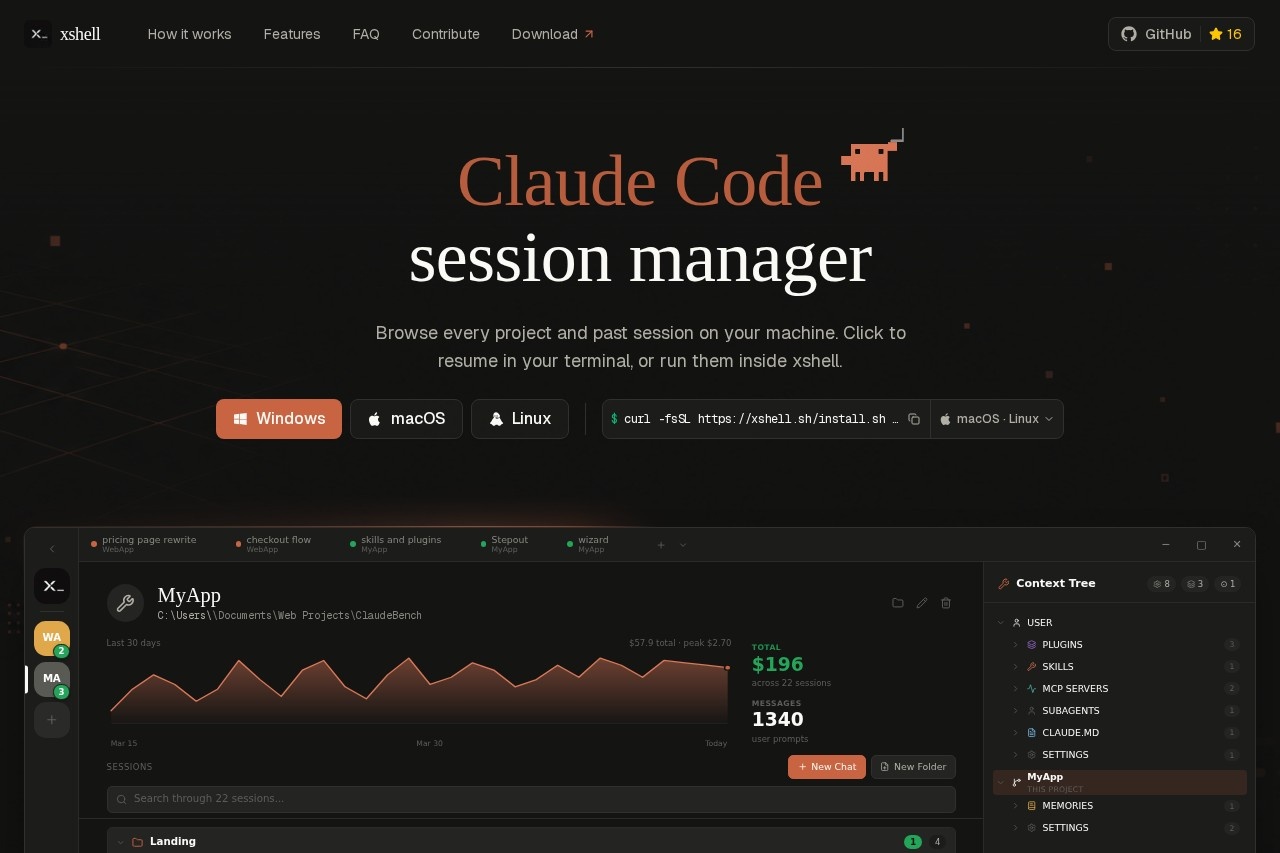
xshell is a project manager for Claude Code sessions that runs on Windows, macOS, and Linux. It reads session data from your local machine and displays every project and past session in a clean interface. You can browse through your history, see cost and message stats for each session, and click to resume a session in your terminal or run it directly inside xshell. The tool is built on a fast, lightweight stack using Tauri, Rust, React, TypeScript, xterm.js, and Vite.Application scenarios
Developer session management
Quickly find and resume past Claude Code sessions across multiple projects.
Cost tracking
Monitor spending per session and over time, with a total cost breakdown across all sessions.
Project browsing
Navigate through all your local projects that have Claude Code session data stored.
Terminal resumption
Click a past session to resume it in your native terminal with a single command.
In-app execution
Run Claude Code sessions directly inside xshell's built-in terminal without leaving the app.
Session search and filtering
Search across sessions, sort by date, and locate specific work from days or weeks ago.
Core Features
Session browser
See every project and past session on your machine, organized with project names, branch names, and timestamps.
Cost overview
View total spending across sessions (e.g., "$196 across 22 sessions") and per-session costs with detailed breakdowns.
Message stats
Check how many messages and user prompts were used in each session for better resource tracking.
One-click resume
Click any past session to run `claude --resume` in a real terminal—the same binary you'd run manually.
xterm.js terminal
Run the actual Claude CLI inside a terminal powered by xterm.js, the same library used by VS Code, Cursor, and Hyper.
Context visibility
See every skill, MCP server, and file the current session has access to in a single tree view.
Cross-platform support
Works on Windows (via PowerShell install), macOS, and Linux.
Local file reading
Reads session data from `~/.claude` on your machine—nothing gets uploaded to the cloud.
Target users
xshell is built for developers and power users who work with Claude Code regularly and need to manage multiple sessions across different projects. It's especially useful for teams or individuals tracking AI coding costs and wanting to quickly resume past work without manually digging through terminal history.How to use xshell?
Install xshell on your machine using the appropriate command for your OS. For Windows, open PowerShell and runirm https://xshell.sh/install.ps1 | iex. For macOS and Linux, a similar install command is available on the official site. Once installed, xshell reads your local Claude Code session data automatically. Browse your projects and sessions in the app, then click any session to resume it in your terminal or run it inside xshell's built-in terminal.Pricing and free trial
The website text does not include any pricing information or free trial details. Pricing is not mentioned on the page.Effect review
xshell delivers exactly what it promises: a fast, local session manager for Claude Code that keeps your data private. The interface shows clear cost and message stats per session, making it easy to track spending and find past work. The use of xterm.js ensures the terminal behaves identically to what you'd get in VS Code or your shell. For developers who run many Claude Code sessions daily, this tool eliminates the friction of remembering session IDs or digging through file history. The lightweight tech stack (Tauri + Rust) suggests it will feel snappy even on older hardware.Frequently Asked Questions
What is xshell?
How do I resume a previous session?
Can I execute commands without opening a terminal?
Is xshell free to use?
What platforms does xshell support?
How do I organize my projects in xshell?
xshell - AI Tool Detail
Project manager by xshell for browsing past projects and sessions, enabling quick terminal resumption or in-app execution.
Category:Project Management
Visit Link:https://xshell.sh/
Tags:project management、terminal sessions、session browser、quick resume、devops tool