
Claudoscope
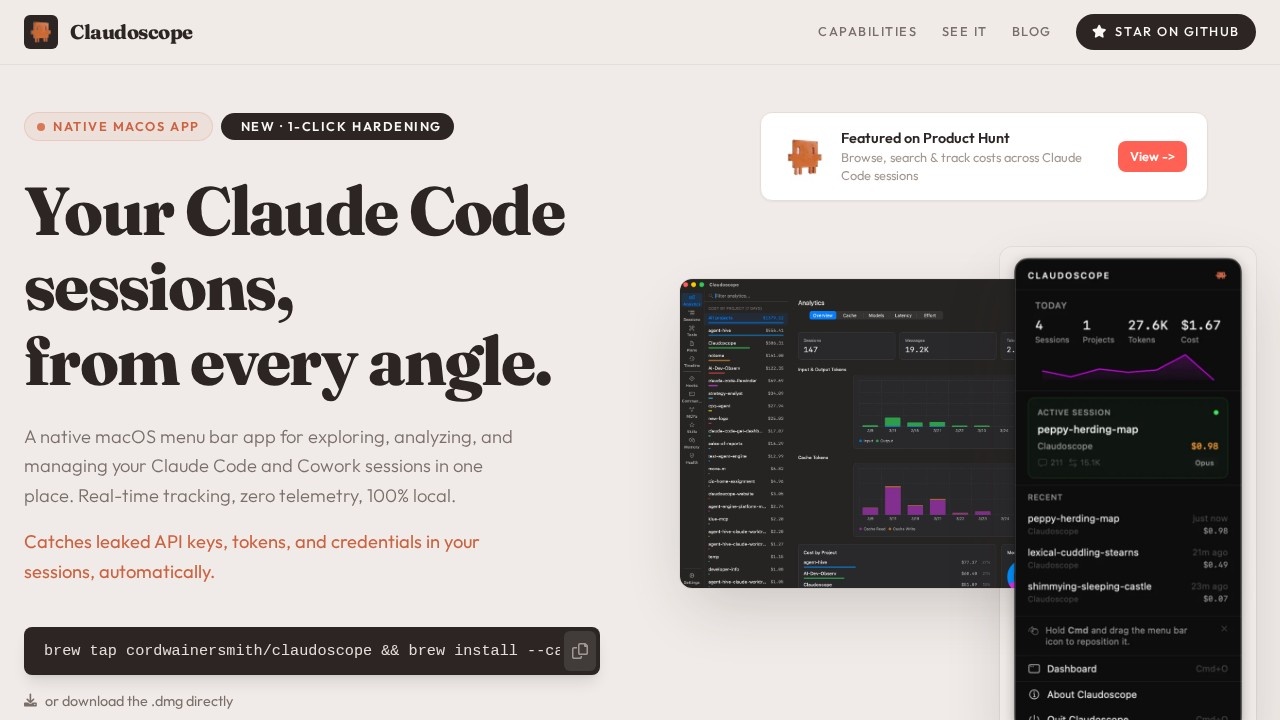
Claudoscope by an open-source developer is a macOS menu bar app for managing Claude Code and Cowork. It browses sessions, tracks costs, detects leaked secrets, and hardens ~/.claude/ configurations wi
What is Claudoscope?
Claudoscope is a native macOS menu bar app designed to explore, analyze, and manage your Claude Code and Cowork sessions in one place. It provides real-time tracking of session activity, cost management, and security scanning—all fully local with zero telemetry. Users rely on it to browse, search, and track costs across Claude Code sessions, while also catching leaked API keys, tokens, and credentials automatically. The app is distributed via Homebrew or as a direct .dmg download, and it was featured on Product Hunt.Application scenarios
Session cost tracking
Monitor and review spending across all Claude Code and Cowork sessions from the menu bar.
Security auditing
Automatically detect leaked API keys, tokens, and credentials within session logs to prevent exposure.
Configuration hardening
Apply one-click hardening to your `~/.claude/` configuration files for better security posture.
Session browsing and search
Quickly find and review past Claude Code sessions without leaving your workflow.
Local-first data management
Keep all session data on your disk with no external transmission, suitable for privacy-sensitive environments.
Developer productivity
Manage multiple Claude Code sessions from a single native macOS interface without switching contexts.
Core Features
Native macOS menu bar app
Access all session management features directly from the menu bar for quick, unobtrusive use.
Browse, search & track costs
Explore and filter Claude Code sessions while monitoring associated costs in real time.
1-Click Hardening
Harden your `~/.claude/` configuration files with a single click to improve security.
Automatic secret detection
Automatically catch leaked API keys, tokens, and credentials in your sessions.
100% local processing
All session data stays on your disk—zero telemetry and no data leaves your machine.
Cross-session management
Manage both Claude Code and Cowork sessions from one unified interface.
Homebrew installation
Install easily via `brew tap cordwainersmith/claudoscope && brew install --cask claudoscope` or download the .dmg directly.
Target users
Developers and power users who work extensively with Claude Code and Cowork sessions on macOS. This includes AI engineers, security-conscious developers, and anyone managing multiple Claude sessions who needs cost tracking, secret scanning, and configuration hardening without sacrificing privacy.How to use Claudoscope?
Install Claudoscope via Homebrew (brew tap cordwainersmith/claudoscope && brew install --cask claudoscope) or download the .dmg directly from the official website. Once installed, the app lives in your macOS menu bar, where you can browse, search, and track costs across Claude Code sessions, apply one-click hardening, and automatically scan for leaked secrets—all without any setup beyond installation.Effect review
Claudoscope delivers exactly what it promises: a lightweight, local-first macOS menu bar tool for managing Claude Code sessions with real-time cost tracking and built-in security scanning. The zero-telemetry, 100% local approach is a strong differentiator for privacy-focused developers, and the automatic secret detection adds practical value for teams handling sensitive API keys. While the app is clearly in its early stages (it was featured on Product Hunt), the feature set is focused and functional. For developers already using Claude Code or Cowork, Claudoscope eliminates the need to manually browse session logs or worry about credential leaks—making it a practical, no-fuss utility rather than a bloated platform.Frequently Asked Questions
What is Claudoscope?
Is Claudoscope free to use?
What platforms does Claudoscope support?
How does Claudoscope detect leaked secrets?
Can Claudoscope track Claude API costs?
Does Claudoscope require any setup?
Claudoscope - AI Tool Detail
Claudoscope by an open-source developer is a macOS menu bar app for managing Claude Code and Cowork. It browses sessions, tracks costs, detects leaked secrets, and hardens ~/.claude/ configurations wi
Category:Agents
Visit Link:https://claudoscope.com/
Tags:macOS menu bar、Claude Code、cost tracking、secret detection、configuration hardening