
Cursor
AI coding agent by Anysphere that enhances developer productivity with advanced code generation, editing, and debugging features.
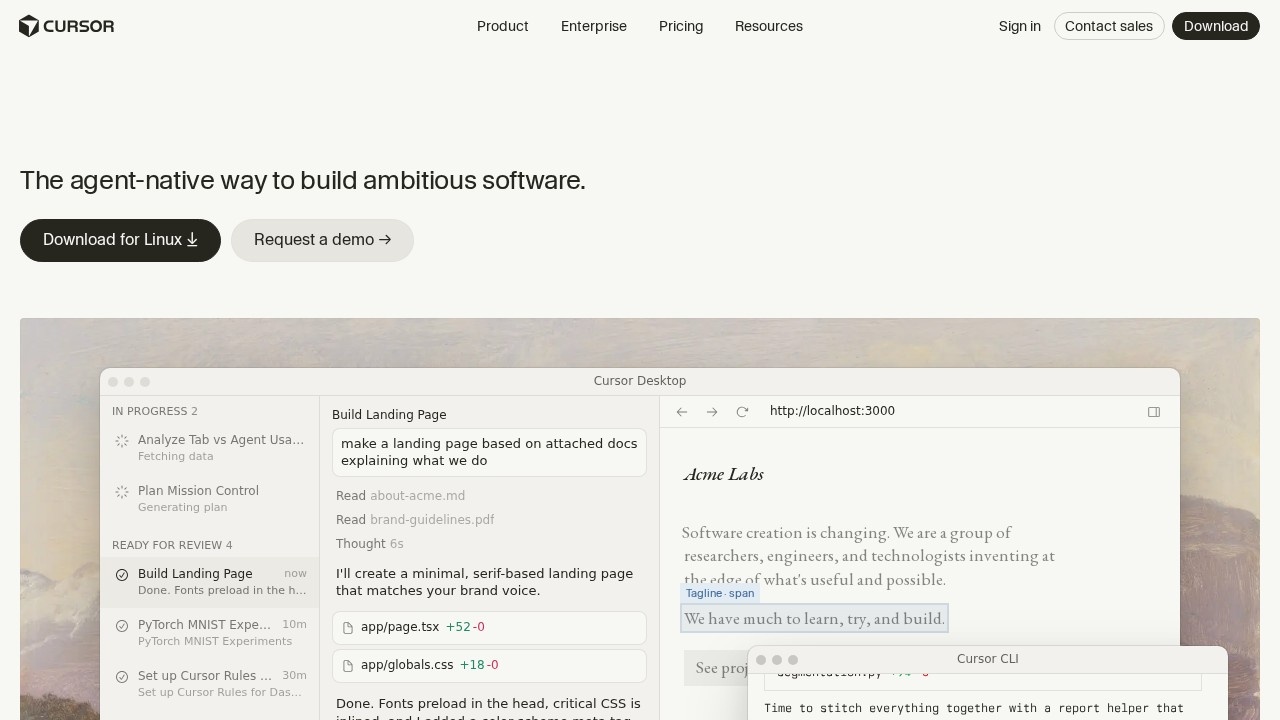
What is Cursor?
Cursor is an AI-powered coding agent developed by Anysphere that enhances developer productivity through advanced code generation, editing, and debugging. It integrates directly into a desktop IDE environment and a CLI interface, allowing developers to offload coding tasks to AI agents. The platform is designed for building ambitious software, with features like context-aware completions, semantic search, and multi-agent collaboration. Cursor is trusted daily by teams building world-class software, as evidenced by its use in projects like Acme Research Dashboard and Live Telemetry Pipeline.Application scenarios
Agent-driven development
Hand off coding tasks to Cursor's AI agents while you focus on high-level decisions.
Codebase indexing and search
Use secure codebase indexing and semantic search to navigate large projects efficiently.
Multi-agent collaboration
Leverage multiple AI agents working in parallel to build, test, and demo features end to end.
Task planning and execution
Create plans (e.g., "Build Mission Control Interface") and let Cursor autonomously execute them, including file exploration and code generation.
Real-time telemetry and deployment
Manage live telemetry pipelines and zero-downtime deploys through AI-assisted workflows.
Research dashboard creation
Build interactive dashboards by providing natural language instructions, with AI handling theme configuration, data wiring, and chart creation.
Core Features
Composer 2.5
Works autonomously and runs in parallel, allowing agents to use their own computers to build, test, and demo features end to end.
Cursor Agent
A dedicated agent mode that can process screen recordings and work for extended periods (e.g., 14m 22s) on complex tasks.
Context-aware completions
Provides intelligent code suggestions based on the current project context.
Semantic search
Enables searching codebases by meaning rather than exact text matches.
Secure codebase indexing
Indexes your entire codebase securely for faster navigation and search.
Multi-agent collaboration
Multiple AI agents can work together on different parts of a project simultaneously.
Intelligent code navigation
Helps developers quickly move through and understand complex codebases.
CLI interface
Offers a command-line interface for developers who prefer terminal-based workflows.
Plan and execute workflow
Users can define tasks (e.g., "Add multiplayer mode") and have the AI generate and implement the code.
Target users
Cursor is designed for software developers, engineers, and teams building complex applications. It's particularly useful for full-stack developers, DevOps engineers, and research teams who need to rapidly prototype, test, and deploy features. The platform's multi-agent and parallel execution capabilities make it ideal for teams working on large codebases or requiring collaborative AI assistance.How to use Cursor?
To get started with Cursor, download the desktop app for macOS from the official website. After installation, you can use the Cursor Desktop interface or the Cursor CLI to interact with the AI. In the IDE, you can create tasks by typing natural language instructions (e.g., "Build Mission Control Interface"), and the AI will explore files, generate code, and execute plans. For cloud-based agents, visit cursor.com/agent to leverage autonomous agents that run in parallel.Effect review
Cursor's feature set suggests a powerful tool for accelerating software development, particularly through its agent-driven approach and multi-agent collaboration. The ability to hand off complex tasks like building dashboards or managing telemetry pipelines while focusing on decision-making is a clear productivity booster. The platform's integration of semantic search and secure codebase indexing adds substantial value for teams working with large codebases. However, the lack of explicit user feedback or performance metrics in the provided content makes it difficult to assess real-world reliability or learning curve. Overall, Cursor appears to be a robust AI coding assistant that could significantly streamline development workflows for teams willing to adopt agent-based development.Frequently Asked Questions
What is Cursor?
How does Cursor enhance coding productivity?
Is Cursor free to use?
What programming languages does Cursor support?
Can Cursor integrate with existing development workflows?
How does Cursor ensure code quality and security?
Cursor - AI Tool Detail
AI coding agent by Anysphere that enhances developer productivity with advanced code generation, editing, and debugging features.
Category:Programming Assistant
Visit Link:https://cursor.com/referral?code=FHSOBDDHSPTG
Tags:AI Code Generator、Developer Productivity、Code Debugging