
Termi Protocol
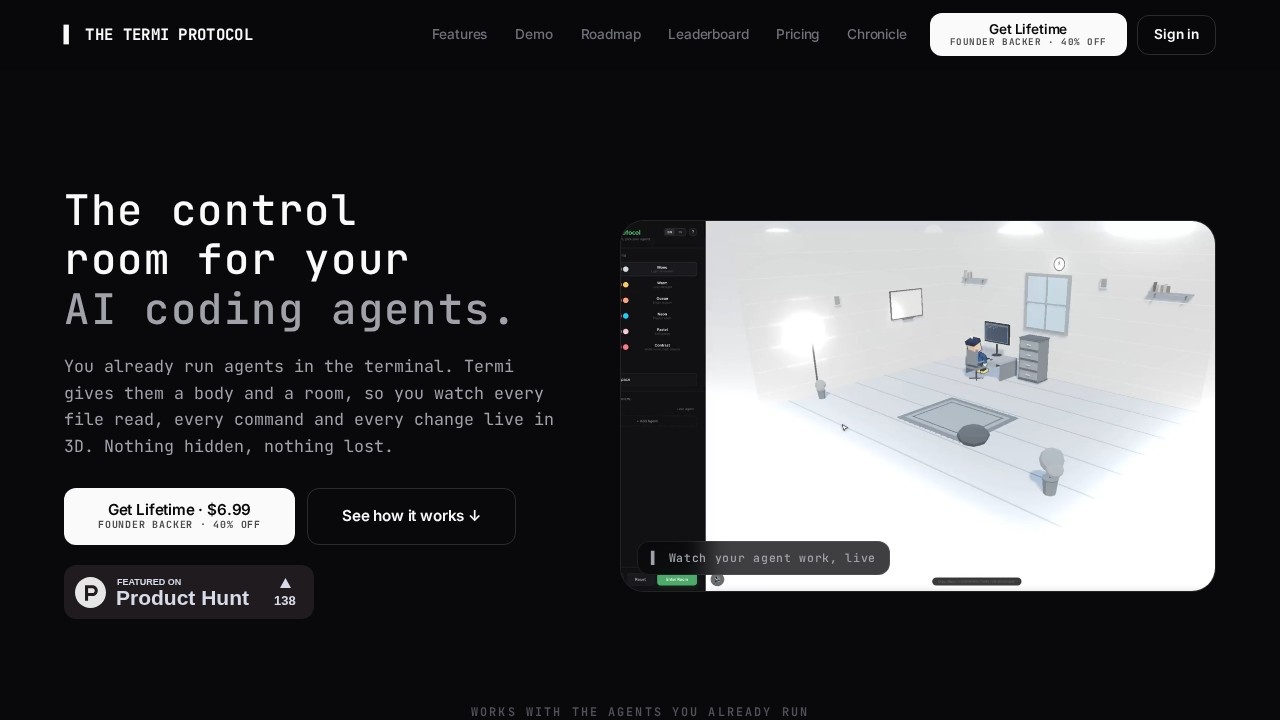
Termi Protocol by the Termi team is a 3D simulation tool that visualizes AI agent workflows. It gives coding agents a virtual face and environment, letting you watch them read, write, and run commands
What is Termi Protocol?
Termi Protocol is a 3D simulation tool that gives AI coding agents a virtual body and environment, turning every terminal step into a visible 3D action. It works with the agents you already run—Claude Code, Codex, Gemini CLI, Copilot, Grok CLI, Aider, and any CLI agent—so you can watch them read, write, and run commands live. The tool runs locally on your machine (your keys, your machine) and provides full visibility into agent behavior, replacing opaque scrolling logs with a visual command center.
Application scenarios
AI agent monitoring
Watch Claude Code, Codex, or any CLI agent perform file reads, writes, and command execution in real-time 3D.
Debugging and oversight
Hover over an agent to see its name, model, goal, live tokens, and real-time cost—catch runaway behavior before it causes damage.
Session persistence
Close the app and reopen later to find task boards, checkpoints, and project memory saved—no lost context.
Multi-agent collaboration
Run multiple agents simultaneously with file locks that prevent two agents from editing the same file.
Approval workflows
Let agents run autonomously; they ping you when they need approval, so you can step away and return only when needed.
Checkpoint recovery
Rewind to any checkpoint in seconds to undo a bad edit without starting over.
Core Features
3D agent visualization
Every terminal step—reading, writing, running commands—becomes a 3D action you can watch live in a virtual room.
Agent passport
Hover any agent to see its name, model, goal, live token count, and current cost.
Real terminal per agent
Each agent gets a genuine shell (xterm + PTY), not a replayed log.
Kanban task board
Agents drive their own kanban board, turning plans into completed tasks.
Checkpoint snapshots
Every change is automatically snapshotted; you can rewind a bad edit in seconds.
Live cost tracking
See token and dollar cost per agent and per session as it runs.
Automatic project memory
Each agent learns about your project and saves that knowledge automatically.
File collision prevention
File locks keep two agents from ever editing the same file simultaneously.
Notification alerts
When an agent pauses for approval, Termi plays an alert and pops a notification so you can respond quickly.
Command center panel
A single panel behind every desk provides a real shell, live cost, tasks, checkpoints, and memory—no tab-juggling.
Target users
Developers and teams who run AI coding agents (Claude Code, Codex, Gemini CLI, Copilot, Grok CLI, Aider, and any CLI agent) and want full visibility into agent behavior. Ideal for anyone tired of opaque scrolling logs, lost session context, and runaway commands—especially those managing multiple agents or working on complex projects where oversight and recovery are critical.
How to use Termi Protocol?
- Connect your agent: Bring your existing AI coding agent (Claude Code, Codex, Gemini CLI, or any CLI agent). Your keys and machine remain local.
- Watch it build: The agent walks to a cabinet to read, sits to write code, and runs commands in a real terminal—all visible in 3D.
- Stay in control: Stop, pause, or approve any step. Rewind to any checkpoint if something goes wrong.
- Pick up where you left off: Close the app and reopen later—your task boards, checkpoints, and agent memory are saved.
Pricing and free trial
The website states a Lifetime price of $6.99 with a Founder backer discount of 40% off. No free trial or subscription tiers are mentioned.
Effect review
Termi Protocol addresses a genuine pain point for AI agent users: the opacity of terminal-only workflows. By giving agents a visual 3D body and a persistent command center, it makes agent behavior observable and recoverable. The checkpoint system and file collision prevention are practical safeguards, while the live cost tracking adds transparency. The $6.99 lifetime price is notably low for a tool that integrates with multiple major agents. For developers already running CLI agents, Termi Protocol offers a straightforward way to gain visibility and control without changing their existing workflow.
Frequently Asked Questions
What is Termi Protocol?
How does Termi Protocol help with AI agents?
Is Termi Protocol free to use?
What kind of AI agents work with Termi Protocol?
Can I customize the virtual environment in Termi Protocol?
Termi Protocol - AI Tool Detail
Termi Protocol by the Termi team is a 3D simulation tool that visualizes AI agent workflows. It gives coding agents a virtual face and environment, letting you watch them read, write, and run commands
Category:Agents
Visit Link:https://termiprotocol.com/
Tags:3D simulation、AI agent visualization、workflow monitoring、coding agents