
AI Video Generator
AI video generator by Text2Vid for creating videos from text prompts or images, turning ideas into professional clips online quickly and for free.
What is AI Video Generator?
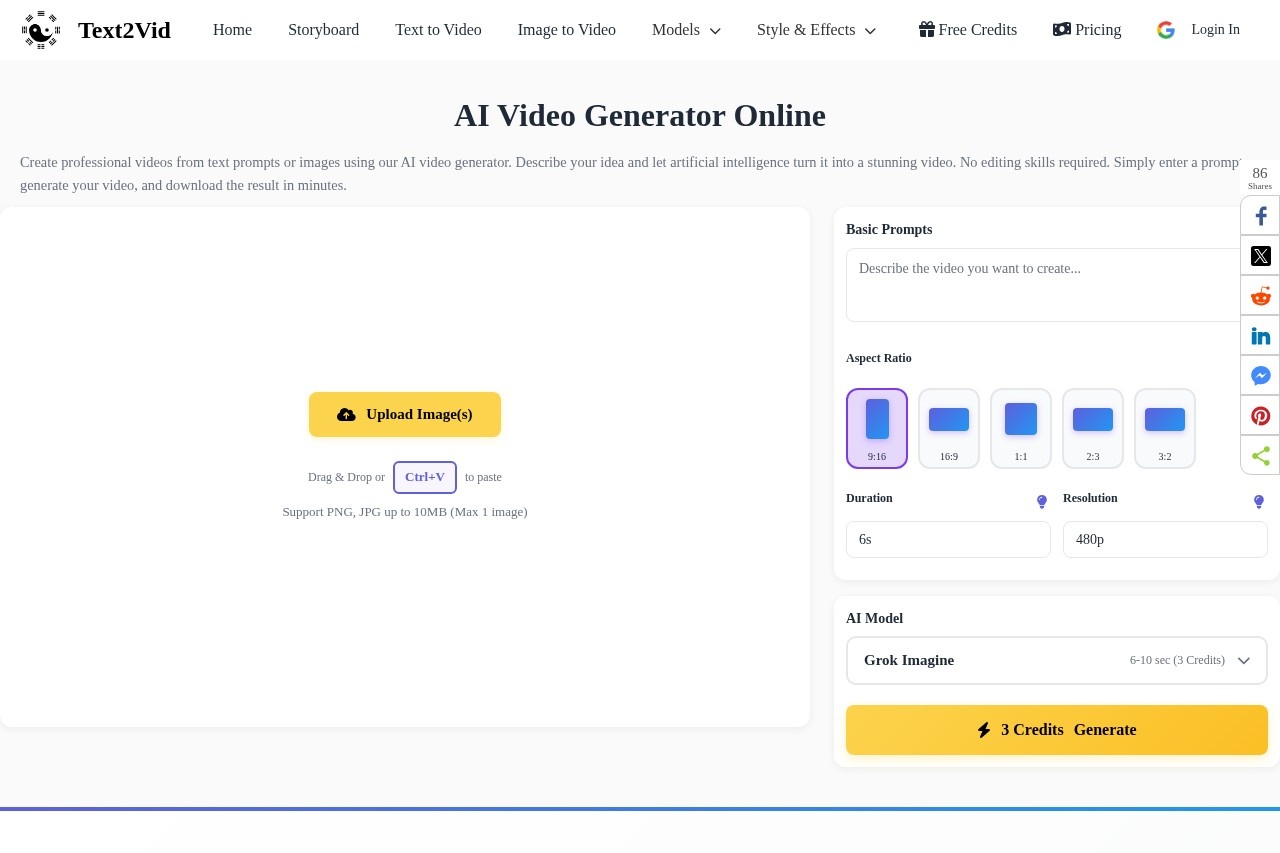
AI Video Generator is a free online tool from Text2Vid that creates professional videos from text prompts or uploaded images. You describe your idea in plain language, and the AI turns it into a stunning video clip within minutes—no editing skills required. The platform handles everything from generating the visual content to offering multiple export formats for different social platforms. It's designed for anyone who needs quick, high-quality video without touching traditional editing software.
Application scenarios
Social media content creation
Generate landscape, portrait, or square videos optimized for YouTube, TikTok, or Instagram.
Creative storytelling
Turn imaginative prompts (e.g., "a fluffy orange tabby cat walking gracefully across a sunlit living room") into cinematic clips.
Marketing and advertising
Quickly produce product demos or brand videos from text descriptions or reference images.
Educational explainers
Convert lesson outlines or concept descriptions into animated visual narratives.
Personal projects
Create unique videos for events, gifts, or social sharing using custom prompts and image uploads.
Inspiration and brainstorming
Browse the Inspiration Gallery to spark new ideas and test different prompt styles.
Core Features
Text to Video AI
Convert written prompts into engaging videos automatically using advanced AI models—no manual editing required.
Image to Video
Upload an image (PNG or JPG up to 10MB, max 2 images) and transform it into an animated video while preserving the original visual style.
Fast AI Rendering
Generate videos within minutes using optimized AI models built for quick content creation.
Multiple Video Formats
Export videos in landscape, portrait, or square format for YouTube, TikTok, or Instagram.
Aspect Ratio & Duration Controls
Set the aspect ratio and video duration directly from the generation interface.
Motion Mode Options
Choose between "None (Best Quality)" for static scenes or "Regular (Faster)" for smoother motion.
Shot Type Selection
Pick from Default, Single Shot, or Multiple Shots, plus a Fixed Lens option for consistent framing.
Audio Prompt Expansion
The AI can expand your original prompt to generate richer, more detailed video content.
Negative Prompt & Seed Controls
Refine results by entering negative prompts (what to avoid) and setting a specific seed (0) or CFG scale (0.5).
AI Model Selector
Choose from multiple AI models to influence the style and quality of the generated video.
Share & Download
Share your creation via link, QR code, or directly to Twitter, Facebook, WhatsApp, or Telegram.
Target users
Content creators, social media managers, marketers, educators, and hobbyists who need to produce professional-looking videos quickly without learning complex editing software. The tool is equally useful for beginners exploring AI video generation and experienced users who want to iterate on prompts and settings for precise results.
How to use AI Video Generator?
- Upload an image (optional): Drag and drop or paste an image (PNG or JPG, up to 10MB, max 2 images) if you want the AI to base the video on a specific visual.
- Write a prompt: Describe the video scene including style, movement, and environment in plain English.
- Adjust settings: Choose aspect ratio, duration, motion mode, shot type, and optional negative prompt or seed values.
- Generate: Click "Generate" and wait while the AI processes your video.
- Download or share: Once complete, download the video or share it via link, QR code, or social media platforms.
Effect review
The AI Video Generator delivers exactly what it promises: fast, no-skill-required video creation from text or images. The example clips in the Inspiration Gallery show impressive quality—cinematic shots of animals, underwater scenes, and stylized animations that would normally require hours of editing. The ability to control aspect ratio, motion mode, and shot type gives users meaningful creative flexibility without overwhelming complexity. For a free tool, the rendering speed and output variety are genuinely competitive, making it a solid choice for quick social media content or prototyping video ideas before committing to full production.
Frequently Asked Questions
What is AI Video Generator?
How does the AI Video Generator work?
Is the AI Video Generator free to use?
What types of videos can I create?
Do I need any video editing skills?
Can I use my own images to create videos?
AI Video Generator - AI Tool Detail
AI video generator by Text2Vid for creating videos from text prompts or images, turning ideas into professional clips online quickly and for free.
Category:Text to Video
Visit Link:https://text2vid.org/
Tags:AI video generator、text to video、free video maker、AI clip creator