
OpenStatus
OpenStatus offers a free online MCP server health check tool. Test JSON-RPC initialize, ping, and tools/list handshake directly from your browser with no installation or signup required.
What is OpenStatus?
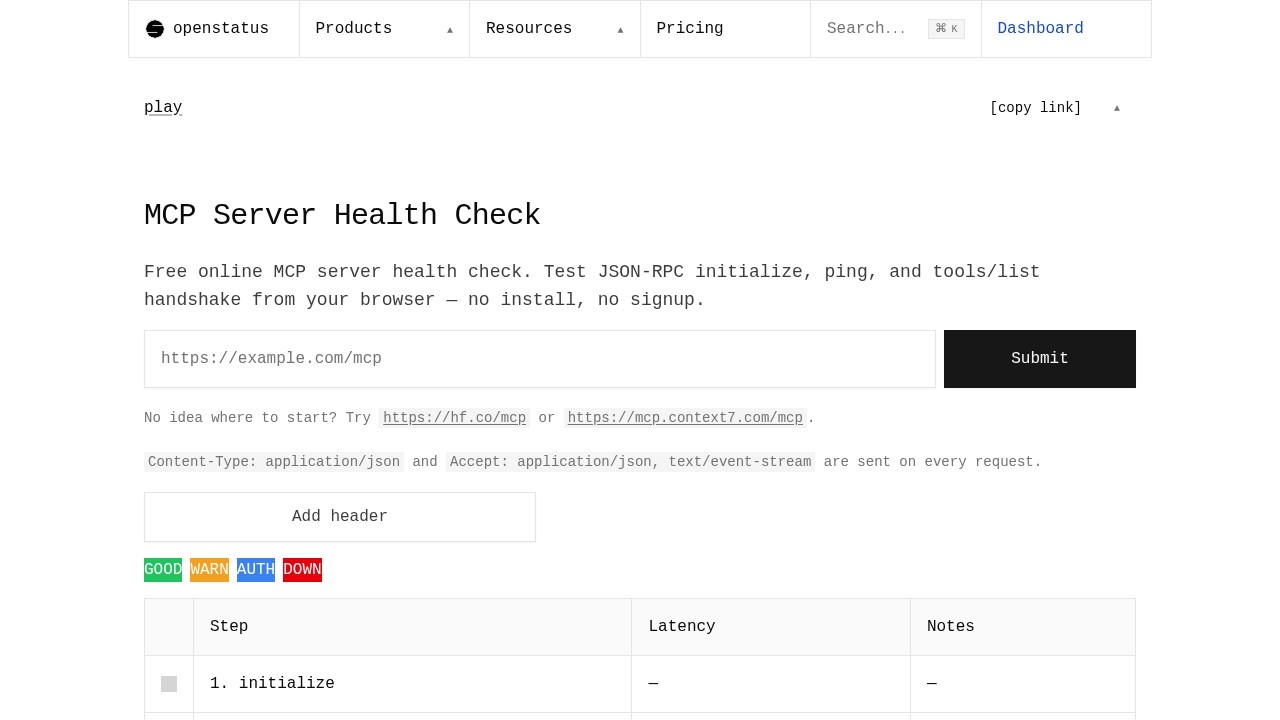
OpenStatus is a free online MCP server health check tool that runs entirely in your browser. It tests a Model Context Protocol (MCP) endpoint by sending the exact JSON-RPC calls an AI client would make on first connection—no installation or signup required. Users paste a Streamable HTTP URL, and the tool runs the spec-defined handshake to confirm the server is reachable, speaks MCP correctly, and exposes the tools it promises. It provides a verdict of Healthy, Partial, Authentication Required, or Unreachable, along with per-step latency and full request/response details.Application scenarios
AI client integration testing
Developers verify that their MCP server works with Claude Desktop, Claude Code, Cursor, Continue, or custom agents before deployment.
Debugging MCP server issues
Quickly identify whether a server is unreachable, returning the wrong content type, missing required JSON-RPC methods, or expecting an auth header.
Monitoring MCP endpoints
Use the tool to run periodic checks and then follow the monitoring guide for continuous monitoring.
Validating public MCP servers
Test servers like `https://hf.co/mcp` or `https://mcp.context7.com/mcp` without any headers.
Sharing diagnostic reports
The only data persisted is the report you explicitly choose to share, making it suitable for collaborative debugging.
Learning MCP handshake flow
Developers new to MCP can see the exact JSON-RPC requests and responses for initialize, ping, and tools/list calls.
Core Features
Three-step handshake
Runs `initialize`, `notifications/initialized`, and `ping` + `tools/list` in the same order an MCP client would.
Per-step inspection
Click any row in the result table to open the exact JSON-RPC request and response, along with per-step latency, negotiated protocol version, server info, and session id.
Verdict output
Returns one of four clear verdicts: GOOD (Healthy), WARN (Partial — server speaks MCP but exposes no tools), AUTH (Authentication Required — server returned 401 with a Bearer challenge), or DOWN (Unreachable — DNS/connection/parse failure).
Authorization header support
Add an Authorization header if the server requires it; public servers can be tested with no headers.
Content-Type enforcement
Sends `Content-Type: application/json` and `Accept: application/json, text/event-stream` on every request.
Browser-local execution
The whole flow takes about 30 seconds and never leaves your browser session — only the report you explicitly share is persisted.
No install or signup
Works directly from the browser with zero setup.
Target users
- MCP server developers who need to validate their endpoints before integrating with AI clients.
- AI agent builders using Claude Desktop, Claude Code, Cursor, Continue, or custom agents that rely on MCP servers.
- DevOps engineers responsible for monitoring MCP infrastructure in production.
- QA engineers testing MCP server compliance and error handling.
- Technical writers documenting MCP server setup and troubleshooting.
How to use OpenStatus?
- Visit the OpenStatus MCP Health Check page at
https://www.openstatus.dev/play/mcp-health. - Paste your MCP server URL (any Streamable HTTP endpoint works, e.g.,
https://hf.co/mcp). - Optionally add an Authorization header if the server requires authentication.
- Click "Submit" to run the check.
- Inspect each step by clicking rows in the result table to see JSON-RPC requests, responses, latency, protocol version, server info, and session id.
- Share the report if needed — the tool only persists data you explicitly choose to share.
Effect review
OpenStatus delivers exactly what it promises: a fast, browser-based MCP health check that mimics real AI client behavior. The three-step handshake and clear verdicts (GOOD, WARN, AUTH, DOWN) make it trivial to diagnose server issues that a simple HTTP status check would miss. The ability to inspect individual JSON-RPC requests and responses with latency data is invaluable for debugging. For a free tool with no signup required, it's a practical and reliable utility for anyone working with MCP servers.Frequently Asked Questions
What is OpenStatus?
Do I need to install anything to use OpenStatus?
What MCP server endpoints can I test with OpenStatus?
Is OpenStatus free to use?
Can I use OpenStatus on any device?
How do I start a health check on OpenStatus?
OpenStatus - AI Tool Detail
OpenStatus offers a free online MCP server health check tool. Test JSON-RPC initialize, ping, and tools/list handshake directly from your browser with no installation or signup required.
Category:API services
Visit Link:https://www.openstatus.dev/play/mcp-health
Tags:MCP server health check、JSON-RPC testing、browser-based AI tool、no-installation tool