GPT Image 2
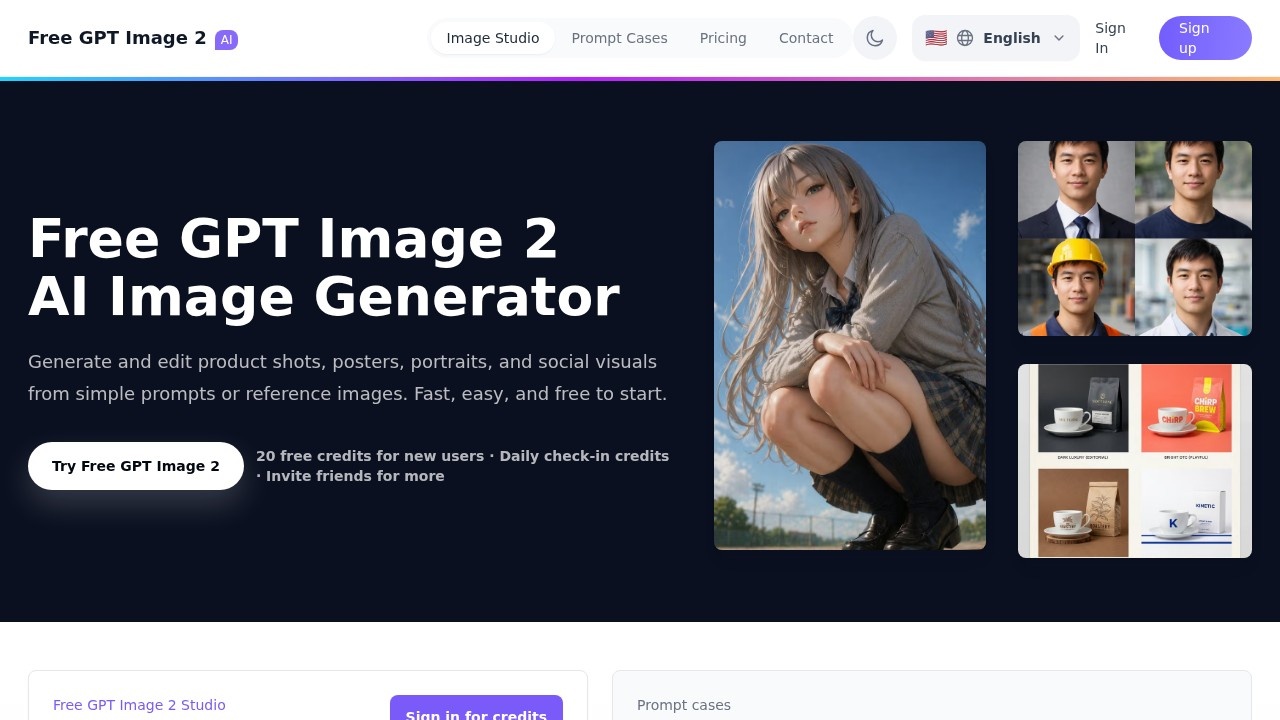
Free GPT Image 2 by the developer enables users to create product shots, posters, portraits, and reference-based image variations online quickly and easily, all for free.
What is GPT Image 2?
GPT Image 2 is a free AI image generator that lets you create product shots, posters, portraits, and social visuals from simple text prompts or reference images. It offers a studio interface where you can edit images, adjust resolution (1K, 2K, or 4K), and choose aspect ratios like square, portrait, landscape, or wide. New users get 20 free credits to start, with additional credits available through daily check-ins and inviting friends. The tool is designed for fast, easy image generation without upfront costs.Application scenarios
Product photography
Generate realistic product shots for e-commerce pages or ads from a single prompt.
Poster design
Create commercial posters, football movie posters, or campaign visuals with dramatic, high-detail compositions.
Social media content
Produce social covers, posts, and story visuals (9:16 aspect ratio) for platforms like Instagram.
Portrait creation
Generate AI portraits for personal or professional use, with options for facial details and lighting.
Reference-based editing
Upload a product photo, portrait, or poster draft, then describe a new visual direction to create variations while preserving the subject and key details.
Campaign ideation
Quickly generate visual concepts for ads, landing pages, or brand campaigns to test different styles and compositions.
Core Features
Text-to-image generation
Create images from simple prompts, with support for multiple styles and compositions.
Image-to-image editing
Upload a reference image (e.g., product photo or poster draft) and describe the desired visual direction to generate new variations while keeping the subject and key details intact.
Resolution options
Choose from 1K (Standard), 2K (Sharper), or 4K (Ultra detail) resolutions, with higher resolutions requiring a fixed aspect ratio.
Aspect ratio presets
Select from Auto (Best fit), Square (1:1), Portrait (3:4), Landscape (4:3), Wide (16:9), or Story (9:16) to match your output format.
Prompt inspiration library
Browse ready-to-use GPT Image 2 prompt examples for portraits, product shots, posters, scenes, and social media visuals. Tap any prompt to load it into the studio.
Image history
Recent generated images stay available for 72 hours, allowing you to reopen or download results during that window.
Credit system
New users receive 20 free credits, with additional credits earned through daily check-ins and inviting friends.
Target users
This tool is ideal for marketers, content creators, e-commerce sellers, social media managers, and designers who need quick, free AI-generated visuals for product pages, ads, posters, portraits, or campaign concepts. It also suits anyone exploring AI image generation without an upfront investment.How to use GPT Image 2?
- Visit the site and sign in to receive your free credits.
- In the studio, enter a text prompt or upload a reference image.
- Adjust settings like resolution (1K, 2K, or 4K) and aspect ratio (e.g., square, portrait, landscape).
- Click to generate your image. Results appear in the studio and are saved in your image history for 72 hours.
- Download or reopen recent results as needed.
Pricing and free trial
- Free credits: 20 free credits for new users upon sign-in.
- Daily check-in credits: Earn additional credits by checking in daily.
- Invite friends: Get more credits by inviting others.
- Resolution costs: 1K is Standard, 2K is Sharper (Plus), 4K is Ultra detail (Pro). Higher resolutions cost the same credits but require a fixed aspect ratio.
Effect review
GPT Image 2 delivers a straightforward, no-cost entry point for generating and editing AI images, with practical features like reference-based editing and resolution scaling. The prompt examples and aspect ratio presets make it easy to get started, especially for product shots and social visuals. However, the credit system (20 free credits, plus daily check-ins) means heavy users will need to manage their credits carefully. For quick prototyping or one-off visuals, it’s a solid free option—though the 72-hour image history limit may require timely downloads. Overall, it’s a capable tool for casual or small-scale creative work.Frequently Asked Questions
What is GPT Image 2?
Is GPT Image 2 really free to use?
What types of images can I create with GPT Image 2?
Do I need to install any software to use GPT Image 2?
How does the reference-based image variation feature work?
Can I use GPT Image 2 for commercial purposes?
GPT Image 2 - AI Tool Detail
Free GPT Image 2 by the developer enables users to create product shots, posters, portraits, and reference-based image variations online quickly and easily, all for free.
Category:Image generation
Visit Link:https://freegptimage2.net/
Tags:AI image generator、free image creation、product shot maker、poster design tool、portrait generator