
Backgrind
Backgrind by Backgrind Inc. puts AI coding agents in an always-on-top overlay window. Supports Claude Code, Cursor, or hosted models. Features include vibe code mode, multi-agent tabs, voice, and loca
What is Backgrind?
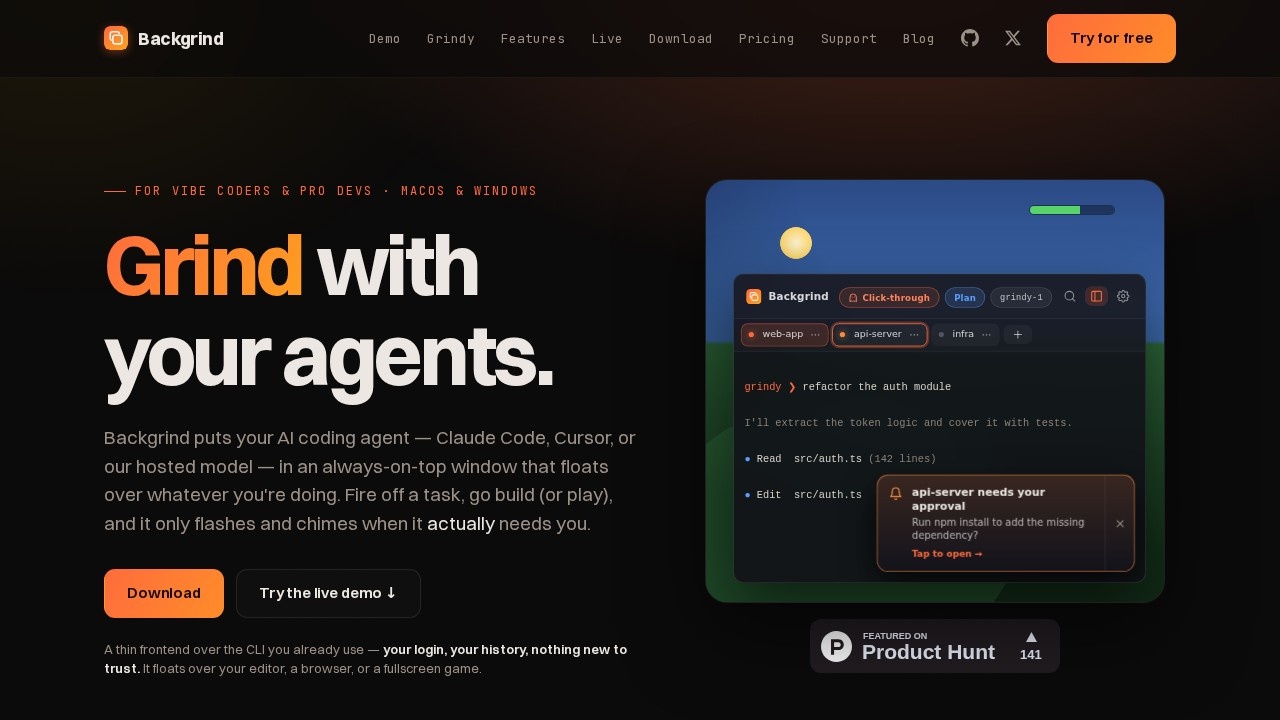
Backgrind is a desktop overlay application for macOS and Windows that puts AI coding agents—including Claude Code, Cursor, or Backgrind’s own hosted model (Grindy)—in a persistent, always-on-top window. It acts as a thin frontend over your existing CLI tools, floating above your editor, browser, or even a fullscreen game. Users fire off coding tasks, and the overlay only flashes or chimes when it needs their attention, keeping them in flow without constant tab-switching.
Application scenarios
Vibe coding sessions
Keep an AI agent visible while you build or play, with the window staying put over any app.
Multi-tasking development
Run coding tasks while watching a video, browsing docs, or grinding a game—the overlay floats independently.
Rapid refactoring
Send a command like "refactor the auth module" and the agent reads, edits, and runs tests without leaving your workspace.
Approval-based workflows
The overlay taps you when it needs approval (e.g., installing a dependency or running a test suite) so you don't miss critical steps.
Live demo testing
Try the product interactively via a live demo before committing to installation.
Cross-backend flexibility
Switch between Claude Code, Cursor, or Grindy per workspace without lock-in.
Core Features
Always-on-top overlay
The window floats over your editor, browser, or any app—you can drag, stretch, recolor, or fade it through.
Multi-agent support
Bring your own agent (Claude Code, Cursor, Codex coming soon) or use Backgrind’s hosted model, Grindy.
Grindy hosted model
A full coding agent powered by OpenCode with no CLI to install, no API keys, and no config files—just sign in and start describing tasks.
Vibe code mode
The overlay only flashes and chimes when it needs your input, letting you build or play uninterrupted.
Multi-agent tabs
Switch between different agent backends per workspace directly from the overlay.
Voice input
Use voice to drive the agent (indicated by the 🎵 icon in the interface).
1M-token context window
Grindy keeps a large slice of your codebase in working memory for long, sprawling tasks.
Build or Plan modes
Flip to "Plan" when you want the agent to think first, or "Build" when you just want it shipped.
Click-through and glance modes
Options like accent opacity, click-through, and quick show/hide (⌘⇧A) or glance (⌃⌘S) keep the overlay unobtrusive.
Metered pay-as-you-go billing
Pay only for what you use, top up anytime—no per-task subscription.
Target users
Backgrind is built for vibe coders and professional developers who want to keep an AI coding agent visible and responsive while working across multiple apps. It suits solo developers, indie hackers, and teams that need a lightweight, non-intrusive interface for tasks like refactoring, testing, or rapid prototyping—especially those who already use Claude Code or Cursor and want a persistent overlay.
How to use Backgrind?
Download the app for macOS or Windows from the official site. You can bring your own agent (Claude Code, Cursor) by logging in with your existing credentials—your login, history, and hooks carry over. Alternatively, use Grindy: sign in, open a folder, and start describing tasks. No Homebrew, npm, or PATH setup needed. The overlay appears automatically; use keyboard shortcuts (⌘⇧A to show/hide, ⌃⌘S for glance) to control visibility. Fire off a command like "refactor the auth module" and the agent reads, edits, and runs tests—it only taps you when approval is needed.
Pricing and free trial
Pricing is metered per usage for the Grindy hosted model: "Pay only for what you use. Metered to the cent, top up whenever—no per-task subscription." The example shows "$3.10 used this month" with a "top up anytime" option. No free trial is mentioned in the provided text, and pricing for bring-your-own-agent setups (Claude Code, Cursor) is not specified.
Effect review
Backgrind’s core value is its non-intrusive overlay design—it keeps an AI agent visible without breaking your flow, whether you’re coding, browsing, or gaming. The support for multiple agent backends (Claude Code, Cursor, Grindy) and the option to switch per workspace gives users flexibility without lock-in. Grindy’s zero-setup approach (no CLI install, no API keys) lowers the barrier for newcomers, while the 1M-token context window and Build/Plan modes add practical depth for complex tasks. The live demo and metered billing suggest a polished, user-focused tool, though the lack of detailed user feedback or awards in the provided text means its real-world reliability is unverified. For developers who want a persistent, floating AI assistant that stays out of the way until needed, Backgrind delivers a clean, focused solution.
Frequently Asked Questions
What is Backgrind?
What platforms does Backgrind support?
What is vibe code mode?
Can I use multiple AI agents at once?
Does Backgrind support voice input?
Is Backgrind free to use?
Backgrind - AI Tool Detail
Backgrind by Backgrind Inc. puts AI coding agents in an always-on-top overlay window. Supports Claude Code, Cursor, or hosted models. Features include vibe code mode, multi-agent tabs, voice, and loca
Category:Agents
Visit Link:https://backgrind.com/
Tags:AI coding agent、overlay window、vibe code mode、multi-agent tabs、voice coding