Yapless
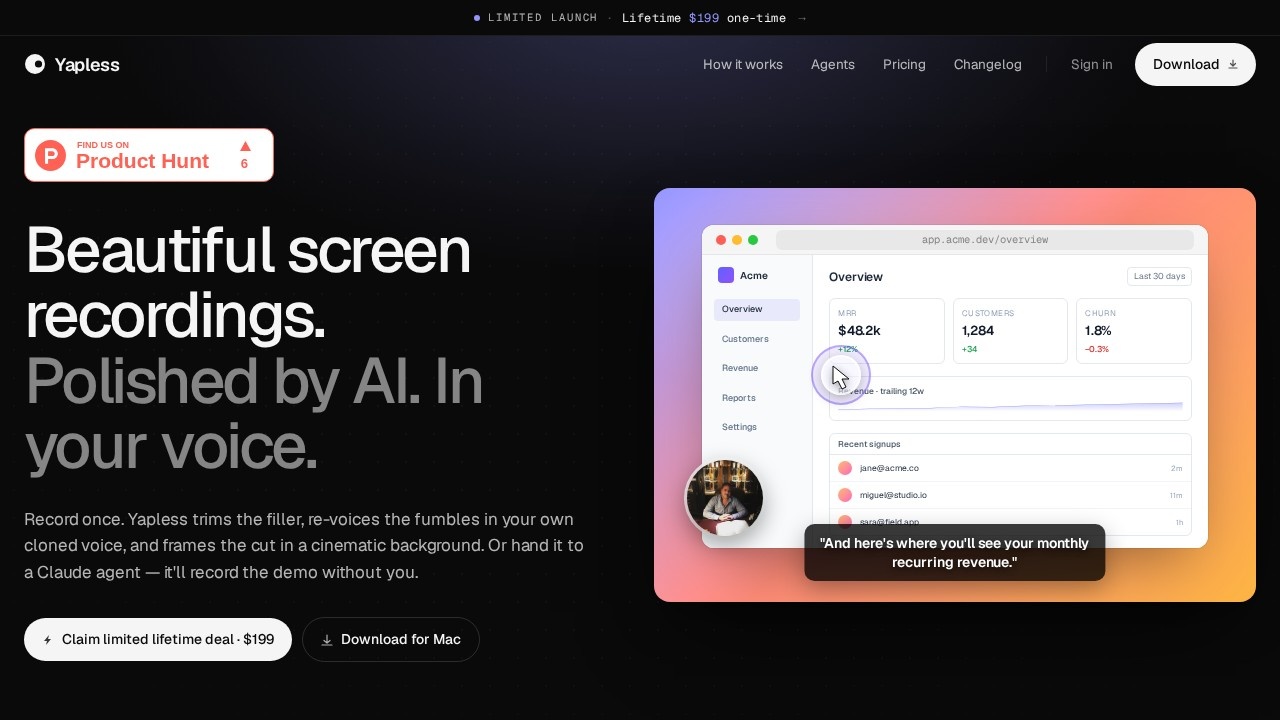
Yapless by GetYapless is a Mac screen recording app that adds branded backgrounds, smooths cursor movement, auto-zooms on clicks, and re-voices mistakes with a voice clone. It also offers an AI agent
What is Yapless?
Yapless is a Mac screen recording app that polishes recordings with AI. It automatically trims filler words, re-records mistakes in a cloned version of your voice, and frames the final cut in a branded background. You can record a walkthrough yourself or hand the task to a Claude agent, which will capture the demo without any human interaction. The result is a clean, professional-looking screen recording ready to ship.Application scenarios
Product demos
Record a walkthrough of your SaaS app, then let Yapless cut the ums, dead air, and retakes for a polished demo.
Customer onboarding
Create branded tutorial videos that show key features without awkward pauses or filler words.
Internal training
Produce quick how-to videos for teammates, with smooth cursor movement and auto-zoom on clicks.
Agent-driven demos
Let a Claude or Cursor agent record a full walkthrough by invoking the CLI, with AI vision writing the narration from sampled frames.
Sales pitches
Deliver a clean, professional screen recording to prospects, with your voice cloned for consistent narration.
Developer documentation
Generate video walkthroughs of your product’s UI without touching a microphone or timeline.
Core Features
Voice cloning & re-voicing
Yapless re-voices fumbles and mistakes in a clone of your own voice, so the final recording sounds like you said it perfectly.
Auto trimming
Filler words (um, uh, like), dead air longer than 0.4 seconds, stumbled retakes, and mouth noises are automatically removed.
Cinematic background framing
The cut is wrapped in a branded, cinematic background for a polished look.
Cursor smoothing & auto-zoom
Cursor movement is smoothed, and the app auto-zooms on every click to guide viewer attention.
Agent mode
A Claude or Cursor agent can invoke the CLI to record a walkthrough without human input—the agent picks the window, drives the UI, and AI vision writes the script.
Keyboard shortcut recording
Hit ⌘⇧R from anywhere to capture a window, area, or full display.
AI vision script writing
When no human is at the mic, AI vision writes the narration from sampled frames during agent-driven recordings.
Stitched retakes
Stumbled retakes and restarts are stitched back so cleanly that nobody hears the join.
Target users
Yapless is built for product managers, developers, sales teams, and anyone who creates screen recordings for demos, onboarding, or training. It’s especially useful for teams that want to ship polished walkthroughs quickly without spending time on manual editing. The agent mode also appeals to developers who want to automate video creation directly from their coding environment.How to use Yapless?
- Record: Hit ⌘⇧R to capture a window, area, or full display. You can use your own mic or skip it entirely.
- Let AI polish: Yapless automatically trims filler words, dead air, retakes, and mouth noises. It re-voices fumbles in your cloned voice and smooths cursor movement.
- Export: The final cut is framed in a branded background and ready to ship. For agent mode, invoke the CLI with
yapless run --window-app Chrome --prompt …and let the agent handle the rest.
Pricing and free trial
Yapless is available as a limited lifetime deal for $199 one-time payment. No free trial or subscription pricing is mentioned on the site.Effect review
Yapless delivers exactly what it promises: polished screen recordings with minimal effort. The voice cloning and auto-trimming features are particularly strong for anyone who hates re-recording takes or editing out filler words. The agent mode is a standout—being able to hand a demo to a Claude agent and get back a finished walkthrough without touching a keyboard is genuinely useful for developers and product teams. The $199 lifetime price is reasonable for a tool that saves hours of editing time, though the lack of a free trial means you’re committing upfront. Overall, Yapless is a solid pick for Mac users who want professional-looking demos fast.Frequently Asked Questions
What is Yapless?
Does Yapless work on Windows or Linux?
Can I replace my voice in recordings?
What is the AI agent in Yapless?
Does Yapless add watermarks to free recordings?
Can I customize the branded background?
Yapless - AI Tool Detail
Yapless by GetYapless is a Mac screen recording app that adds branded backgrounds, smooths cursor movement, auto-zooms on clicks, and re-voices mistakes with a voice clone. It also offers an AI agent
Category:Video editing
Visit Link:https://www.getyapless.com/
Tags:screen recording、AI voice clone、cursor effects、Mac app、branded backgrounds