
Remove Video Backgrounds in Mi
AI-powered video background remover by VidBGRemover that eliminates backgrounds without green screens. Upload your video and get clean, transparent results in minutes.
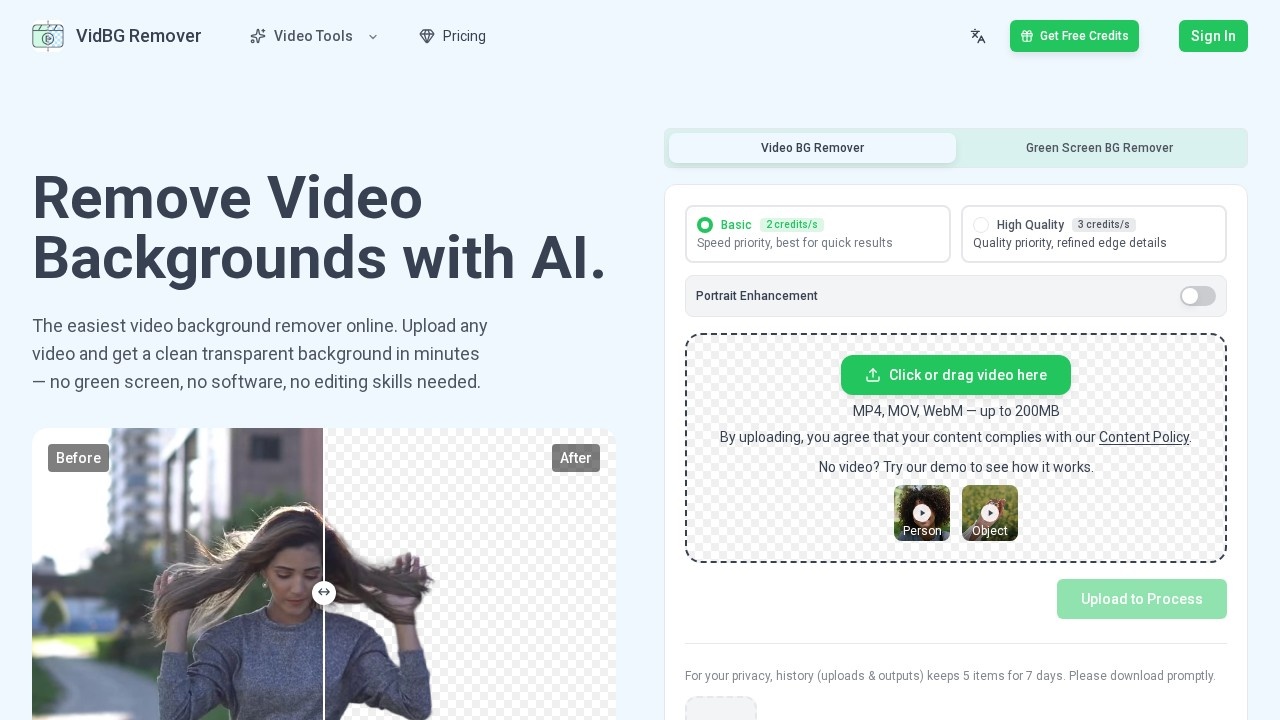
What is Remove Video Backgrounds in Mi?
Remove Video Backgrounds in Mi is an AI-powered online tool that removes backgrounds from videos without requiring a green screen, software installation, or editing skills. Users upload MP4, MOV, or WebM files (up to 200MB) and receive clean, transparent results in minutes. The service processes videos in the cloud, so no local processing is needed. It outputs files with a true alpha channel in WebM (VP9) or MOV (ProRes 4444) formats, ready for direct use in video editing software like Premiere, DaVinci Resolve, After Effects, or CapCut.
Application scenarios
Talking heads video
Clean hair edges and stable fingers for professional creators, replacing cluttered backgrounds with modern offices or dynamic backdrops.
E-commerce ads
Shoot once and composite products anywhere with crisp edges, enabling localized ad campaigns.
Online courses
Layer presenters cleanly over slides without a green screen, ideal for educators and trainers.
Action shots
Full-body motion with clean edges, even during fast movement, for sports or action content.
Animal memes
Extract pets and animals for viral content and memes.
Car effects
Isolate vehicles for stunning automotive visuals and compositing.
Core Features
AI video background removal
Automatically removes backgrounds while keeping edges clean and stable, with most clips ready in minutes.
Speed priority mode
Uses 2 credits per second for quick results, prioritizing speed over quality.
Quality priority mode
Uses 3 credits per second for refined edge details, prioritizing quality over speed.
Portrait enhancement
Specialized processing for human subjects, improving hair and finger edge clarity.
Person and object detection
Choose between removing backgrounds from people or objects in your video.
Multiple output formats
Export with a true alpha channel as WebM (VP9) for online use or MOV (ProRes 4444) for professional video editors.
No software installation
Entirely browser-based; files go straight to secure cloud storage with no local processing.
Demo video
Try a sample video to see how the tool works before uploading your own.
Privacy history
Upload and output history keeps the last 5 items for 7 days, with prompt download recommended.
Target users
This tool is built for content creators, knowledge educators, reviewers, real estate agents, e-commerce marketers, and social media managers who need fast, clean video background removal without technical expertise. It serves professionals who want to replace cluttered backgrounds with polished settings for talking heads, ads, online courses, or action shots.
How to use Remove Video Backgrounds in Mi?
- Upload your video: Drag or click to upload an MP4, MOV, or WebM file (up to 200MB) to the video background remover. Files go to secure cloud storage.
- AI processes the background: The tool automatically removes the background while keeping edges clean and stable. Most clips are ready in minutes, depending on video length.
- Download the result: Get your video with the background removed as WebM (VP9) or MOV (ProRes 4444), both with a true alpha channel. Use the WebM online or drop the MOV into Premiere, DaVinci Resolve, After Effects, or CapCut.
Pricing and free trial
The website mentions a credit-based system: "Basic" mode uses 2 credits per second (speed priority), and "High Quality" mode uses 3 credits per second (quality priority). No specific free trial or pricing tiers are stated beyond these credit rates.
Effect review
The tool delivers on its core promise: fast, no-fuss background removal without green screens or software. The before/after demos show clean edges on talking heads, e-commerce products, and even fast-moving action shots, which suggests reliable performance for common use cases. The dual speed/quality modes give users flexibility, though the credit-based pricing may require monitoring for heavy use. For creators who need quick, professional-looking results without learning complex tools, Remove Video Backgrounds in Mi is a practical, straightforward solution.
Frequently Asked Questions
Do I need a green screen to remove video backgrounds?
How long does it take to process a video?
What video formats are supported?
Is the result truly transparent?
Can I use this tool for free?
Is my video data kept private?
Remove Video Backgrounds in Mi - AI Tool Detail
AI-powered video background remover by VidBGRemover that eliminates backgrounds without green screens. Upload your video and get clean, transparent results in minutes.
Category:Video editing
Visit Link:https://vidbgremover.com/
Tags:AI video background remover、no green screen needed、transparent video background、automatic background removal、VidBGRemover