MiaoCut
MiaoCut AI by MiaoCut is a free online tool for instant background removal from images, offering HD cutouts without watermarks or signup, with a focus on privacy-first processing.
What is MiaoCut?
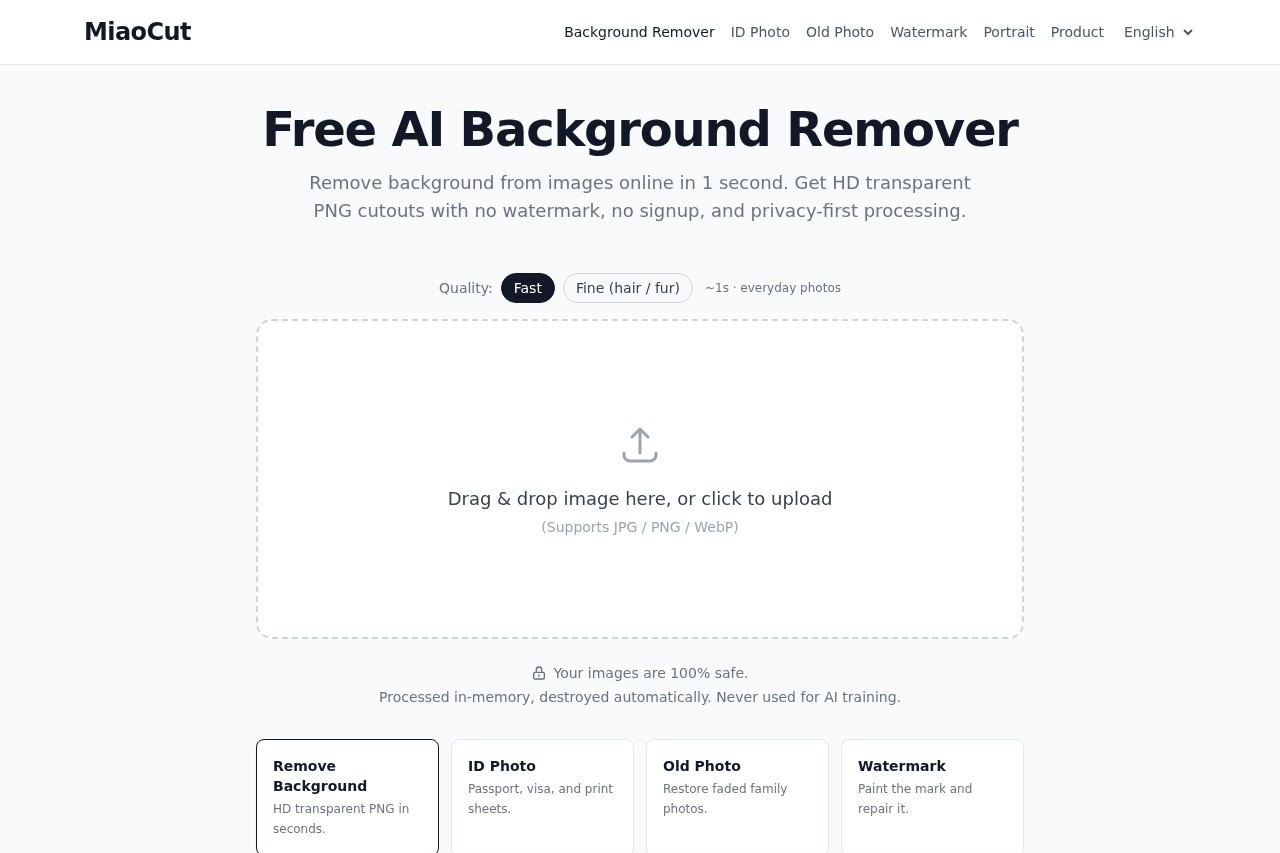
MiaoCut is a free online AI background remover that processes images in about one second. It delivers HD transparent PNG cutouts without watermarks and requires no signup. The tool handles JPG, PNG, and WebP files, and all processing happens in-memory with automatic deletion—your images are never used for AI training.Application scenarios
E-commerce product photos
Remove backgrounds from product shots to create clean, transparent PNGs for online listings.
ID and passport photos
Generate cutouts suitable for visa, passport, and print sheet requirements.
Old photo restoration
Restore faded family photos by removing unwanted backgrounds.
Watermark removal
Paint over watermarks and repair the image area automatically.
Social media content
Quickly isolate subjects for memes, profile pictures, or story graphics.
Graphic design projects
Extract people or objects for compositing in presentations or marketing materials.
Core Features
One-second background removal
Upload an image and get a clean cutout in roughly one second, including fine details like hair or fur.
HD transparent PNG output
Download high-definition cutouts with a transparent background, no resolution loss.
No watermark or signup
Use the tool immediately without creating an account, and all downloads are watermark-free.
Privacy-first processing
Images are processed entirely in-memory and automatically destroyed after use; they are never stored or used for AI training.
ID photo support
Generate cutouts specifically for passport, visa, and print sheet formats.
Old photo restoration
Restore faded family photos by removing damaged or unwanted backgrounds.
Watermark removal
Paint over a watermark area and let the tool repair the image automatically.
Drag-and-drop upload
Simply drag an image onto the page or click to upload—supports JPG, PNG, and WebP formats.
Target users
MiaoCut is ideal for anyone who needs quick, no-fuss background removal without sacrificing image quality or privacy. This includes e-commerce sellers, graphic designers, social media managers, photographers, and individuals preparing ID photos or restoring old family pictures. The zero-signup requirement makes it especially accessible for casual or one-off use.How to use MiaoCut?
- Open the MiaoCut website at https://miaocut.app/.
- Drag and drop an image onto the page, or click to upload a JPG, PNG, or WebP file.
- The AI processes the image in about one second, removing the background automatically.
- Download the resulting HD transparent PNG cutout—no signup or payment required.
Effect review
MiaoCut delivers exactly what it promises: fast, free background removal with clean HD output and no watermarks. The one-second processing time is genuinely impressive for everyday photos, and the privacy-first approach (in-memory processing, no training use) adds real trust. While the tool is limited to the core features listed on the site—no batch processing, advanced editing, or API access is mentioned—it serves its primary use case exceptionally well. For casual users and quick tasks, MiaoCut is a reliable, no-hassle option.Frequently Asked Questions
What is MiaoCut AI?
Is MiaoCut AI free to use?
Do I need to sign up or provide personal information?
How does MiaoCut AI protect my privacy?
What image formats does MiaoCut AI support?
Can I download the output in high definition?
MiaoCut - AI Tool Detail
MiaoCut AI by MiaoCut is a free online tool for instant background removal from images, offering HD cutouts without watermarks or signup, with a focus on privacy-first processing.
Category:Image editing
Visit Link:https://miaocut.app/
Tags:background removal、free AI tool、no signup、HD cutout、privacy-first