
Uncluttr
Uncluttr is a free AI-powered Chrome extension by Uncluttr that auto-organizes browser tabs into groups and displays them in a vertical sidebar. Works with Edge, Brave, and all Chromium browsers for c
What is Uncluttr?
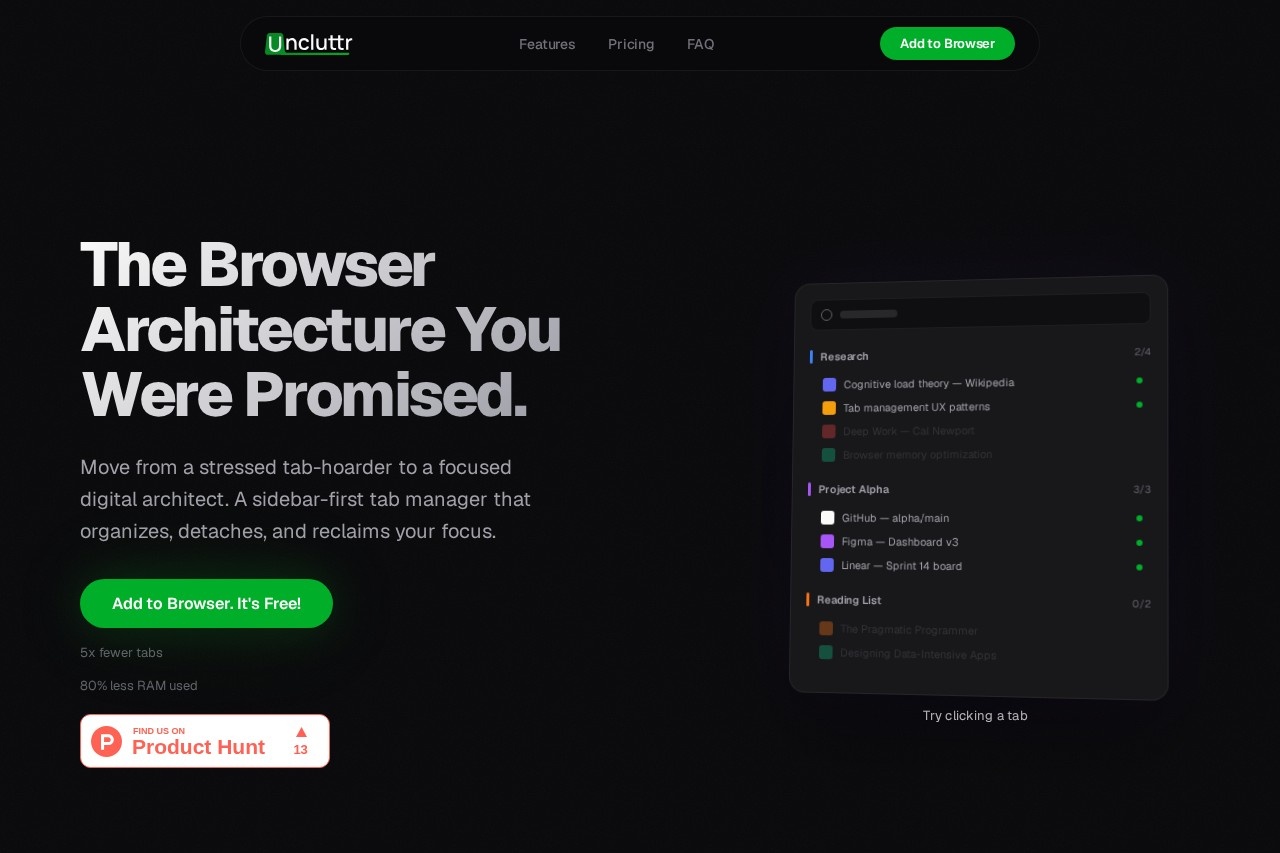
Uncluttr is a free AI-powered Chrome extension that automatically organizes browser tabs into groups and displays them in a vertical sidebar. It works with Chrome, Edge, Brave, and all Chromium-based browsers. The tool is designed to help users move from "tab hoarding" to focused digital architecture, reducing active tabs by 5x and RAM usage by 80%. It positions itself as a modern replacement for the traditional horizontal tab bar, which the site describes as "designed for 1995."
Application scenarios
Deep work sessions
Organize research and project tabs into groups to minimize distractions and stay focused on a single task.
Research projects
Group tabs by topic (e.g., "Research 2/4" and "Project Alpha 3/3") for easy access and memory efficiency.
Reading lists
Keep articles and books like "The Pragmatic Programmer" and "Designing Data-Intensive Apps" in a dedicated group for later reading.
Workflow management
Separate work tabs (Gmail, Slack, GitHub, Jira, Docs) from personal tabs (Reddit, Twitter, Notion) to reduce cognitive load.
Browser memory optimization
Detach unused tabs to free up RAM—detached tabs use "zero memory while staying one click away."
Productivity tracking
Use analytics and insights (coming soon in the Architect plan) to monitor tab usage and improve focus habits.
Core Features
Automatic AI grouping
Uncluttr's AI automatically organizes tabs into groups based on content, reducing manual sorting effort.
Vertical sidebar
Tabs are displayed in a vertical sidebar instead of a horizontal bar, making titles readable and navigation faster.
Tab detachment
Detach tabs to remove them from active memory while keeping them accessible with one click—no tabs lost.
Unlimited workspaces
Create unlimited workspaces (e.g., "Work," "Research," "Personal") to separate projects and contexts.
Unlimited groups and tabs
Store an unlimited number of groups and tabs without hitting limits.
Search through all tabs & groups
Instantly find any tab or group using a global search function.
Auto-close unused tabs
Automatically close tabs that haven't been used for a set period to reduce clutter and memory usage.
Auto-collapse groups
Groups collapse automatically to keep the sidebar clean and focused.
Duplicate detection
Identify and remove duplicate tabs to prevent redundancy.
Smart Group Renaming (coming soon)
AI-powered renaming of groups for better organization (Architect plan feature).
Target users
Uncluttr is ideal for power users who juggle dozens of browser tabs daily—researchers, developers, designers, project managers, and anyone practicing deep work. The site specifically mentions "digital architects" and "power users who live in the browser" as the primary audience. It's also useful for students managing multiple research papers and professionals who need to separate work from personal browsing.
How to use Uncluttr?
- Install the Uncluttr extension from the Chrome Web Store (or Edge/Brave add-ons store).
- Click the Uncluttr icon in your browser toolbar to open the vertical sidebar.
- The AI automatically groups your open tabs into categories (e.g., "Work," "Research," "Personal").
- Use the sidebar to search, detach, or close tabs. Detached tabs remain accessible with one click.
- For advanced features like unlimited AI auto-grouping and analytics, upgrade to the Architect plan in-app after installation.
Pricing and free trial
Uncluttr offers two pricing tiers:
- Explorer (Free): Includes unlimited workspaces, unlimited groups, unlimited tabs, search, auto-close unused tabs, auto-collapse groups, automatic grouping, duplicate detection, and limited smart grouping.
- Architect ($4.16/month, $49.99 billed yearly): Everything in Explorer plus unlimited AI auto-grouping, priority support, analytics & insights (coming soon), rule-based grouping (coming soon), cross-device sync (coming soon), and smart group renaming (coming soon). This plan saves 58% compared to a monthly subscription.
There is no mention of a free trial—the Explorer tier is free to use with no time limit.
Effect review
Uncluttr delivers on its core promise: reducing tab clutter and memory usage through AI-powered organization and a vertical sidebar. The free Explorer tier is generous, offering unlimited workspaces and groups without paywalling basic functionality. The RAM reduction claim (80% less memory) is compelling for users on lower-spec machines, and the tab detachment feature ensures no tabs are lost even when inactive. However, the most powerful features—unlimited AI auto-grouping, rule-based grouping, and cross-device sync—require the $4.16/month Architect plan, and some of these are still "coming soon." For everyday tab hoarders, the free tier is likely sufficient; for professionals who need advanced automation and analytics, the Architect plan offers clear value once the promised features launch.
Frequently Asked Questions
What is Uncluttr?
Which browsers does Uncluttr support?
Is Uncluttr free to use?
How does Uncluttr organize tabs?
Does Uncluttr save my data or privacy?
Can I customize the tab groups created by Uncluttr?
Uncluttr - AI Tool Detail
Uncluttr is a free AI-powered Chrome extension by Uncluttr that auto-organizes browser tabs into groups and displays them in a vertical sidebar. Works with Edge, Brave, and all Chromium browsers for c
Category:Chat bot
Visit Link:https://www.uncluttr.net/
Tags:AI tab manager、browser organization、tab grouping extension、productivity tool