
Gemini Omni
AI video generator by Gemini Omni for creating short clips from text prompts, images, and reference frames, designed for social content, ads, product stories, explainers, and visual concepts.
What is Gemini Omni?
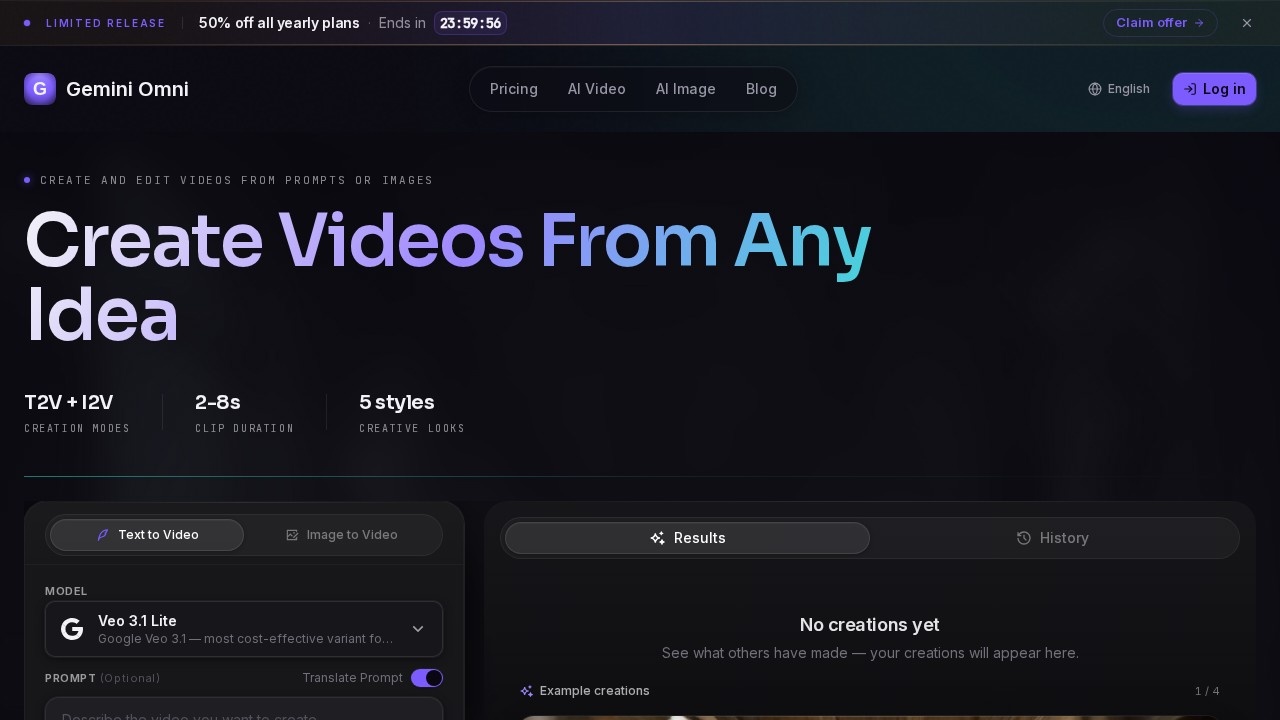
Gemini Omni is an AI video generator that creates short clips from text prompts, images, and reference frames. It uses Google's Veo 3.1 Lite model to turn ideas into video content with motion, lighting, and visual detail. Creators use it for drafting social clips, campaign visuals, product videos, and visual stories. The platform supports text-to-video and image-to-video creation modes with clip durations from 2 to 8 seconds.Application scenarios
Social media content
Draft short clips for TikTok, Instagram, and YouTube in landscape, portrait, or square formats.
Campaign visuals
Generate ad concepts and promotional videos quickly without a traditional shoot.
Product videos
Animate product concepts or storyboards into short explainer clips.
Education explainers
Create visual narratives for learning materials and tutorials.
Game trailers
Produce short promotional clips for games using text or image references.
Music visuals
Generate animated visuals that match the tone of a music project.
Creative concepts
Explore visual ideas with style controls (cinematic, anime, realistic, artistic, minimalist).
Core Features
Text-to-Video Creation
Describe a scene in natural language and turn it into a short video with motion, lighting, and visual detail.
Image-to-Video Animation
Start with a reference image, describe how it should move, and animate it into a short AI video.
Style Controls
Choose from five creative looks—cinematic, anime, realistic, artistic, or minimalist—to match your project's tone.
Flexible Formats
Generate clips in 16:9, 9:16, or square aspect ratios for different platforms and uses.
Resolution Options
Export videos at 720p, 1080p, or 4K resolution.
Clip Duration Settings
Create clips ranging from 2 to 8 seconds in length.
Conversational Prompting
Use natural language to describe motion, lighting, and visual details for each clip.
Simple Export Workflow
Preview settings, generate the clip, then download or share the result when ready.
Public Visibility Option
Choose whether to make your creations visible to others in the community gallery.
Target users
Video creators, social media managers, marketers, educators, game developers, and musicians who need quick, AI-generated short clips for content drafts, campaign concepts, product demos, or visual storytelling. The platform is designed for individuals and teams who want to move from idea to usable video without a traditional production setup.How to use Gemini Omni?
- Visit the Gemini Omni website and sign up or log in.
- Choose between Text-to-Video or Image-to-Video creation mode.
- Enter a text prompt describing the scene (up to 20,000 characters) or upload a reference image.
- Optionally adjust style (cinematic, anime, realistic, artistic, minimalist), aspect ratio (16:9, 9:16, square), resolution (720p, 1080p, 4K), and clip duration (2–8 seconds).
- Click "Generate with AI" to create the clip using credits.
- Preview the result, then download or share it when ready.
Pricing and free trial
Gemini Omni offers a free tier with 5 credits per day to get started. Paid plans are available monthly or yearly (50% off with annual billing):- Basic: $234/year (≈ $19.50/month) – 400 credits/month, HD resolution, email support, priority queue.
- Pro: $474/year (≈ $39.50/month) – 1,000 credits/month, all AI models, HD & 4K resolution, priority queue, dedicated support.
- Max: $894/year (≈ $74.50/month) – 2,300 credits/month, all AI models, 4K & 8K resolution, priority queue, dedicated support.
Effect review
Gemini Omni delivers a practical, no-fuss video generation experience with clear controls for style, format, and resolution. The platform's focus on short clips (2–8 seconds) makes it ideal for social media drafts and quick concept visualization rather than long-form storytelling. The inclusion of image-to-video animation and style presets gives creators meaningful flexibility without overwhelming complexity. While the free daily credits (5 per day) allow casual testing, serious users will need a paid plan for high-volume work. The platform is best suited for rapid prototyping and content iteration rather than polished final production.Frequently Asked Questions
What is Gemini Omni?
What types of content can I create with Gemini Omni?
What input formats does Gemini Omni support?
How long are the generated videos?
Is Gemini Omni free to use?
Can I customize the style of the generated video?
Gemini Omni - AI Tool Detail
AI video generator by Gemini Omni for creating short clips from text prompts, images, and reference frames, designed for social content, ads, product stories, explainers, and visual concepts.
Category:Video generation
Visit Link:https://omnigemini.org/
Tags:AI video generator、text-to-video、social media content、AI content creation、video ads