
Gemini Omini
Gemini Omini is an AI video creation tool for generating short clips from text prompts or reference images, enabling text-to-video and image-to-video scenes for social media, ads, education, and produ
What is Gemini Omini?
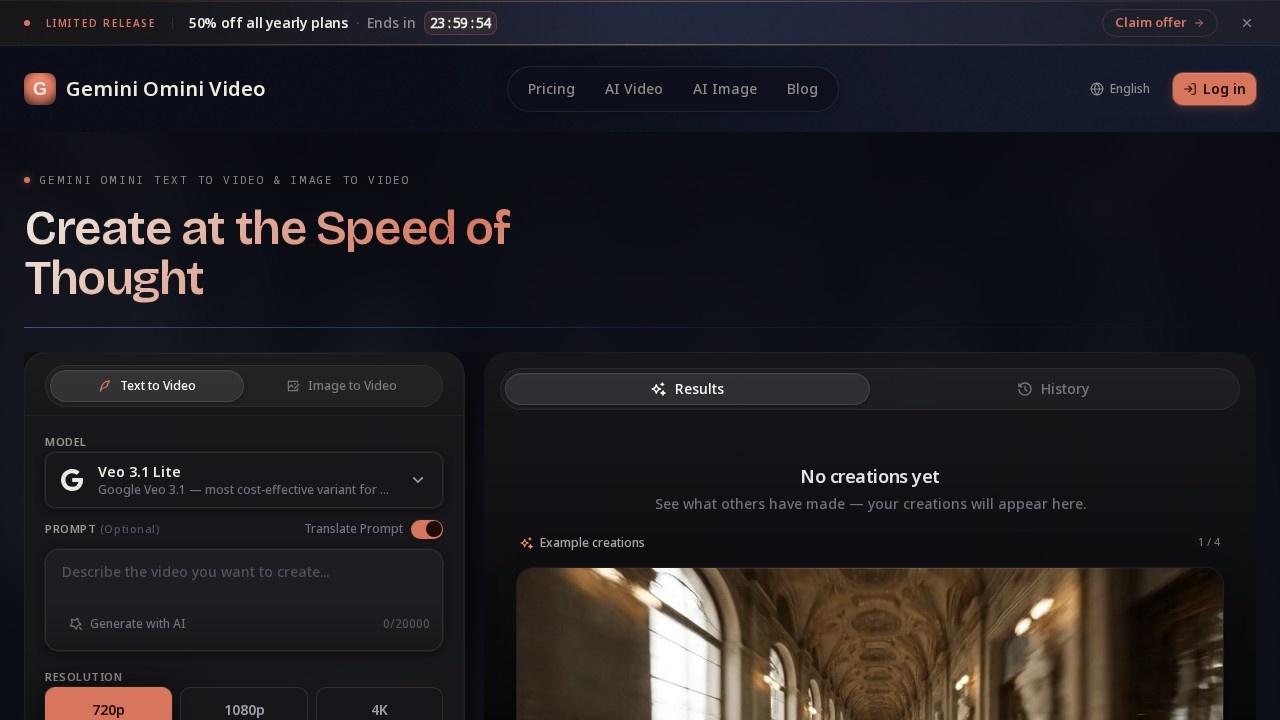
Gemini Omini is an AI video creation tool that generates short clips from text prompts or reference images. It uses Google's Veo 3.1 Lite model to turn scene descriptions or uploaded visuals into animated videos with motion, lighting, and detail. Creators use it for drafting social media clips, campaign visuals, product videos, and storyboards—no traditional filming required.Application scenarios
Social media content
Generate landscape, portrait, or square clips for YouTube, TikTok, and Instagram.
Advertising campaigns
Draft campaign visuals and product videos quickly from prompts or reference images.
Education explainers
Create short explainer videos for teaching or training purposes.
Game trailers
Produce visual snippets for game trailers or promotional materials.
Music visuals
Generate short video clips to accompany music tracks.
Presentation assets
Create custom video clips for business presentations or slides.
Storyboarding
Turn storyboards or scripts into animated video clips for pre-production.
Core Features
Text-to-video
Describe a scene in natural language and generate a short video with motion, lighting, and visual detail.
Image-to-video
Upload a reference image, describe how it should move, and animate it into a short AI video.
Style controls
Choose from cinematic, anime, realistic, artistic, or minimalist looks to match your project's tone.
Flexible formats
Generate landscape (16:9), portrait (9:16), or square clips for different platforms.
Resolution options
Output at 720p, 1080p, or 4K resolution (up to 8K on the Max plan).
Prompt translation
Translate prompts into other languages before generation.
Advanced settings
Adjust aspect ratio, resolution, and public visibility of your creations.
Credit-based generation
Each video creation consumes credits from your plan's allowance.
Target users
Video creators, social media managers, marketers, educators, game developers, and content teams who need to produce short video clips quickly from text or images. The tool suits individuals, freelancers, and small to medium-sized teams.How to use Gemini Omini?
Visit the official site (https://geminiomni.im/), sign up for a free account, and claim your daily free credits. Enter a text prompt or upload a reference image, choose your style, resolution, and aspect ratio, then click "Create Video." Preview the result, download or share the clip once it's ready. For higher volume, upgrade to a paid plan.Pricing and free trial
Gemini Omini offers a free tier with 5 credits per day (login to claim) and standard quality output. Paid plans are billed monthly or yearly (50% off with annual billing):- Basic: $234/year ($19.50/month) – 400 credits/month, HD resolution, email support, priority queue.
- Pro: $474/year ($39.50/month) – 1,000 credits/month, all AI models, HD & 4K resolution, priority queue, dedicated support.
- Max: $894/year ($74.50/month) – 2,300 credits/month, all AI models, 4K & 8K resolution, priority queue, dedicated support.
Effect review
Gemini Omini delivers practical AI video generation with a clear focus on speed and simplicity. The text-to-video and image-to-video workflows are straightforward, and the style controls give users creative flexibility without technical complexity. The credit system is transparent, and the free daily credits make it easy to test before committing. With over 50 million images and videos created and 2 million active creators, the platform has proven reliable for high-volume content production. It's a solid choice for teams that need to iterate quickly on social clips, ads, or educational videos without a production crew.Frequently Asked Questions
What is Gemini Omini?
How does Gemini Omini work?
What can I use Gemini Omini for?
Does Gemini Omini support both text-to-video and image-to-video?
Is Gemini Omini free to use?
What are the output video specifications?
Gemini Omini - AI Tool Detail
Gemini Omini is an AI video creation tool for generating short clips from text prompts or reference images, enabling text-to-video and image-to-video scenes for social media, ads, education, and produ
Category:Text to Video
Visit Link:https://geminiomni.im/
Tags:AI video generator、text-to-video、image-to-video、short clip creation、social media video tool