
FreeSubtitler
FreeSubtitler by an independent developer generates subtitles for free with no account, signup, watermark, or upsell. Export SRT files or burned-in videos easily.
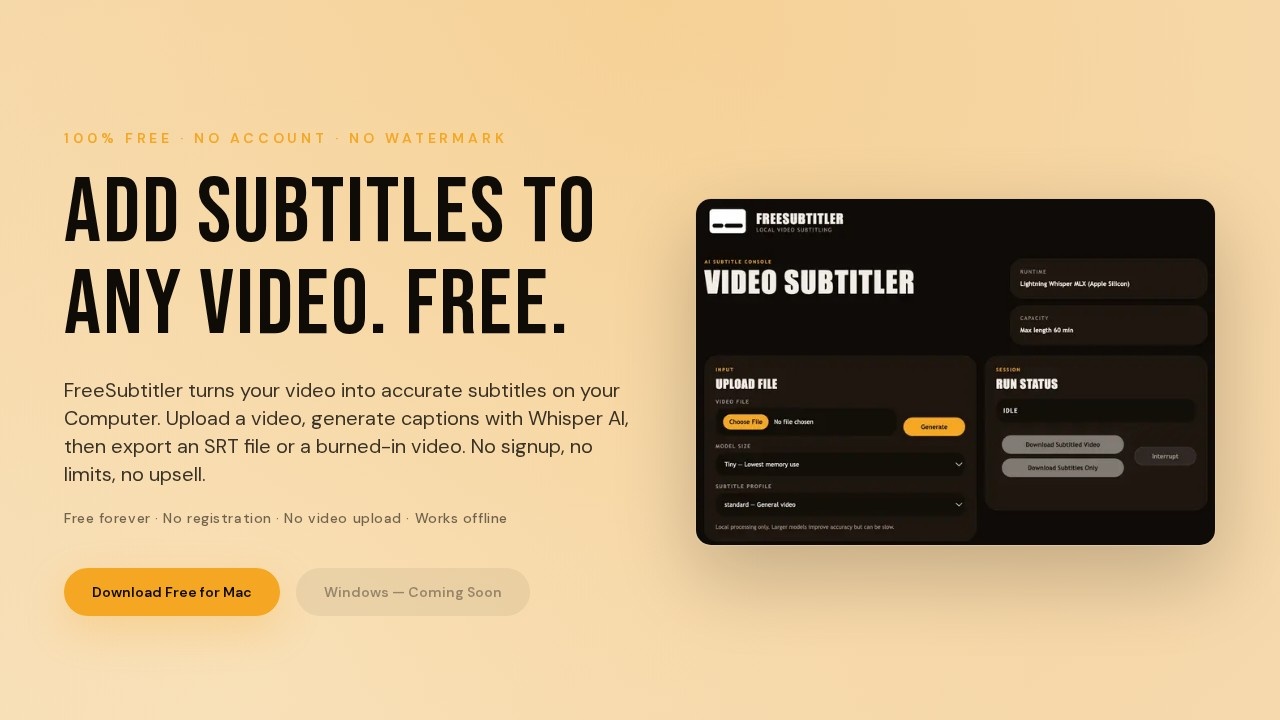
What is FreeSubtitler?
FreeSubtitler is a desktop application that generates subtitles for videos using Whisper AI, entirely on your own computer. It runs locally, so no video upload is required, and it works without an account, signup, or watermark. Users can export subtitles as an SRT file or burn them directly into the video. The tool is part of BacklogBuild's free public toolkit, with no hidden fees or upsells.Application scenarios
Content creation
Add accurate subtitles to YouTube videos, social media clips, or presentations without uploading files.
Education
Generate captions for lecture recordings, training videos, or online courses to improve accessibility.
Accessibility
Create SRT files for hearing-impaired viewers or non-native speakers who need text support.
Archiving
Burn subtitles into old home videos or archival footage for permanent captions.
Post-production
Quickly produce subtitle files for indie films, vlogs, or corporate videos without third-party services.
Offline work
Generate subtitles on a Mac without an internet connection, ensuring privacy for sensitive content.
Core Features
100% free with no account
No signup, login, registration, or subscription required to use any feature.
No watermark
Exported videos and SRT files are completely free of watermarks, even without a paid plan.
Local processing
All subtitle generation runs on your machine, so your video never leaves your computer.
Whisper AI integration
Uses OpenAI's Whisper model to produce accurate captions from video audio.
SRT file export
Export subtitles as a standard .srt subtitle file for use in any video player or editor.
Burned-in video export
Generate a video file with subtitles permanently embedded into the footage.
One-click install
Download and install the app with a single click on macOS (Apple Silicon, macOS 14+).
Active development
Users can send feedback or report bugs directly, and the developer actively shapes updates based on input.
Target users
- Independent video creators who need free, watermark-free subtitles without signing up for a service.
- Educators and trainers who caption lecture videos or training materials offline.
- Accessibility advocates looking for a simple tool to add captions to existing video content.
- Hobbyists and small teams who want a no-fuss subtitle generator that respects privacy and works locally.
How to use FreeSubtitler?
- Download the free app from the official website for macOS (Apple Silicon, macOS 14+). Windows support is coming soon.
- Install the application with one click—no account or signup required.
- Open the app and upload a video file directly on your computer.
- The app generates subtitles using Whisper AI entirely on your machine.
- Export your subtitles as an SRT file or a video with burned-in captions.
Pricing and free trial
FreeSubtitler is completely free forever. There are no subscriptions, hidden fees, upsells, or paywalled features. No account or signup is needed to access any functionality.Effect review
FreeSubtitler delivers exactly what it promises: a straightforward, no-cost subtitle generator that runs entirely offline. The local processing ensures privacy and fast turnaround, while the lack of watermarks or paywalls makes it a rare find in the AI tools space. The app is currently limited to macOS (Apple Silicon), but the developer's active feedback loop suggests improvements and Windows support are on the way. For anyone needing quick, clean subtitles without strings attached, FreeSubtitler is a solid, trustworthy choice.Frequently Asked Questions
What is FreeSubtitler?
Is FreeSubtitler really free?
Do I need to create an account to use FreeSubtitler?
What file formats can I export?
How accurate are the subtitles?
Can I edit the subtitles after generation?
FreeSubtitler - AI Tool Detail
FreeSubtitler by an independent developer generates subtitles for free with no account, signup, watermark, or upsell. Export SRT files or burned-in videos easily.
Category:Video editing
Visit Link:https://www.freesubtitler.com/
Tags:free subtitles、SRT export、no signup、AI subtitle generator、video captioning