StampCut
StampCut by its developer lets you turn anything into a stamp. Point your iPhone at plants, animals, or objects, frame them through the precision cutter, and capture them as your own custom stamps.
StampCut Review
What is StampCut?
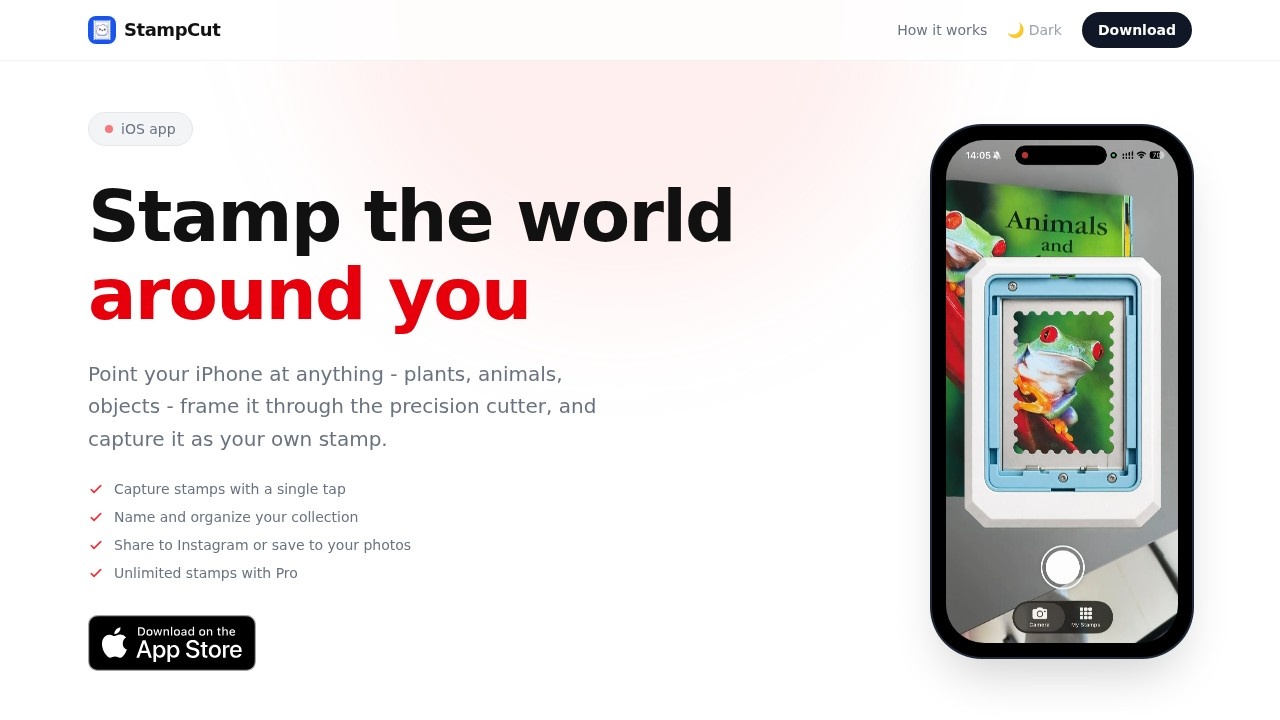
StampCut is an iOS app that turns anything you see into a custom stamp. Point your iPhone at plants, animals, or objects, frame them through the app's precision cutter, and capture them as your own digital stamps. The app lets you name and organize your collection, then share stamps to Instagram or save them to your photos. It’s a straightforward tool for turning real-world visuals into personalized, shareable stamp designs.Application scenarios
Personal creativity
Capture unique shapes and textures from nature or everyday objects to build a custom stamp collection.
Social media sharing
Create stamps and share them directly to Instagram for a distinctive visual post.
Photo organization
Save stamps to your phone’s photo library for easy access and reuse.
Educational projects
Use stamps to label or illustrate school assignments, presentations, or scrapbooks.
Gift or branding ideas
Design custom stamps for personal gifts, event invites, or small business branding.
Quick art reference
Collect stamps as visual references for drawing, design, or collage work.
Core Features
Precision cutter
Frame any object through the camera’s precision cutter to create a clean stamp cutout overlay.
Single-tap capture
Press the shutter, and the stamp appears instantly as a cutout overlay on your screen.
Naming and organization
Tap a stamp, give it a name, and it’s saved to your collection for easy retrieval.
Share to Instagram
Export your stamps directly to Instagram to share with followers.
Save to photos
Save stamps to your iPhone’s photo library for offline use or further editing.
Unlimited stamps with Pro
Upgrade to Pro for unlimited stamp creation (no cap on how many stamps you can capture).
Retake option
Not happy with a stamp? Tap anywhere outside the stamp to try again.
Target users
StampCut is built for iPhone users who enjoy creative photography, digital collecting, or personalized social media content. It’s ideal for hobbyists, artists, educators, and anyone who wants to turn everyday objects into shareable, reusable stamps without complex editing software.How to use StampCut?
- Open the StampCut app on your iPhone and point the camera at any object (plant, animal, or object).
- Press the shutter button; the stamp appears as a cutout overlay on your screen.
- Tap the stamp, give it a name, and it’s saved to your collection.
- If you’re not satisfied, tap anywhere outside the stamp to retake the shot. Then share to Instagram or save to your photos.
Pricing and free trial
The website mentions an "Unlimited stamps with Pro" option, but does not list specific pricing or a free trial. Check the app store for current pricing details.Effect review
StampCut delivers on its promise: point, capture, name, and share. The four-step workflow is simple and fast, making it easy to build a collection of stamps from real-world objects. The precision cutter and retake option give you control over each stamp’s quality. While the app lacks advanced editing features (like filters or resizing), its core function is solid for casual creative use. For iPhone users who want a quick, fun way to turn everyday sights into shareable stamps, StampCut is a practical and enjoyable tool.Frequently Asked Questions
How does StampCut work?
What can I turn into a stamp?
Is StampCut free to use?
Which devices are supported?
Can I edit or resize the stamps after capture?
Are the stamps saved in high resolution?
StampCut - AI Tool Detail
StampCut by its developer lets you turn anything into a stamp. Point your iPhone at plants, animals, or objects, frame them through the precision cutter, and capture them as your own custom stamps.
Category:Emoticon Avatar Generator
Visit Link:https://stampcutapp.com/
Tags:AI stamp maker、photo to stamp、custom stamp generator、mobile stamp app、object capture stamp