
Pushary
Pushary by Pushary lets you approve AI agent requests from your phone with a single tap. Designed for Claude Code, Codex, Cursor, and any MCP agent, it removes friction so your agents keep working wit
What is Pushary?
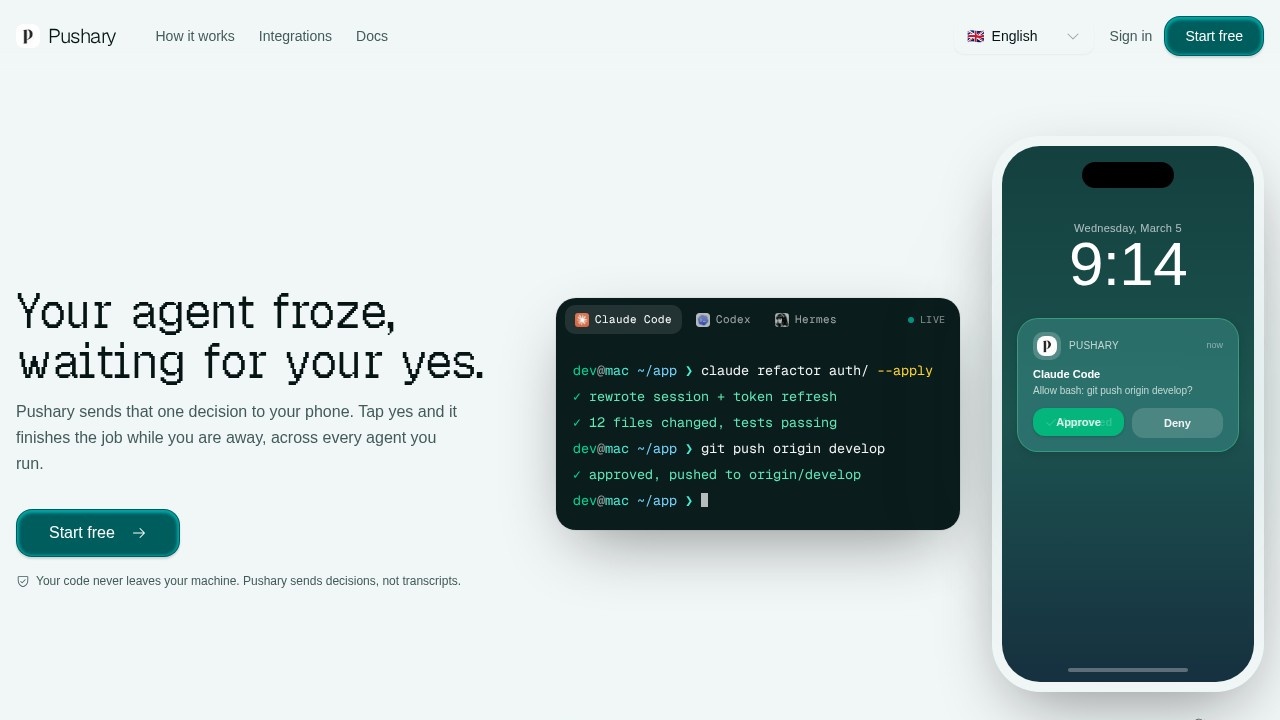
Pushary is a control panel for AI agents that sends permission requests to your phone, Slack, web app, and an audit trail. It works with Claude Code, Codex, Cursor, Hermes, Windsurf, and any MCP agent. When an agent pauses at a step that needs your approval, Pushary delivers that decision to your phone—tap yes and the agent continues working while you're away. Your code never leaves your machine; Pushary sends decisions, not transcripts.
Application scenarios
Remote agent supervision
Approve or deny AI agent requests from your phone while away from your desk.
Long-running tasks
Hand off a multi-step task and get notified only when a decision is needed, instead of babysitting the agent.
Deployment approvals
Tap approve or deny on production deployment requests sent to your phone or Slack.
Multi-agent management
Control requests from Claude Code, Codex, Cursor, Hermes, Windsurf, and any MCP agent from one place.
Workflow automation with human checkpoints
Pause an n8n workflow for human approval before continuing.
Slack-based approvals
Answer agent questions directly in Slack with Approve and Deny buttons, with results updating in the message.
Core Features
One-tap approval
Approve or deny agent requests from your phone's lock screen with a single tap.
Multi-channel delivery
Permission requests reach you on your phone, Slack, the web app, and an audit trail simultaneously.
Cross-agent support
Works with Claude Code, Codex, Cursor, Hermes, Windsurf, and any MCP agent.
YOLO mode
Automatically approves all steps (including risky ones like rm and deploy) without pinging you.
Safe auto-run mode
Pushary automatically runs only safe steps and only pings you for decisions that need your call.
Slack integration
Agent questions appear in Slack with Approve and Deny buttons; one click answers and updates the message.
n8n integration
Add a human checkpoint node to any n8n workflow—the flow pauses, asks you, and continues with your answer.
Audit trail
Every permission request is logged in a full audit trail across all channels.
Three question types
Supports different kinds of agent requests (run a command, change a file, or pick between options).
One-command setup
Get Pushary running in under two minutes with a single command.
Target users
Developers and engineers who run AI coding agents (Claude Code, Codex, Cursor, Hermes, Windsurf) and need to approve or deny agent actions without sitting at their machine. Also useful for teams using n8n workflows that require human checkpoints, and anyone managing multiple AI agents who wants a unified approval dashboard.
How to use Pushary?
- Sign up for a free account at pushary.com.
- Run the one-command setup (takes under two minutes) to connect your AI agents.
- Install the Pushary mobile app to receive approval requests on your phone.
- When an agent pauses at a step needing your decision, your phone buzzes—tap approve, deny, choose an option, or type a reply from your lock screen.
- Your answer flows back to the agent, which continues working. When the task finishes, you get a ping.
Pricing and free trial
The website text mentions "Start free" and "Start free" but does not provide specific pricing tiers or free trial details. Users should visit pushary.com for current pricing information.
Effect review
Pushary solves a real friction point for anyone running AI agents: the 37-minute wait for a single yes. The one-tap mobile approval and Slack integration make it genuinely useful for developers who want to walk away from long tasks. The YOLO mode and safe auto-run options give users control over how much they trust their agents. The cross-agent support (Claude Code, Codex, Cursor, Hermes, Windsurf, and any MCP agent) means it works with most popular coding agents out of the box. For teams using n8n workflows, the human checkpoint node adds a practical safety layer. Overall, Pushary delivers exactly what it promises—removing the friction of manual agent babysitting.
Frequently Asked Questions
What is Pushary?
How does Pushary work?
Which AI agents does Pushary support?
Is Pushary free to use?
Do I need to install anything on my computer?
Is my data secure with Pushary?
Pushary - AI Tool Detail
Pushary by Pushary lets you approve AI agent requests from your phone with a single tap. Designed for Claude Code, Codex, Cursor, and any MCP agent, it removes friction so your agents keep working wit
Category:Automation
Visit Link:https://pushary.com/
Tags:AI agent approval、MCP agent tools、Claude Code productivity、mobile approval tool、agent workflow management