
Phasr
Phasr is a free, open-source AI code editor by its developer for orchestrating parallel coding agents. It supports Claude, Codex, Cursor, and Copilot with Git worktree isolation, real-time diffs, and
What is Phasr?
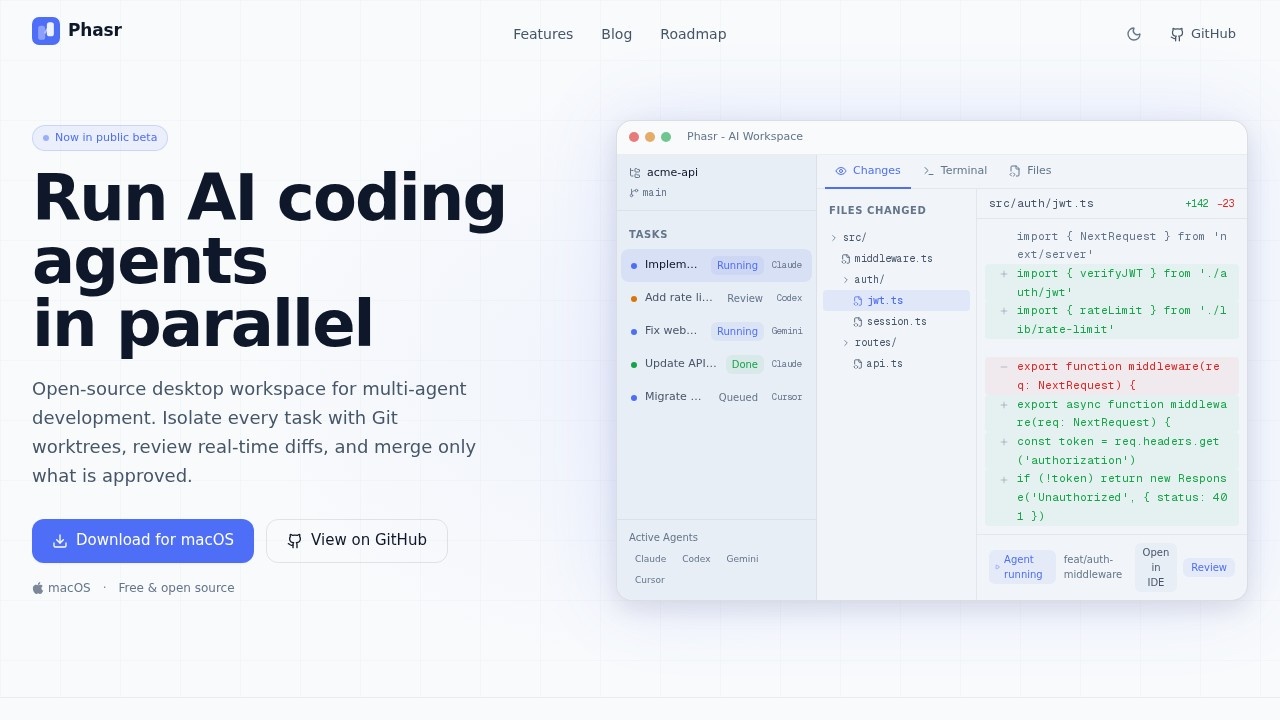
Phasr is a free, open-source desktop workspace for orchestrating multiple AI coding agents in parallel. It allows you to run agents from providers like Claude, Codex, Cursor, and Copilot simultaneously, each isolated in its own Git worktree. The tool focuses on a "review-first" workflow, letting you see real-time diffs and merge only approved changes. It is currently in public beta and available for macOS.
Application scenarios
Parallel feature development
Launch multiple agents to work on different features (e.g., auth middleware, rate limiting, webhook retry logic) at the same time.
Code review and approval
Review file-level diffs and line counts before merging any agent-generated code into the main branch.
Multi-provider experimentation
Run agents from different AI providers (Claude, Codex, Gemini, Cursor) side-by-side to compare results.
Isolated task execution
Use Git worktrees to keep each agent's changes completely separate, preventing file collisions and merge conflicts.
IDE integration
Open agent-generated code in your preferred editor (VS Code, Cursor, JetBrains, Xcode, etc.) with one-click deep links.
Core Features
Parallel execution
Run dozens of agents at once across independent tasks, each in its own isolated environment with live status and progress visibility.
Universal compatibility
Works with any CLI agent that runs in a terminal—no vendor lock-in or proprietary protocols required.
Git worktree isolation
Every agent automatically gets its own Git worktree, ensuring zero-conflict parallel development and clean merge paths to main.
Real-time diff review
See exactly what each agent changed with file-level diffs and line counts before approving or rejecting changes.
One-click IDE integration
Open any agent's code directly in VS Code, Cursor, Zed, JetBrains, Sublime, Terminal, Xcode, or Finder with keyboard shortcuts.
Approval workflow
Keep humans in control by reviewing and approving changes before merging them into the main branch.
Automatic resource management
The tool handles resource allocation across concurrent tasks, with real-time progress tracking and status updates.
Target users
Phasr is built for development teams and individual developers who need to orchestrate multiple AI coding agents efficiently. It's ideal for teams using Claude Code, Codex CLI, Gemini CLI, Aider, Cursor, Zed, VS Code, JetBrains, Git, GitHub, Linear, Supabase, Vercel, or Neovim. Anyone who wants to run AI agents in parallel without file conflicts or vendor lock-in will benefit.
How to use Phasr?
- Download and install: Get the macOS version from the official website (phasr.sh) or view the source code on GitHub.
- Set up agents: Connect your preferred CLI agents (Claude, Codex, Gemini, Cursor, etc.)—if it runs in a terminal, it runs in Phasr.
- Launch tasks: Assign tasks to different agents, each running in its own Git worktree for isolation.
- Monitor progress: Track real-time status and progress of all running agents from the workspace dashboard.
- Review and merge: Examine file-level diffs, approve changes, and merge only what you want into the main branch.
Pricing and free trial
Phasr is free and open-source. No pricing tiers or paid plans are mentioned on the website.
Effect review
Phasr delivers a practical solution for teams overwhelmed by managing multiple AI coding agents. Its parallel execution and Git worktree isolation eliminate the common headache of file collisions and forced merges. The review-first approach keeps human oversight central, which is crucial for maintaining code quality. While the tool is still in public beta and macOS-only, its open-source nature and universal agent compatibility make it a promising addition to any AI-assisted development workflow.
Frequently Asked Questions
What is Phasr?
Is Phasr free to use?
What AI models does Phasr support?
How does Phasr handle multiple agents?
Can I use Phasr with my existing codebase?
Phasr - AI Tool Detail
Phasr is a free, open-source AI code editor by its developer for orchestrating parallel coding agents. It supports Claude, Codex, Cursor, and Copilot with Git worktree isolation, real-time diffs, and
Category:Programming Assistant
Visit Link:https://phasr.sh/
Tags:open-source、code editor、parallel agents、Git worktree、real-time diffs