
Doctagd
Doctagd is a document automation tool that transforms Excel responses and spreadsheets into polished Word documents. It enables one-time mapping for reusable templates, ideal for service agreements, q
What is Doctagd?
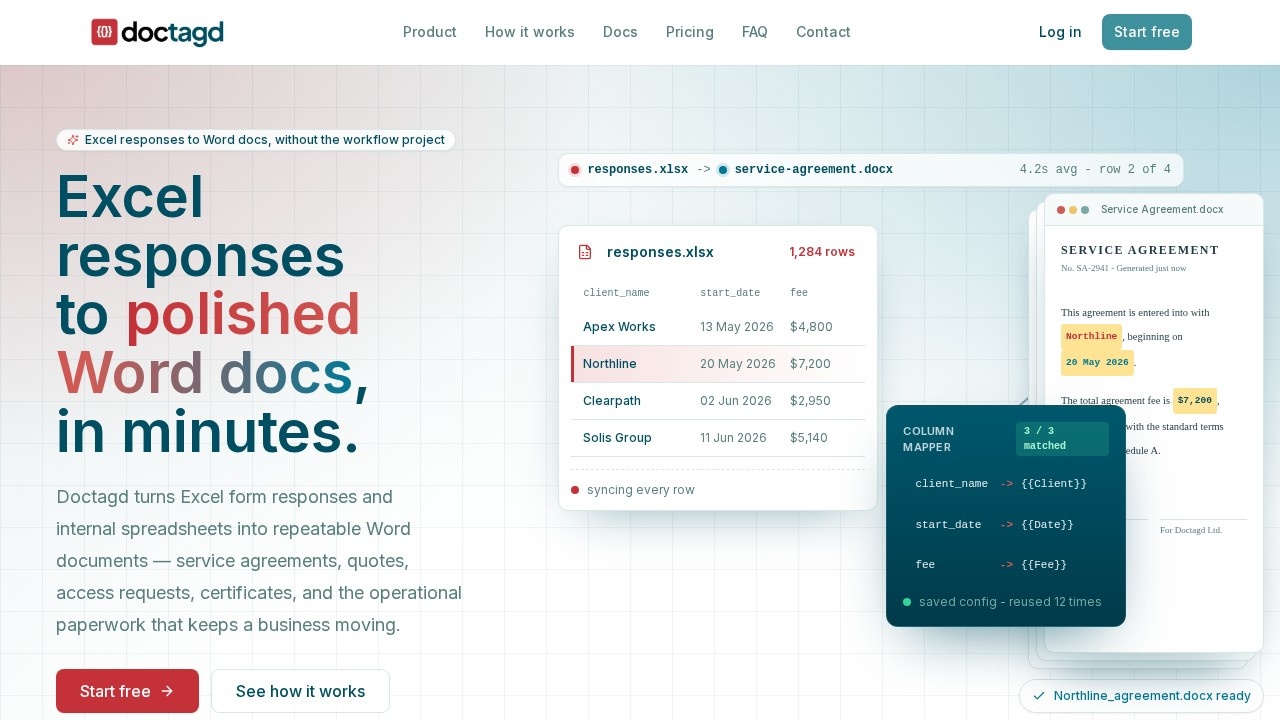
Doctagd is a document automation tool that transforms Excel responses and spreadsheets into polished Word documents. It enables one-time mapping for reusable templates, eliminating the need for manual document creation. Users can generate service agreements, quotes, certificates, and other operational paperwork directly from spreadsheet data. The platform supports both template-based and quick generation modes, with saved configurations for repeat workflows.Application scenarios
Service agreements
Generate tailored service agreement documents from Excel rows, including client name, start date, and fee details.
IT access requests
Automate the creation of access request forms from spreadsheet data for IT operations.
Business cases
Produce business case documents quickly by mapping Excel columns to Word placeholders.
Software quotes
Convert spreadsheet quotes into polished Word documents for client delivery.
Certificates
Create certificate documents from Excel data, such as completion or compliance certificates.
Packing slips
Generate packing slips directly from spreadsheet rows for shipping and logistics.
Core Features
Template mode
Upload an Excel file plus a .docx template; Doctagd extracts placeholders, suggests mappings, previews one row, and generates one Word document per row.
Quick mode
No template needed—each Excel row becomes a tidy form-style Word document with column selection and preview before generation.
Saved configurations
Reuse saved mappings that keep the template, expected columns, and confirmed mappings together for repeat workflows.
Column drift detection
When a fresh Excel file arrives, Doctagd points out renamed or missing columns before generating documents.
Private file storage
Uploads are handled through private blob storage for security.
Automation API (beta)
Wire saved configs into Zapier, n8n, Make, or your backend; send Excel files or JSON rows and receive a Word-document download URL.
API endpoint
Run a config via a simple curl POST request to generate documents programmatically.
Target users
Doctagd is designed for operational teams, administrators, and small businesses that regularly produce repetitive Word documents from spreadsheet data. It benefits anyone handling service agreements, quotes, access requests, certificates, or packing slips who wants to automate manual document creation.How to use Doctagd?
Start by signing up for a free account at doctagd.com. Upload an Excel file and optionally a .docx template. In template mode, Doctagd extracts placeholders and suggests mappings; preview one row, then generate one Word document per row. In quick mode, select columns and preview before generating tidy form-style documents. Save the mapping as a config for reuse on future exports. For automation, create an API key and wire a saved config into Zapier, n8n, Make, or your backend.Pricing and free trial
Doctagd offers a free tier with 10 generated documents per month and 2 saved configs, supporting Excel-to-Word template mode. Paid plans scale by generated documents, with monthly and annual billing options; annual billing includes 2 months free. Previews and failed generations do not count toward the monthly allowance.Effect review
Doctagd delivers on its promise of turning Excel data into polished Word documents without complex workflow projects. The dual template and quick modes cover both structured and ad-hoc document needs, while saved configurations and drift detection ensure reliability for repeat tasks. The beta automation API extends utility for teams using Zapier, n8n, or Make, keeping template logic out of brittle workflow steps. For users generating operational paperwork at scale, Doctagd offers a practical, no-fuss solution that minimizes manual effort.Frequently Asked Questions
What is Doctagd?
How does Doctagd work?
What types of documents can I create with Doctagd?
Do I need programming skills to use Doctagd?
Can I reuse templates in Doctagd?
Is Doctagd suitable for batch document generation?
Doctagd - AI Tool Detail
Doctagd is a document automation tool that transforms Excel responses and spreadsheets into polished Word documents. It enables one-time mapping for reusable templates, ideal for service agreements, q
Category:Document processing
Visit Link:https://doctagd.com/
Tags:document automation、Excel to Word、template mapping、service agreements、spreadsheet integration