
ChronaPilot
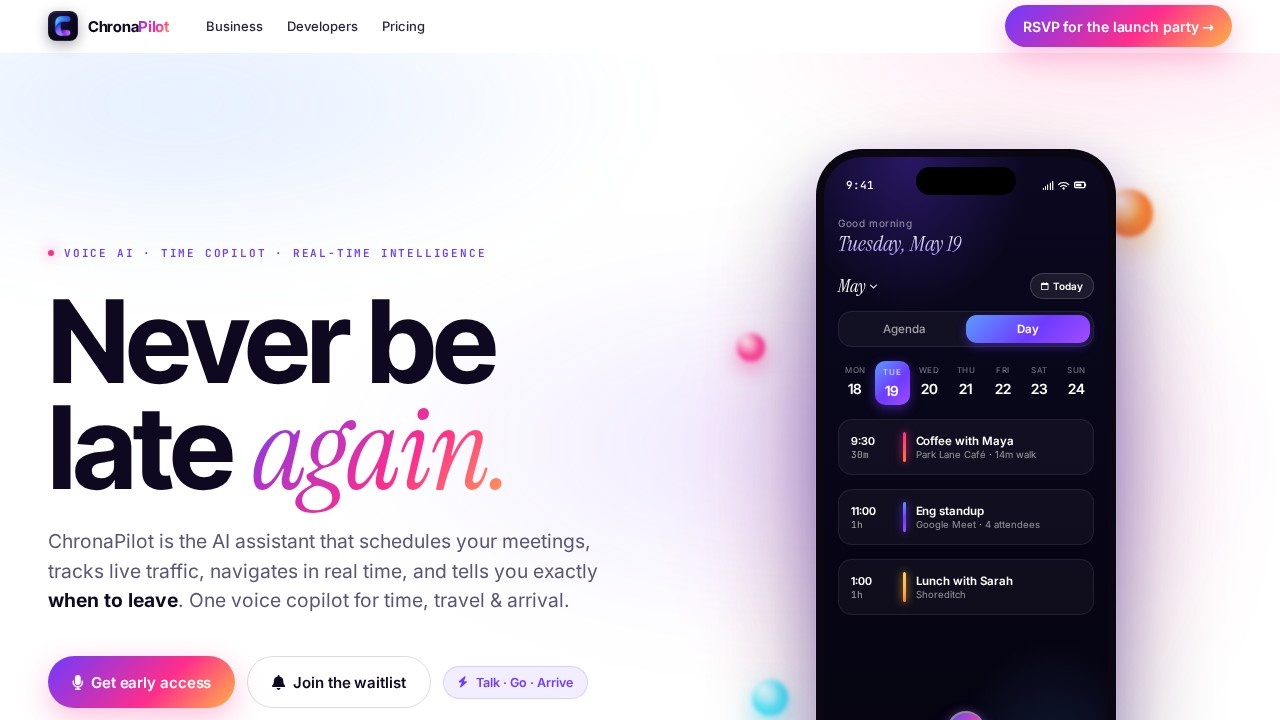
ChronaPilot is an AI-powered calendar assistant that uses voice-first, real-time intelligence to manage schedules across all platforms, enabling seamless and hands-free organization.
What is ChronaPilot?
ChronaPilot is an AI-powered calendar assistant that manages your schedule across Google Calendar, iCloud, Outlook, and Notion using voice commands. It replaces manual drag-and-drop scheduling with real-time intelligence that plans your day around energy, travel, and priorities. The tool runs your calendar like a live operating system—not just a static list of events. It syncs across devices from your wrist to your laptop, keeping everything in one unified timeline.
Application scenarios
Daily schedule management
Ask "What's my next event?" or "Am I free at 3pm?" and get instant voice responses.
Smart rescheduling
Say "Move my 9am to tomorrow" or "Move Maya to Friday at 10" and ChronaPilot updates everything automatically.
Focus time booking
Request "Schedule a focus block tomorrow" and the AI finds the best slot based on your energy patterns.
Travel planning
Use voice routing with live traffic, weather, and leave-now alerts that account for road conditions and meeting shifts.
Team collaboration
Share calendars, assign tasks, and stay aligned with your team through the unified timeline.
Cross-platform sync
Connect Google, Outlook, iCloud, and Notion without double-booking or manual copy-paste.
Core Features
Voice AI Copilot
Speak naturally to schedule, move, or ask about events—ChronaPilot understands context, priority, and tone.
Real-time time intelligence
Automatically plans your day around energy levels, travel time, and what matters most—no drag-and-drop required.
Timely reminders
Leave-now alerts that factor in traffic, weather, and last-minute meeting changes to keep you ahead.
Unified calendar view
All events, meetings, and tasks from multiple calendars appear in one beautiful, synced timeline.
Smart priorities
AI helps you focus on what matters most by surfacing the right events at the right time.
Routing and travel intelligence
Built-in Valhalla-based engine provides end-to-end navigation with live traffic rerouting, weather warnings, and points of interest along your route.
Anywhere access
Plans sync in real time across all your devices—wrist, laptop, and phone.
Team collaboration
Share calendars, assign tasks, and keep your team aligned without switching tools.
Target users
Busy professionals who manage multiple calendars and need hands-free scheduling. Remote workers, frequent travelers, and team leads who juggle meetings across Google, Outlook, iCloud, and Notion. Anyone who prefers voice commands over manual calendar entry and wants real-time travel intelligence built into their schedule.
How to use ChronaPilot?
Visit the official site at https://chronapilot.com/ and sign up for early access. Once onboarded, connect your existing calendars (Google, iCloud, Outlook, Notion) to create a unified timeline. Use the voice mic button to ask questions like "What's my next event?" or give commands like "Schedule a focus block tomorrow." The AI handles the rest—rescheduling, routing, and sending leave-now alerts. For detailed setup and device sync instructions, refer to the official documentation.
Effect review
ChronaPilot delivers on its promise of a voice-first calendar that actually runs your day rather than just storing it. The real-time routing engine with live traffic and weather alerts is a standout feature that goes beyond typical calendar apps. The ability to sync across four major platforms without double-booking is practical for multi-calendar users. While the tool is still in early access and lacks public pricing, the feature set suggests it could replace both your calendar app and navigation tool for daily scheduling. The voice AI appears responsive and context-aware based on the demo, making it a strong contender for hands-free productivity.
Frequently Asked Questions
What is ChronaPilot?
How does voice-first scheduling work?
Which calendar platforms does ChronaPilot support?
Is ChronaPilot free to use?
Can ChronaPilot handle conflicts or overlapping events?
How does ChronaPilot ensure data privacy?
ChronaPilot - AI Tool Detail
ChronaPilot is an AI-powered calendar assistant that uses voice-first, real-time intelligence to manage schedules across all platforms, enabling seamless and hands-free organization.
Category:AI voice assistant
Visit Link:https://chronapilot.com/
Tags:voice-first calendar、AI scheduling assistant、hands-free organization、cross-platform sync、real-time scheduling