
AI App Store Screenshots
AI App Store Screenshots by Vercel generates polished app store screenshots for iOS and Android, helping developers showcase their apps with customizable templates and layouts.
What is AI App Store Screenshots?
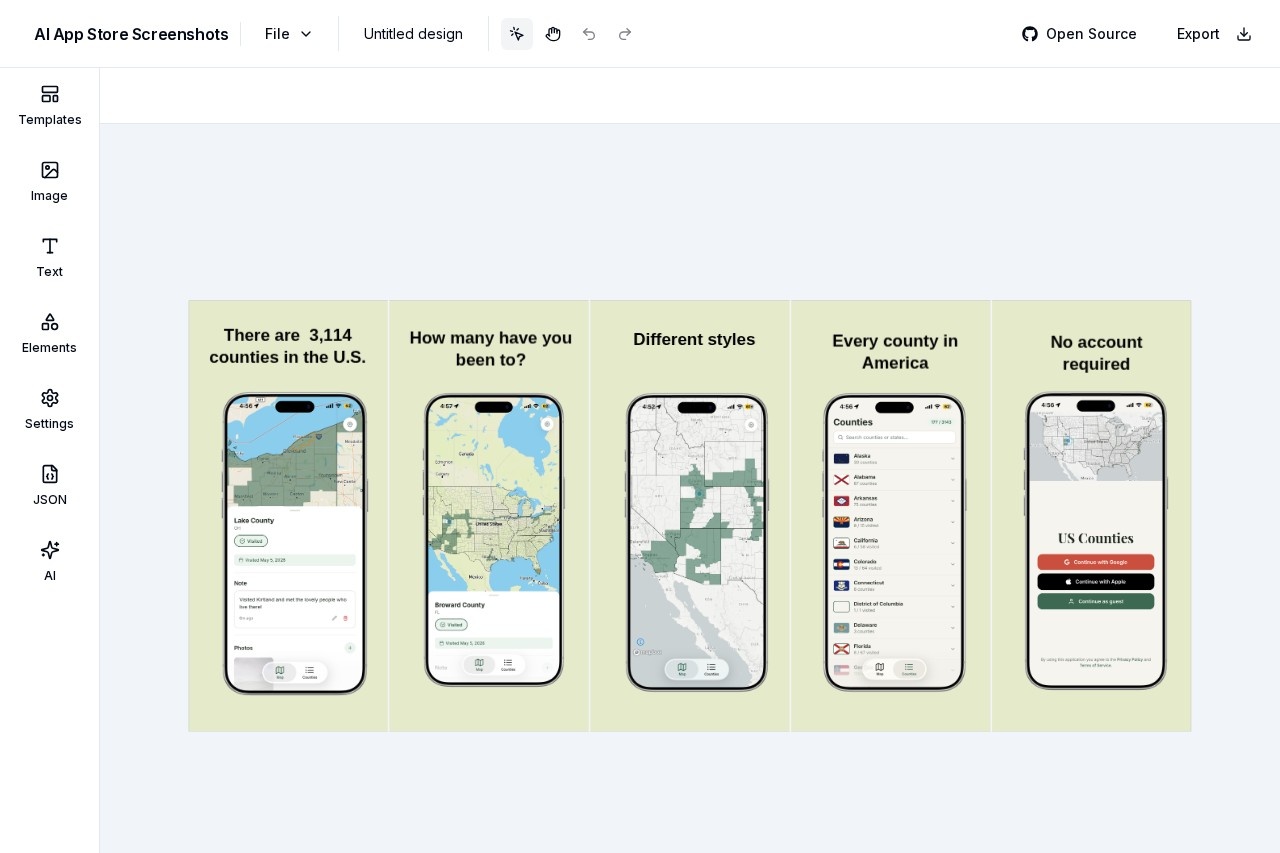
AI App Store Screenshots is a free, open-source web tool by Vercel that lets developers and designers generate polished app store screenshots for iOS and Android. It provides a canvas-based editor where you can add device frames, text, images, shapes, and gradients to create custom app previews. The tool focuses on simplifying the process of producing professional-looking screenshots without needing design software. Users can export their final designs directly from the browser.
Application scenarios
App store optimization
Create multiple screenshot variants for A/B testing in the App Store and Google Play.
Marketing materials
Generate consistent visuals for social media posts, landing pages, or ad campaigns.
Product demos
Quickly mock up app interfaces inside realistic device frames for presentations or pitch decks.
Freelance design
Produce client-ready app store assets without opening heavy design tools like Photoshop or Sketch.
Developer portfolios
Showcase personal projects with clean, branded screenshots for GitHub or personal websites.
Rapid prototyping
Experiment with different layouts, fonts, and color schemes before committing to final assets.
Core Features
Templates
Start from pre-built layouts to speed up the design process.
Device frames
Choose from a wide range of iPhone models (11, 11 Pro, 11 Pro Max, 12 Pro Max, 13) in various colors like White, Gold, Graphite, Pacific Blue, Silver, Blue, Midnight, and Pink.
Text editing
Add textboxes, headings, subheadings, and paragraphs with font options including Arial, Helvetica, Times New Roman, Georgia, Comic Sans MS, and more.
Image upload
Upload your own screenshots (up to 4MB) and apply them to device frames.
Shape tools
Draw shapes with customizable fill color (solid or gradient), stroke color, stroke width, stroke type, and opacity.
Elements panel
Manage all canvas objects—shapes, text, images—with a dedicated "Elements" section for easy selection and editing.
Export
Export your final composition directly from the editor.
Open source
Full code available on GitHub for self-hosting or customization.
Target users
App developers, indie makers, mobile designers, and product marketers who need to quickly produce app store screenshots without relying on expensive design subscriptions. The tool is especially useful for solo developers and small teams who want a no-fuss, browser-based solution for creating consistent app previews.
How to use AI App Store Screenshots?
- Open the website at https://ai-app-store-screenshots.vercel.app/.
- Use the "Templates" tab to pick a starting layout, or start from scratch.
- Add elements via the "Elements" panel: shapes, text (heading, subheading, paragraph, textbox), and images.
- Upload your app screenshot (max 4MB) and select a device frame (e.g., iPhone 13 in Blue) to apply it.
- Customize colors, fonts, stroke options, and opacity for each element.
- Export your finished screenshot using the "Export" button.
Effect review
AI App Store Screenshots delivers exactly what its name promises: a straightforward way to generate app store screenshots with device frames and customizable text. The open-source nature and zero cost make it a practical choice for developers who want full control over their assets. The device frame selection covers recent iPhone models with multiple color options, which is more than enough for most indie projects. However, the tool lacks Android device frames and advanced features like batch export or AI-generated copy. For quick, one-off screenshots, it's a solid, no-frills solution that gets the job done without bloat.
Frequently Asked Questions
What is AI App Store Screenshots by Vercel?
Does the tool support both iOS and Android platforms?
Can I customize the templates and layouts?
Is the tool free to use?
Do I need design skills to use this tool?
Can I export screenshots in different resolutions?
AI App Store Screenshots - AI Tool Detail
AI App Store Screenshots by Vercel generates polished app store screenshots for iOS and Android, helping developers showcase their apps with customizable templates and layouts.
Category:Product image generation
Visit Link:https://ai-app-store-screenshots.vercel.app/
Tags:app store screenshots、AI design tool、app marketing、iOS screenshots、Android screenshots