Zed
A high-performance, multiplayer code editor from the creators of Atom and Tree-sitter, designed for collaborative coding and rapid development.
What is Zed?
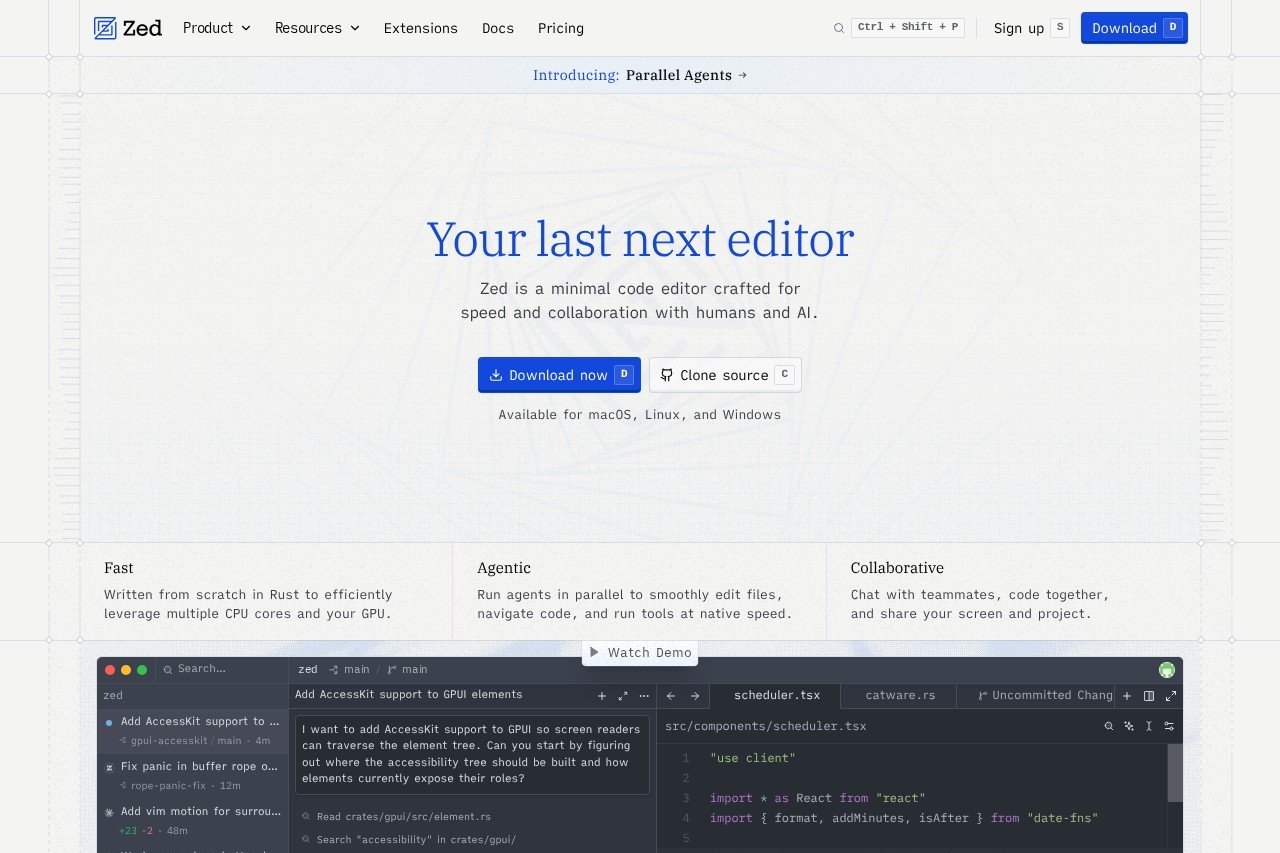
Zed is a high-performance, multiplayer code editor built from scratch in Rust, designed to efficiently leverage multiple CPU cores and your GPU. It’s crafted for speed and collaboration with both humans and AI, offering a minimal interface that prioritizes rapid development. Users rely on Zed for smooth file editing, code navigation, and running tools at native speed, with built-in support for parallel agents and real-time teamwork.Application scenarios
Collaborative coding
Chat with teammates, code together, and share your screen and project in real time.
Parallel agent workflows
Run multiple AI agents simultaneously to edit files, navigate code, and execute tools without lag.
Performance-critical development
Write and debug large codebases with a Rust-based editor that maximizes CPU and GPU usage.
Remote pair programming
Use the cloud-based collaboration features to work with distributed teams on the same project.
AI-assisted coding
Leverage integrated AI agents (like Claude Opus) to analyze code, search for patterns, and suggest changes.
Cross-platform development
Develop on macOS, Linux, or Windows with a consistent, fast editing experience.
Core Features
Parallel Agents
Run multiple AI agents in parallel to smoothly edit files, navigate code, and run tools at native speed.
Collaborative editing
Chat with teammates, code together, and share your screen and project in real time.
Rust-powered performance
Written from scratch in Rust to efficiently leverage multiple CPU cores and your GPU for fast operations.
Multi-cursor support
Add multicursor support in search and replace operations for efficient bulk editing.
Vim motion support
Includes vim motion for surround pairs, appealing to users who prefer modal editing.
LSP integration
Supports Language Server Protocol for features like hover tooltip positioning and diagnostics.
GPUI framework
Built on GPUI, a custom UI framework that handles elements, accessibility, and text shaping.
Cloud collaboration
Includes cloud-based features like billing, team settings, and org membership management.
Cross-platform availability
Available for macOS, Linux, and Windows.
Target users
Zed is designed for professional developers, engineering teams, and open-source contributors who need a fast, collaborative coding environment. It’s ideal for remote teams that rely on real-time pair programming, AI-assisted development, and performance-sensitive workflows. The editor also appeals to Rust enthusiasts and developers who value minimal, GPU-accelerated tools.How to use Zed?
To get started, download Zed from the official website for macOS, Linux, or Windows. After installation, you can clone a source repository or open an existing project. Use the built-in chat and screen-sharing features to collaborate with teammates, and invoke parallel agents for tasks like file editing, code navigation, or running tools. The editor includes a search bar for finding files and commands, and supports LSP for code intelligence.Effect review
Zed delivers on its promise of speed and collaboration, with a Rust-based architecture that feels snappy even on large projects. The parallel agents feature is a standout, allowing developers to run AI-assisted tasks without blocking their workflow. While the editor is still evolving—evidenced by ongoing commits for features like AccessKit support and multicursor search—it already offers a polished experience for modern development teams. For developers who prioritize performance and real-time collaboration, Zed is a compelling alternative to traditional editors.Frequently Asked Questions
What is Zed?
Is Zed free to use?
What platforms does Zed support?
How does collaborative editing work in Zed?
What programming languages does Zed support?
Can I use my existing editor extensions in Zed?
Zed - AI Tool Detail
A high-performance, multiplayer code editor from the creators of Atom and Tree-sitter, designed for collaborative coding and rapid development.
Category:Uncategorized
Visit Link:https://zed.dev/
Tags:code editor、multiplayer coding、collaborative development、high-performance IDE、AI-assisted coding