
PDF Translate
AI-powered PDF translator by PDF Translate for free, high-quality document translation into 100+ languages, including English, Spanish, and Chinese, while preserving original layout.
What is PDF Translate?
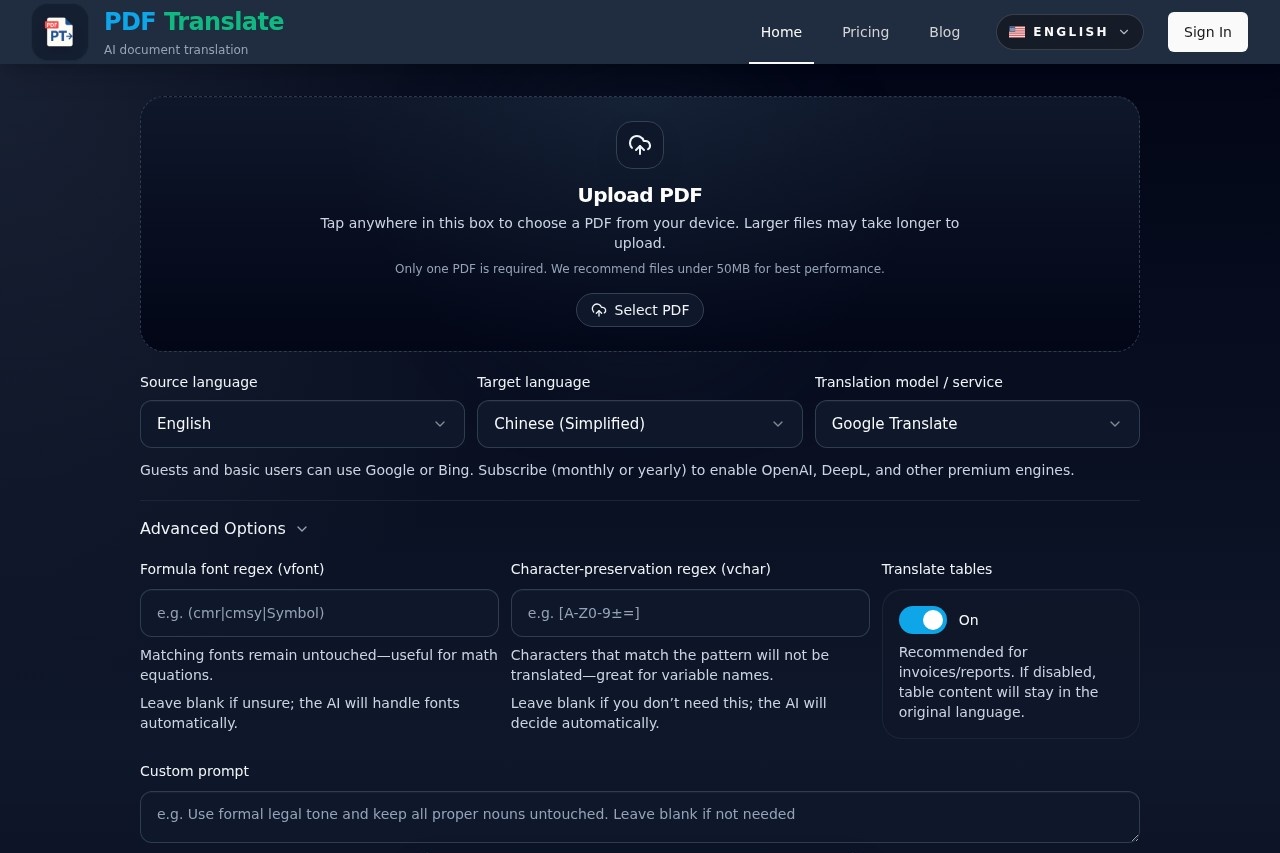
PDF Translate is an AI-powered document translation tool that converts PDFs into over 100 languages while preserving the original layout, fonts, tables, and images. It supports free basic translations using Google or Bing, with premium engines like OpenAI and DeepL available via subscription. Users can upload a PDF, select source and target languages, and receive a translated document with the same formatting in seconds. The tool also offers features like formula preservation, character-preservation regex, and document Q&A for advanced use cases.Application scenarios
Research papers
Translate academic PDFs with formulas and variable names intact using regex rules.
Finance reports
Convert invoices or financial documents while maintaining table structures.
Patents
Translate patent documents with precise character preservation for technical terms.
Novels
Translate entire books while keeping original layout and formatting.
Lesson decks
Translate presentation slides for multilingual classrooms.
Technical manuals
Convert user guides or manuals without losing diagrams or images.
Contracts
Translate legal documents with accurate layout and table support.
Core Features
Layout preservation
Keeps original fonts, tables, images, and formatting in the translated PDF.
Multi-engine translation
Choose from Google, Bing (free), or OpenAI and DeepL (premium) for different quality levels.
Formula font regex
Preserves mathematical equations by matching font patterns and leaving them untouched.
Character-preservation regex
Prevents translation of specific characters (e.g., variable names) using custom patterns.
Table translation
Option to translate table content or keep it in the original language—recommended for invoices and reports.
Custom prompt
Add a custom instruction to guide the AI translation style or context.
Real-time progress page
Automatically creates a task with live monitoring, cancel, and retry options.
Dual-column PDF export
Download mono or dual-column PDFs for side-by-side review of original and translated text.
Scanned page support
Translates even scanned PDFs using OCR technology.
Free summaries and Q&A
Generate summaries of lengthy reports or ask questions about the document for quick insights.
Target users
- Researchers and academics who need to translate papers with complex formulas and technical terms.
- Business professionals handling invoices, contracts, or reports in multiple languages.
- Students and educators working with lesson decks or study materials in foreign languages.
- Translators and linguists requiring high-quality, layout-preserving document translation.
- Patent agents who need precise character preservation for legal and technical documents.
How to use PDF Translate?
- Upload a PDF file (under 50MB recommended) by clicking the upload area on the homepage.
- Select the source and target languages from the dropdown menus.
- Choose a translation model: Google or Bing for free users; OpenAI or DeepL for subscribers.
- Optionally configure advanced options like formula font regex, character-preservation regex, or table translation.
- Click "Start translation" to create a task and be redirected to the live progress page.
- Monitor the translation in real time, with options to cancel or retry if needed.
- Download the translated PDF as a mono or dual-column document for review.
Pricing and free trial
The website states that guests and basic users can use Google or Bing for free. To enable OpenAI, DeepL, and other premium engines, users must subscribe monthly or yearly. The tool is described as "free to try" with the ability to "translate entire PDFs before upgrading."Effect review
PDF Translate delivers on its core promise: fast, layout-preserving translation with minimal setup. The free tier with Google and Bing is practical for casual use, while premium engines like OpenAI and DeepL likely improve accuracy for complex documents. The advanced regex options for formulas and characters are a standout for technical fields, though they require some familiarity to configure. The real-time progress page and dual-column export add transparency and ease of review. Overall, it’s a solid choice for anyone needing quick, formatted document translation without installing software.Frequently Asked Questions
What is PDF Translate?
Is PDF Translate free to use?
Which languages does PDF Translate support?
Does PDF Translate maintain the original formatting?
Can I translate any PDF file?
How do I use PDF Translate?
PDF Translate - AI Tool Detail
AI-powered PDF translator by PDF Translate for free, high-quality document translation into 100+ languages, including English, Spanish, and Chinese, while preserving original layout.
Category:AI Translation
Visit Link:https://pdf-translation.com/
Tags:PDF translation、document translator、AI translator、multilingual、layout preservation