OpenL
OpenL offers AI-powered translation in over 100 languages, handling text, documents, images, and speech for free. It's designed to be faster and smarter than traditional translation tools.
What is OpenL?
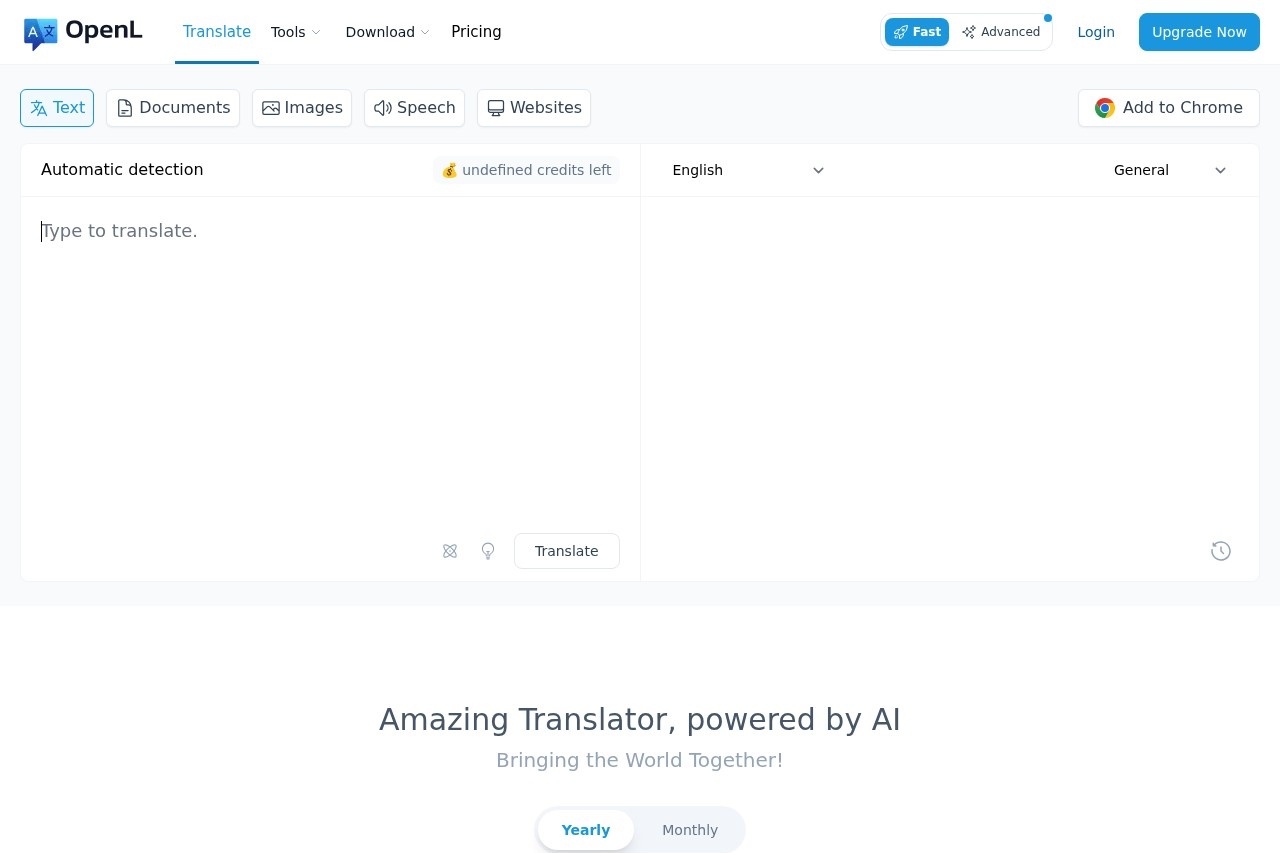
OpenL is an AI-powered translation tool that supports over 100 languages. It translates text, documents, images, and speech for free, aiming to be faster and smarter than traditional options. Users can access it via a web platform and a Chrome browser extension for instant translation anywhere.Application scenarios
Global communication
Translate conversations and documents for seamless international dialogue.
Academic work
Translate and refine documents, research papers, and scanned PDFs for study.
Professional documentation
Handle multi-format business documents like Word files and PDFs with professional accuracy.
Content browsing
Use the browser extension to instantly translate any website text.
Language learning
Utilize AI grammar tools and writing refinement for educational improvement.
Audio translation
Translate speech from audio files such as MP3 formats.
Core Features
Multi-format translation
Translate text, documents (PDF, Word), images (PNG), and audio (MP3) in one service.
Scanned PDF support
Translate text from scanned PDF documents daily, with limits varying by plan.
Large character processing
Translate up to 150,000 characters at once depending on your subscription tier.
Text-to-Speech
Generate unlimited speech from translated text.
AI Detection
Use unlimited AI content detection alongside translation.
Chrome extension
Select any text on a webpage for instant translation or use a Side Panel for longer content.
Advanced Mode
Access precise and professional translations using advanced credits.
DeepThink
Employ a deep thinking AI mode for professional translation accuracy.
Smart Context
Improve translation quality through better contextual understanding.
AI Language Assistant
Get assistance with language-related tasks beyond direct translation.
File upload
Upload files up to 100 MB for translation, depending on your plan.
Target users
This tool serves students and educators, who are offered an educational discount. It also targets professionals needing accurate document translation, global teams managing cross-border communication, and general users who require fast, multi-format translation while browsing or handling personal documents.How to use OpenL?
Visit the official website to try the service with a free tier. For instant use while browsing, add the Chrome extension to Microsoft Edge or Chrome to select text for translation or use the Side Panel. You can upload documents and images directly on the platform for translation. Upgrading to a Pro plan unlocks higher limits and advanced features.Pricing and free trial
OpenL offers a free trial providing 30 daily translations. Paid Pro plans are structured as Monthly or Yearly subscriptions with tiered features:- A base plan includes unlimited "Fast Credits," 3 scanned PDF translations per day, a 30,000-character limit, and 1v1 customer service.
- A "Most Popular" plan offers 1,000 Advanced Credits per month, 10 scanned PDF translations per day, a 100,000-character limit, and access to Advanced Mode, DeepThink, Smart Context, and an AI Language Assistant.
- A top-tier plan provides unlimited Advanced Credits (with a fair-use rate limit after 4,000 monthly credits), 40 scanned PDF translations per day, and a 150,000-character limit. All paid plans include unlimited Fast Credits, Text-to-Speech, AI Detection, Chrome extension support, and the option to cancel anytime.
Effect review
The website highlights strong user testimonials, with one reviewer expressing surprise at its quality and another stating they turn to OpenL for tasks requiring high accuracy and document integrity. The feature set, particularly the support for scanned PDFs, professional Advanced Mode, and unlimited Text-to-Speech, suggests a tool built for serious translation needs beyond simple phrases. For users tired of basic translators, OpenL’s multi-format approach and focus on contextual accuracy position it as a comprehensive solution for both casual and professional language tasks.Frequently Asked Questions
What is OpenL?
Is OpenL free to use?
What types of content can OpenL translate?
How many languages does OpenL support?
How is OpenL different from other translation tools?
Can OpenL translate speech in real-time?
OpenL - AI Tool Detail
OpenL offers AI-powered translation in over 100 languages, handling text, documents, images, and speech for free. It's designed to be faster and smarter than traditional translation tools.
Category:AI Translation
Visit Link:https://openl.io/
Tags:translation、multilingual、AI-powered、free tool、speech translation