
OpenCode
A Codex-inspired native workspace by OpenCode for coding with local, self-hosted, or cloud models. It features realtime voice, private dictation, Computer Use, extensions, widgets, and secure Remote a
What is OpenCode?
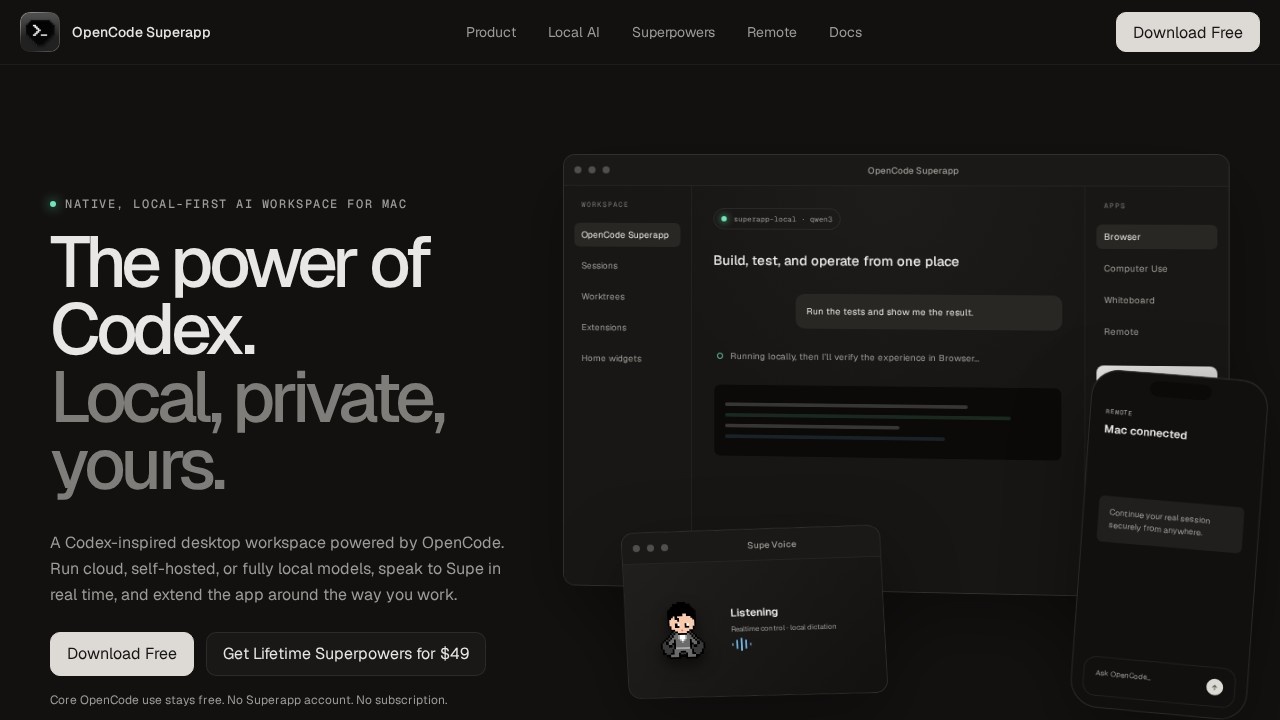
OpenCode is a native, local-first AI workspace for Mac, inspired by Codex. It allows you to run cloud, self-hosted, or fully local models, and interact with them via realtime voice. The app is designed to build, test, and operate from one place, with features like Computer Use, extensions, and secure remote access. It’s a free application that gives you a complete native workspace, which you can shape into your own.Application scenarios
Local AI development
Run models like Qwen 3 locally on your Mac without needing a separate server.
Multi-provider coding
Switch between OpenAI, Anthropic, Google, xAI, Ollama, or self-hosted models per task.
Real-time voice coding
Speak to Supe in real time to create, message, monitor, and open files.
Browser automation
Let OpenCode inspect and operate web experiences directly in the in-app browser.
Native macOS control
Use Computer Use to inspect and operate native macOS applications through guarded tools.
Remote work
Continue your real session securely from anywhere using a paired phone or browser via encrypted relay.
Private dictation
Compose prompts with private, multilingual speech recognition running on your Mac.
Core Features
Multi-provider flexibility
Use models from OpenAI, Anthropic, Google, xAI, Ollama, or self-hosted endpoints, with your own credentials and billing.
Integrated local AI
Install the app-managed Ollama engine to use models already stored in your local library without running a separate server.
Real desktop workflows
Keep projects, parallel sessions, Files, Git, worktrees, terminals, search, and configuration all in one place.
Extensions and skills
Add commands, right-panel apps, Skills, MCP services, resources, and local extension packages.
Custom widgets
Ask the agent to create a Home widget, test it in a live preview, and publish it when ready.
Workspace personalization
Choose from 21 app icons and customize Supe with presets, colors, outfit details, and placement.
Browser automation (Superpower)
Let OpenCode inspect and operate the exact web experience in the in-app Browser.
Native Computer Use (Superpower)
Let OpenCode inspect and operate native macOS applications through guarded tools.
Local dictation (Superpower)
Compose prompts with private, multilingual speech recognition running on your Mac.
Remote + Mobile (Superpower)
Reach the trusted Mac host from a paired phone or browser through the encrypted relay.
Supe Realtime Voice (Superpower)
Speak with Supe to create, message, monitor, and open files.
Target users
OpenCode is built for developers and power users who want a local-first, private AI workspace on Mac. It benefits software engineers, AI researchers, and anyone who needs to build, test, and operate code across multiple models and providers without relying on a subscription or cloud-only service.How to use OpenCode?
Download OpenCode for Mac for free from the official website. You can start using core features immediately without a Superapp account or subscription. To unlock Superpowers (like Computer Use, Browser Automation, Local Dictation, Remote + Mobile, and Realtime Voice), purchase the Lifetime Superpowers for $49. After installation, you can add your own provider credentials (OpenAI, Anthropic, Google, etc.), install the integrated Ollama engine for local models, and begin building, testing, and operating from one workspace.Pricing and free trial
OpenCode is free to download and use for core features. No subscription is required. For full access to Superpowers (Browser Automation, Native Computer Use, Local Dictation, Remote + Mobile, and Supe Realtime Voice), there is a one-time purchase of $49 for Lifetime Superpowers.Effect review
OpenCode delivers a genuinely native, local-first experience that puts you in full control of your AI tools and data. The ability to switch between local, self-hosted, and cloud models per task, combined with realtime voice and private dictation, makes it a powerful alternative to browser-based coding assistants. The Superpowers unlock practical automation and remote access capabilities that extend beyond chat. While the feature set is ambitious, the app’s local-first design and one-time pricing model offer a compelling value proposition for developers who prioritize privacy and flexibility.Frequently Asked Questions
What models can I use with OpenCode?
Does OpenCode support voice commands?
What is Computer Use in OpenCode?
Can I extend OpenCode's functionality?
Is my data secure with OpenCode?
What makes OpenCode different from other coding tools?
OpenCode - AI Tool Detail
A Codex-inspired native workspace by OpenCode for coding with local, self-hosted, or cloud models. It features realtime voice, private dictation, Computer Use, extensions, widgets, and secure Remote a
Category:Programming Assistant
Visit Link:https://opencodesuper.app/
Tags:AI coding assistant、local-first、voice coding、remote development、open source