
deep code
DeepCode is a professional programming assistant by DeepSeek, offering comprehensive support including code generation, debugging, optimization, and Q&A to help developers complete tasks efficiently.
What is deep code?
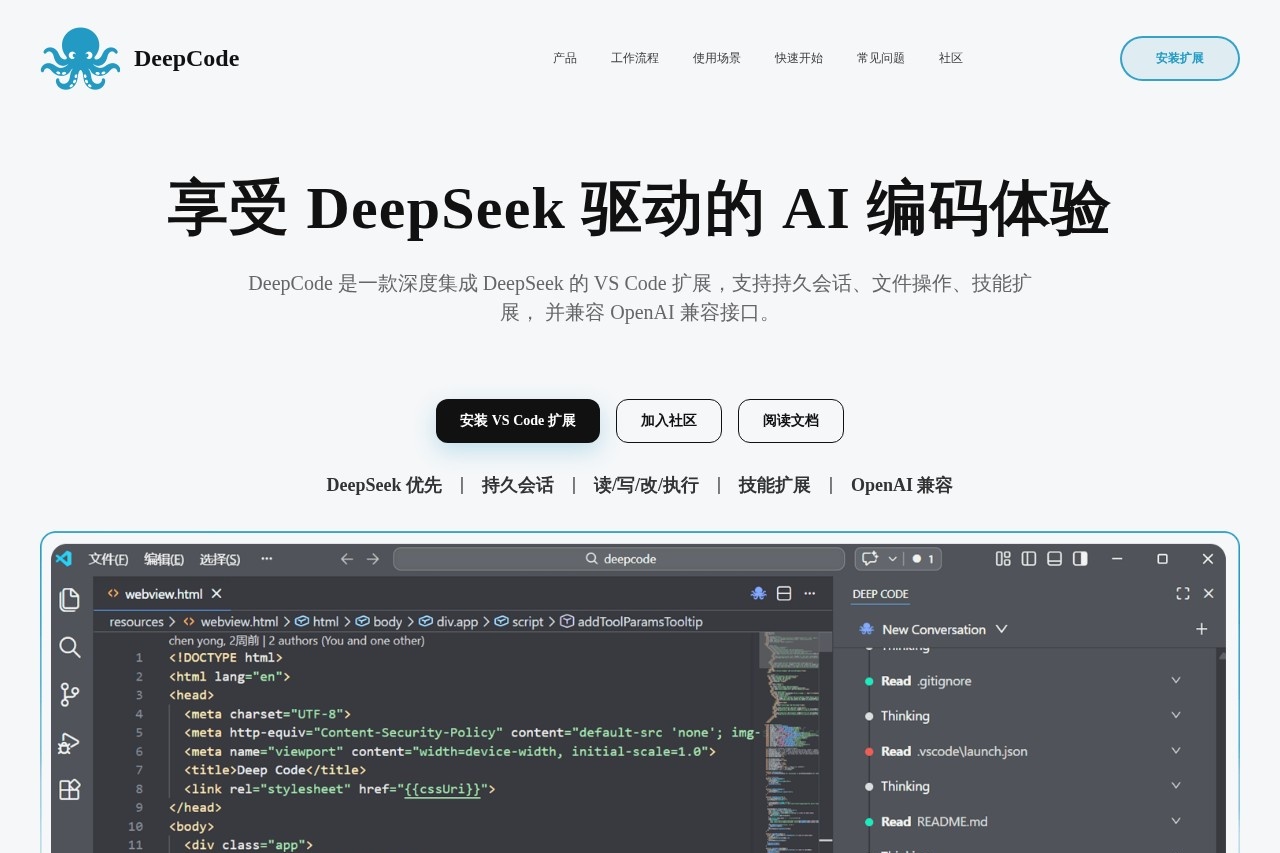
DeepCode is a professional programming assistant built as an extension for Visual Studio Code. It is powered by the DeepSeek AI model and integrates directly into the developer's IDE. Users employ it for a comprehensive coding workflow that includes generating, debugging, and optimizing code within their project context. It moves beyond simple chat to act as a collaborative agent that can read, write, modify, and execute files and commands.Application scenarios
Understanding unfamiliar code
Get explanations and context for codebases you are new to.
Documentation translation and organization
Assist in translating and structuring project documentation.
Continuous task progression
Work on extended, multi-step development tasks without losing context.
High-frequency development tasks
Handle common coding chores efficiently within the editor.
Custom model integration
Connect team-specific or alternative AI models that use a compatible API.
Core Features
DeepSeek-first optimization
The tool is specifically tuned to leverage DeepSeek model capabilities like reasoning modes and prefix caching.
Project-level persistent sessions
Maintains conversation history and context on a per-project basis, allowing you to resume work later.
File operations
Read, write, modify, and execute files directly from the sidebar interface.
Skill extensions
Extend capabilities by creating or using custom Skills that encapsulate common workflows or specialized knowledge.
OpenAI-compatible interface
Supports integration with other AI model services that offer an OpenAI-compatible API.
Immersive sidebar workflow
Conduct the entire coding interaction—chat, file edits, command execution—within a dedicated VS Code sidebar without switching windows.
Tool-driven workflow
The assistant can call tools and execute commands as part of its operation.
Agent-based assistance
Functions as a programming assistant agent designed for continuous collaboration, not just one-off Q&A.
Target users
This tool is built for software developers and development teams who use Visual Studio Code. It is particularly valuable for developers already using or wanting to optimize for the DeepSeek model, and for teams seeking a deeply integrated, context-aware AI assistant that persists across coding sessions.How to use deep code?
First, install the DeepCode extension from the VS Code marketplace. To configure it, create a settings file at~/.deepcode/settings.json with your model parameters, such as specifying MODEL as "deepseek-reasoner", your BASE_URL, and your API_KEY. Once installed and configured, you can access DeepCode from a sidebar within VS Code to begin interacting with it in the context of your open project.Effect review
DeepCode positions itself as a significant step beyond basic AI coding chat plugins by focusing on persistent, project-aware collaboration. Its emphasis on a complete "coding闭环" (closed loop) within the IDE, combined with file operations and skill-based extensions, suggests a tool designed for real, sustained development work. The ability to maintain session memory and execute commands points toward a practical assistant that can handle complex, multi-step tasks. For developers seeking an agent-like partner that stays within the VS Code environment and leverages DeepSeek's strengths, DeepCode offers a focused and integrated workflow.Frequently Asked Questions
What is DeepCode?
What programming languages does DeepCode support?
Is DeepCode free to use?
How does DeepCode help with debugging?
Can DeepCode generate code from scratch?
How do I get started with DeepCode?
deep code - AI Tool Detail
DeepCode is a professional programming assistant by DeepSeek, offering comprehensive support including code generation, debugging, optimization, and Q&A to help developers complete tasks efficiently.
Category:Programming Assistant
Visit Link:https://deepcode.vegamo.cn/
Tags:code generation、debugging、programming assistant、code optimization、developer tools