
Elvin
Proactive AI assistant by Elvin that monitors your inbox, calendar, and messages, automatically drafts tasks and responses before you ask. Simply review and approve. Free during beta.
What is Elvin?
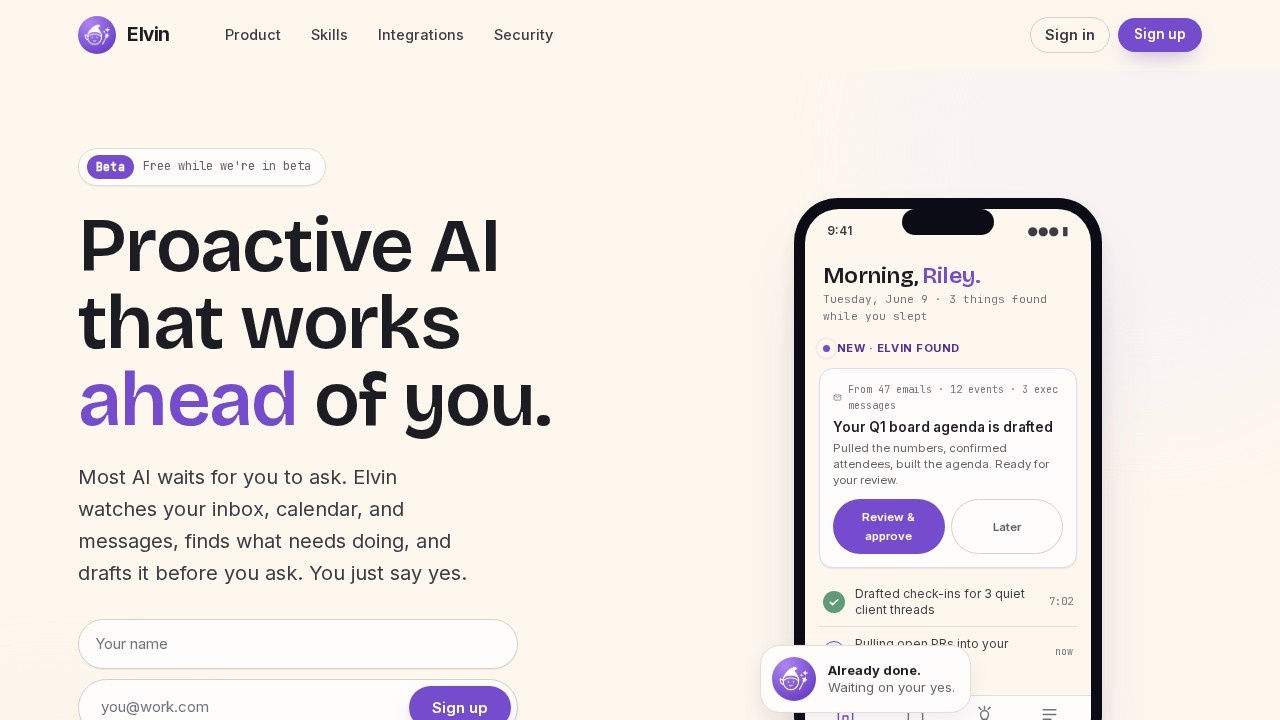
Elvin is a proactive AI assistant that monitors your inbox, calendar, and messages to automatically draft tasks and responses before you ask. It finds what needs doing—like drafting agendas or follow-ups—and presents them for your review and approval. The tool requires zero setup beyond connecting your accounts and learns your preferences over time. It is currently free during beta and is CASA Tier 2 Certified, meaning it never trains on your data.Application scenarios
Email management
Elvin scans hundreds of emails to identify overdue invoices, follow-ups, and action items, then drafts responses or reminders.
Calendar preparation
It spots upcoming meetings (like board meetings) and automatically drafts agendas, pulling data from emails and events.
Client communication
Elvin drafts check-ins for quiet client threads, keeping relationships warm without manual effort.
Task tracking
It monitors messages from exec teams and creates to-do lists, such as pulling open PRs into a Monday status.
Meeting prep
The AI identifies unread meeting preps and drafts necessary documents before you even think about them.
Daily workflow
It surfaces a morning summary of what was found overnight, including drafted items ready for your approval.
Core Features
Proactive drafting
Elvin works ahead of you—it drafts board agendas, follow-ups, and status updates without needing a prompt.
Context Live learning
It picks up who you are and how you work from your existing actions, adapting to your style automatically.
Memory Live customization
Tell Elvin once how you want it to behave (e.g., keep follow-ups under three sentences), and it remembers without further input.
Zero setup
Connect your accounts and the tool starts working immediately—no configuration, prompts, or agents to build.
Multi-source monitoring
It watches email, calendar, and messages (including Slack reactions) to find tasks and drafts.
Review-and-approve workflow
Elvin presents drafted items on your home screen; you simply review and say yes to send or schedule.
CASA Tier 2 Certification
The platform ensures your data is never used for training, providing enterprise-grade security.
Morning summary
Each day, Elvin shows a digest of what it found while you slept, with drafted items ready for action.
Target users
Busy professionals and executives who manage heavy email, calendar, and messaging loads—such as team leads, managers, and founders. It is also ideal for anyone who wants to reduce mental overhead from open loops like overdue invoices, unread meeting preps, or client follow-ups. The tool suits individuals who prefer a "review and approve" workflow over manual task creation.How to use Elvin?
Sign up at tryelvin.com (free during beta). After signing up, you'll receive email directions to connect your accounts—email, calendar, and messaging platforms. There is nothing to configure; Elvin immediately starts monitoring your data and drafting tasks. Each morning, check your home screen for a summary of found items and drafted responses. Review each item and tap "Review & approve" or "Later" to manage your workflow.Pricing and free trial
Elvin is free while it remains in beta. The website explicitly states: "Free while we're in beta." No other pricing tiers or future costs are mentioned.Effect review
Elvin's proactive approach genuinely reduces the friction of daily task management, as it drafts work before you even think to ask. The zero-setup promise and learning capabilities (Context Live and Memory Live) make it practical for busy users who don't want to configure prompts. However, since the tool is still in beta, its long-term reliability and accuracy across diverse workflows remain unproven. For now, it offers a compelling, hands-off way to stay on top of emails, meetings, and messages—ideal for anyone tired of carrying open loops in their head.Frequently Asked Questions
What is Elvin?
How does Elvin work?
Is Elvin free?
What platforms does Elvin support?
Does Elvin send messages automatically?
How do I get started with Elvin?
Elvin - AI Tool Detail
Proactive AI assistant by Elvin that monitors your inbox, calendar, and messages, automatically drafts tasks and responses before you ask. Simply review and approve. Free during beta.
Category:Personal Assistant
Visit Link:https://tryelvin.com/
Tags:AI assistant、email automation、task management、productivity tool、inbox management