
TrustClaw
TrustClaw is a secure AI assistant by the OpenClaw team, offering 24/7 support with over 1,000 OAuth integrations and sandboxed execution for safe, automated workflows.
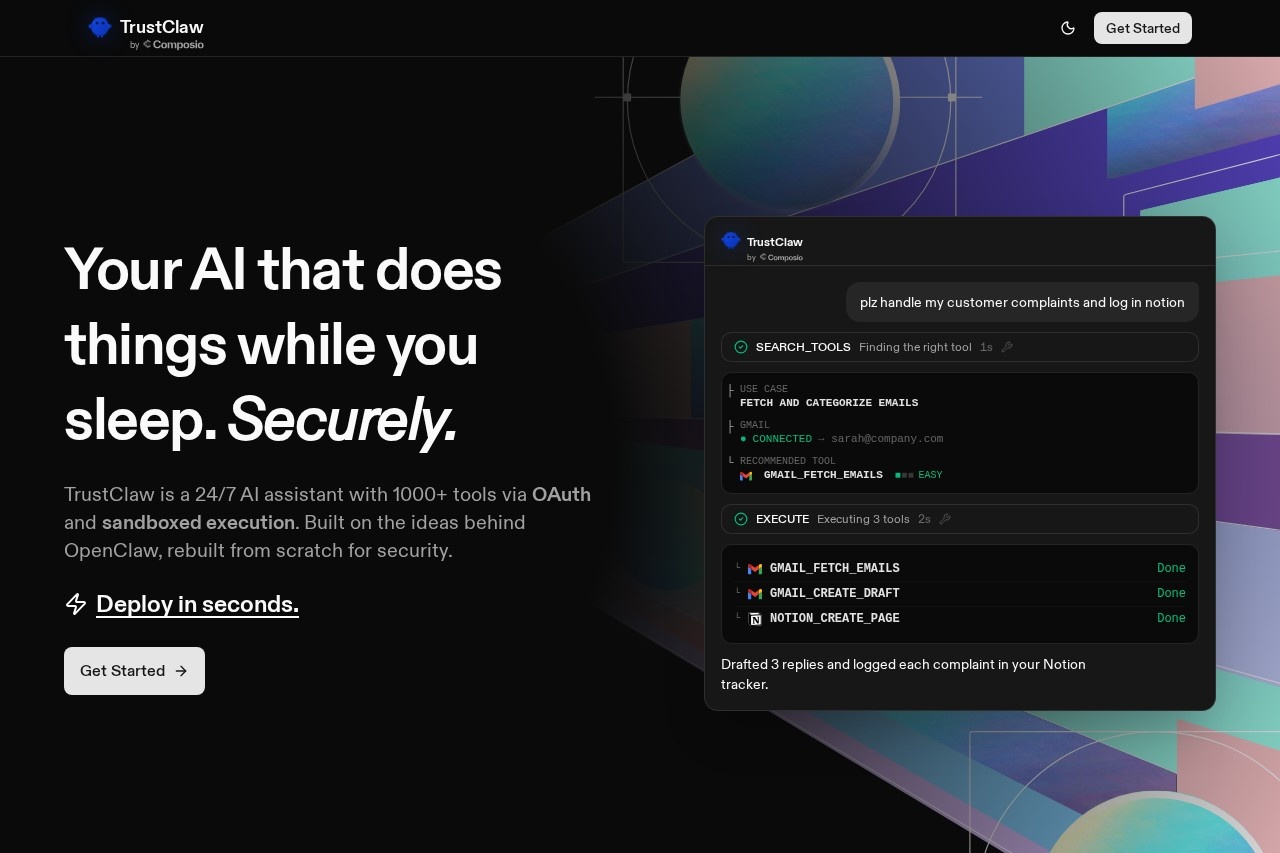
What is TrustClaw?
TrustClaw is a secure AI assistant built for automated workflow execution. It provides 24/7 support by connecting to over 1,000 external tools and applications. Users primarily deploy it to automate tasks like processing communications, managing data, and logging information across their connected apps, all within a security-focused architecture.Application scenarios
Customer support automation
Fetch and categorize emails from Gmail, then draft replies and log complaints in a Notion tracker.
Competitor and market intelligence
Pull and analyze Reddit threads mentioning a competitor or scrape reviews from sites like G2 and Capterra.
Internal feedback aggregation
Summarize all Slack messages from a designated channel like #product-feedback on a weekly basis.
Product and release management
Pull completed tickets from a tool like Linear to automatically draft release notes.
User behavior analysis
Analyze database events from a platform like Supabase to identify user drop-off patterns.
Scheduled task management
Schedule the AI agent to handle repetitive tasks autonomously while you sleep.
Core Features
Broad integration network
Connect to over 1,000 tools and apps, including Gmail, Notion, Linear, Slack, and Reddit, via a single click.
OAuth-only authentication
Connect to apps using OAuth without ever storing or sharing passwords or API keys.
Zero setup deployment
Begin using the assistant by signing up and chatting; no manual API key configuration or config files are required.
Multi-platform chat interface
Interact with your AI agent through popular messaging apps like Telegram, WhatsApp, Discord, or Slack.
Sandboxed execution
Every automated action runs in an isolated, temporary cloud environment that is destroyed when the task is complete.
Scheduled automation
Set up tasks for the AI agent to handle automatically on a defined schedule.
Managed tool surface
The assistant operates using a managed set of tools from Composio, as opposed to unvetted community skills.
Full audit trails
Review complete logs of all actions performed by the AI agent.
One-click revocation
Instantly revoke access to connected integrations with a single click.
Target users
TrustClaw is built for professionals and teams who need to automate workflows across multiple software services securely. It is particularly relevant for customer support teams, product managers, marketing analysts, and developers who manage data aggregation, communication processing, and routine reporting tasks between apps like Gmail, Notion, Slack, and Linear.How to use TrustClaw?
The process is designed for simplicity. First, sign up for an account on the TrustClaw platform. Then, connect your desired applications using OAuth—this requires no manual API key entry. After setup, you can begin chatting with your AI agent directly on the platform or via a connected messaging app like Telegram. Provide natural language instructions, such as "Check my Gmail for all customer emails this month, categorize by complaint vs feature request." The agent will execute the necessary tools in sequence and report back.Effect review
TrustClaw positions itself as a more secure evolution of tools like OpenClaw, directly addressing common security liabilities. By enforcing OAuth, sandboxing all code execution, and using a managed integration platform, it offers a practical solution for users who need automation but are concerned about credential exposure and unsafe code. The feature set of extensive integrations, scheduled tasks, and cross-platform chat suggests a tool focused on reliable, hands-off operation for common business workflows, shifting the risk profile away from the user's local machine.Frequently Asked Questions
What is TrustClaw?
How does TrustClaw ensure security?
What integrations does TrustClaw support?
Is TrustClaw available 24/7?
What are the main features of TrustClaw?
Who developed TrustClaw?
TrustClaw - AI Tool Detail
TrustClaw is a secure AI assistant by the OpenClaw team, offering 24/7 support with over 1,000 OAuth integrations and sandboxed execution for safe, automated workflows.
Category:Claw Product
Visit Link:https://www.trustclaw.app/
Tags:AI assistant、workflow automation、secure AI、OAuth integrations、sandboxed execution