
Text to Speech AI
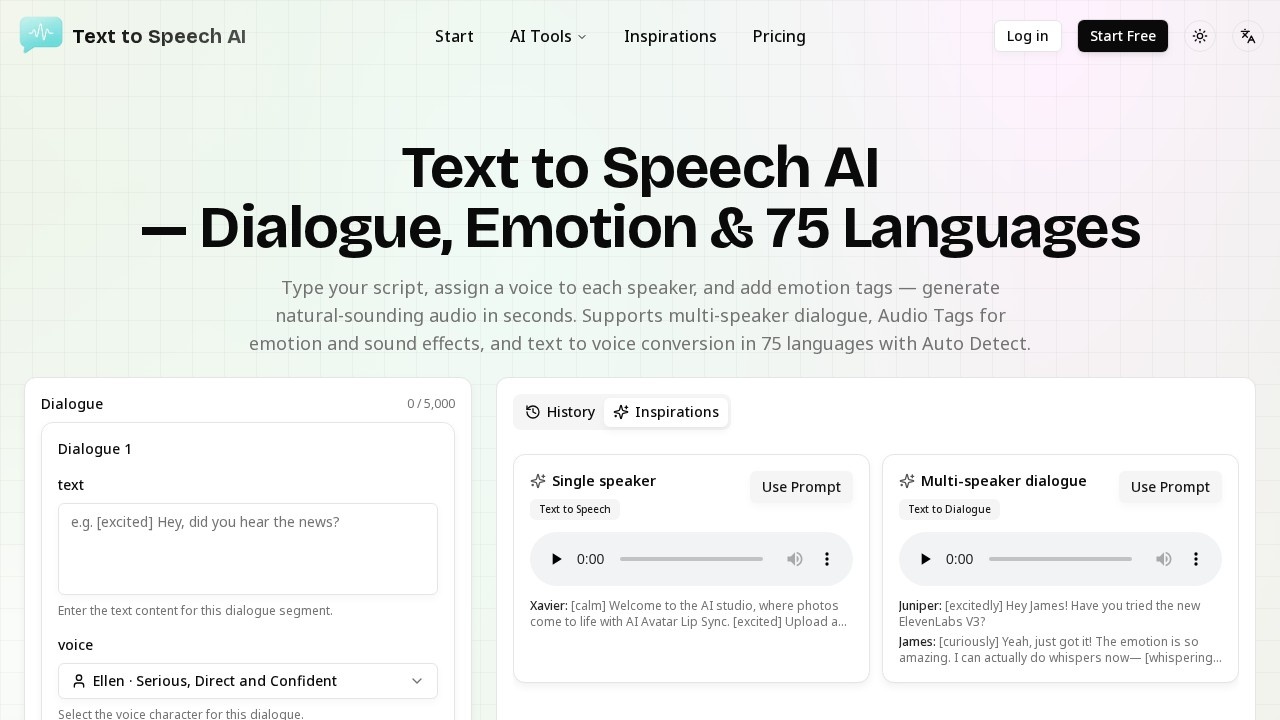
Text to Speech AI by the platform generates natural AI speech with multiple speakers and emotion control, converting text to audio in 75 languages for free online use.
What is Text to Speech AI?
Text to Speech AI is a free online tool that converts written text into natural-sounding speech. It supports 75 languages with auto-detection and stands out by offering multi-speaker dialogue generation—meaning you can assign different voices to different characters in a script and generate a single audio file with natural turn-taking. The platform also includes Audio Tags for emotion, delivery, and sound effects, giving you direct control over how the AI delivers each line.
Application scenarios
Podcast scripts
Write dialogue for multiple hosts or guests, assign distinct voices, and generate a complete conversation without manual audio editing.
Character dialogue
Create natural-sounding exchanges for animated videos, audiobooks, or game narratives with separate voices per speaker.
E-learning scenarios
Produce training materials with multiple instructors or role-play conversations in various languages.
Single-voice narration
Generate straightforward text-to-speech for voiceovers, announcements, or any content needing a single speaker.
Emotion-rich audio
Use Audio Tags like [excited], [whispering], or [laughing] to add expressive delivery to any script.
Sound effects integration
Embed tags like [door knocking] directly into the script to include ambient sounds without recording studio equipment.
Core Features
Multi-speaker dialogue
Assign a different AI voice to each speaker in a script, and the tool generates the entire conversation as a single audio file with natural pacing and turn-taking.
Audio Tags for emotion and sound
Insert tags such as [excited], [sad], [whispers], or [laughing] to control delivery, emotion, nonverbal sounds, and even sound effects like [door knocking].
75-language support with Auto Detect
Convert text to speech in 75 languages, and the tool automatically detects the language of your input.
Voice library with preview
Browse a selection of AI voices and preview them before generating your final audio.
Dialogue and single-speaker modes
Switch between multi-speaker dialogue creation and single-voice narration depending on your project needs.
Context-aware conversation flow
The AI maintains shared emotional context between speakers, making dialogue sound natural rather than disconnected.
No manual audio editing required
Because the tool generates the full conversation as one file, you avoid timeline stitching or post-production work.
Target users
Content creators, podcasters, e-learning developers, video producers, and game narrative designers who need to generate natural-sounding voiceovers or multi-speaker audio quickly. The tool also suits anyone who wants expressive text-to-speech with emotion control and language variety—no audio engineering skills required.
How to use Text to Speech AI?
- Open the Text to Speech AI website.
- Type your script into the dialogue editor (up to 5,000 characters per segment).
- Assign a voice character to each speaker (e.g., Ellen with a "Serious, Direct and Confident" tone).
- Add Audio Tags like [excited] or [whispering] to shape delivery.
- Select the language or enable Auto Detect.
- Click generate to produce a single audio file with natural pacing and conversational flow.
Effect review
Text to Speech AI delivers exactly what it promises: a straightforward way to create multi-speaker audio with expressive control. The Audio Tags feature is particularly useful—it lets you direct the AI like a recording session, adding emotion, delivery cues, and even sound effects without needing a studio. The 75-language support with auto-detect broadens its appeal for global projects, and the ability to preview voices before generating saves time. While the tool focuses on dialogue and emotion rather than advanced voice cloning or real-time synthesis, its free online availability and ease of use make it a solid choice for podcasters, educators, and content creators who need natural-sounding voiceovers fast.
Frequently Asked Questions
What is Text to Speech AI?
How many languages does Text to Speech AI support?
Can I control the emotion of the AI speech?
Is Text to Speech AI free to use?
Does the tool support multiple speakers?
Text to Speech AI - AI Tool Detail
Text to Speech AI by the platform generates natural AI speech with multiple speakers and emotion control, converting text to audio in 75 languages for free online use.
Category:Speech synthesis
Visit Link:https://www.texttospeechai.app/
Tags:text to speech、AI voice generator、natural speech synthesis、multilingual audio、emotion control