
Image to Prompt Generator
Image to Prompt Generator by the developer converts any image into reusable AI prompts for Midjourney, DALL-E 3, Flux, and Stable Diffusion. Free, fast, and no login required for easy prompt creation.
What is Image to Prompt Generator?
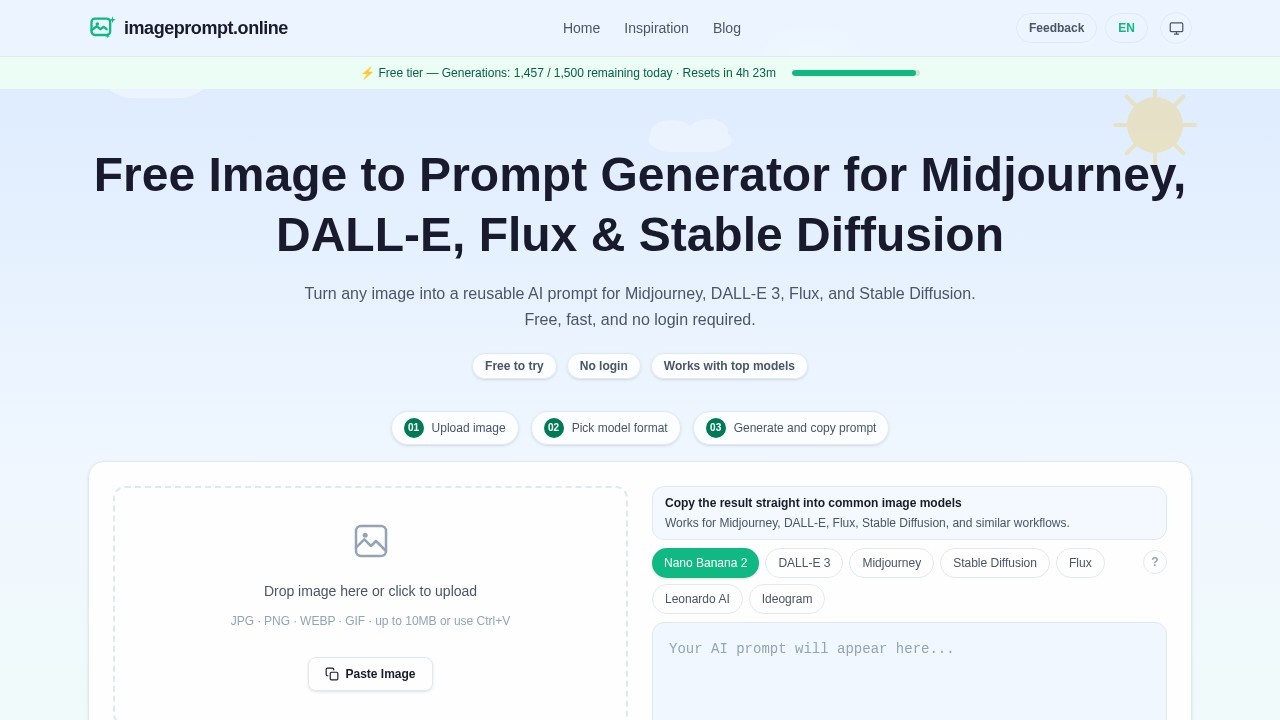
Image to Prompt Generator is a free online tool that converts any uploaded image into a reusable text prompt for AI image generators like Midjourney, DALL-E 3, Flux, and Stable Diffusion. It works with JPG, PNG, WEBP, and GIF files up to 10MB, and requires no login or sign-up. Users simply upload or paste an image, select a model format, and the tool generates a detailed prompt that can be copied directly into their preferred AI image generator.
Application scenarios
AI art creation
Turn reference images into prompts for Midjourney, DALL-E 3, Flux, or Stable Diffusion to recreate or iterate on visual styles.
Reverse engineering prompts
Extract the descriptive text behind any image to understand how it was generated or to reuse the style.
Creative inspiration
Use real-world photos or existing artwork as a starting point for new AI-generated variations.
Content repurposing
Convert images from social media, marketing materials, or personal projects into prompts for AI reimaginings.
Learning and experimentation
Study how different image attributes (lighting, composition, color) translate into prompt language for better prompt engineering.
Multilingual support
Generate prompts in English, Chinese, Japanese, Russian, Polish, or Hindi for global users.
Core Features
One-click image upload
Drag and drop an image onto the page, click to upload, or paste directly with Ctrl+V.
Model format selection
Choose from Midjourney, DALL-E 3, Stable Diffusion, Flux, Leonardo AI, or Ideogram to tailor the prompt output.
Instant prompt generation
Upload an image, pick a model, and get a ready-to-copy prompt immediately—no waiting or processing delays.
Multi-language output
Generate prompts in six languages (English, Chinese, Japanese, Russian, Polish, Hindi) to match your workflow or audience.
Real-world examples
The site includes working examples showing original images, AI recreations, and the extracted prompts for cyberpunk anime, portrait photos, and fantasy landscapes.
No login required
Use the tool entirely without creating an account or signing in—just upload and generate.
Free to use
All features are available at no cost, with no hidden paywalls or trial limitations.
Target users
Digital artists, AI content creators, graphic designers, social media managers, and anyone experimenting with AI image generation who needs to reverse-engineer or replicate visual styles. The tool is also useful for prompt engineers looking to learn how specific image attributes are described in prompt language.
How to use Image to Prompt Generator?
- Open the website at https://imageprompt.online/.
- Upload an image by dragging it onto the drop zone, clicking to browse, or pasting with Ctrl+V (supports JPG, PNG, WEBP, GIF up to 10MB).
- Select your target AI model format (Midjourney, DALL-E 3, Stable Diffusion, Flux, Leonardo AI, or Ideogram).
- Choose your output language from the available options.
- Click "Generate Prompt" and copy the resulting text directly into your chosen AI image generator.
Effect review
The tool delivers exactly what it promises: a fast, free way to turn any image into a structured prompt for popular AI image generators. The example outputs—like the cyberpunk anime prompt—are detailed and capture lighting, mood, and composition effectively, which suggests the underlying model is well-tuned for descriptive language. For users who frequently work with Midjourney or DALL-E 3, this eliminates the guesswork of manually describing images. The lack of a login requirement and the ability to paste images directly make it exceptionally convenient for quick tasks. However, the 10MB file size limit may restrict professional-grade high-resolution images, and the tool's reliance on a single prompt format per model means users cannot customize the output style further. Overall, it's a practical utility for prompt generation that works reliably out of the box.
Frequently Asked Questions
What is Image to Prompt Generator?
Do I need to create an account to use it?
Which AI models does it support?
Is the tool free to use?
How does the tool generate prompts from images?
Can I use the generated prompts for commercial purposes?
Image to Prompt Generator - AI Tool Detail
Image to Prompt Generator by the developer converts any image into reusable AI prompts for Midjourney, DALL-E 3, Flux, and Stable Diffusion. Free, fast, and no login required for easy prompt creation.
Category:prompt
Visit Link:https://imageprompt.online/
Tags:image to prompt、ai prompt generator、midjourney prompts、dalle-3 prompts、stable diffusion prompts