
Didon
Didon is an AI productivity tool by Didon that offers automatic time tracking, generates workday logs and journals, and provides insights into how you spend your time.
What is Didon?
Didon is an AI-powered productivity tool that automatically tracks your time and generates detailed work logs and journals. It runs in the background on your Mac, capturing screenshots every 30 seconds and using a local AI to analyze your activities. The tool categorizes your work by project and activity type, providing insights into how you spend your day. You can ask natural language questions about your logs, export daily reports to CSV, and improve your productivity without manual input.Application scenarios
Freelancing
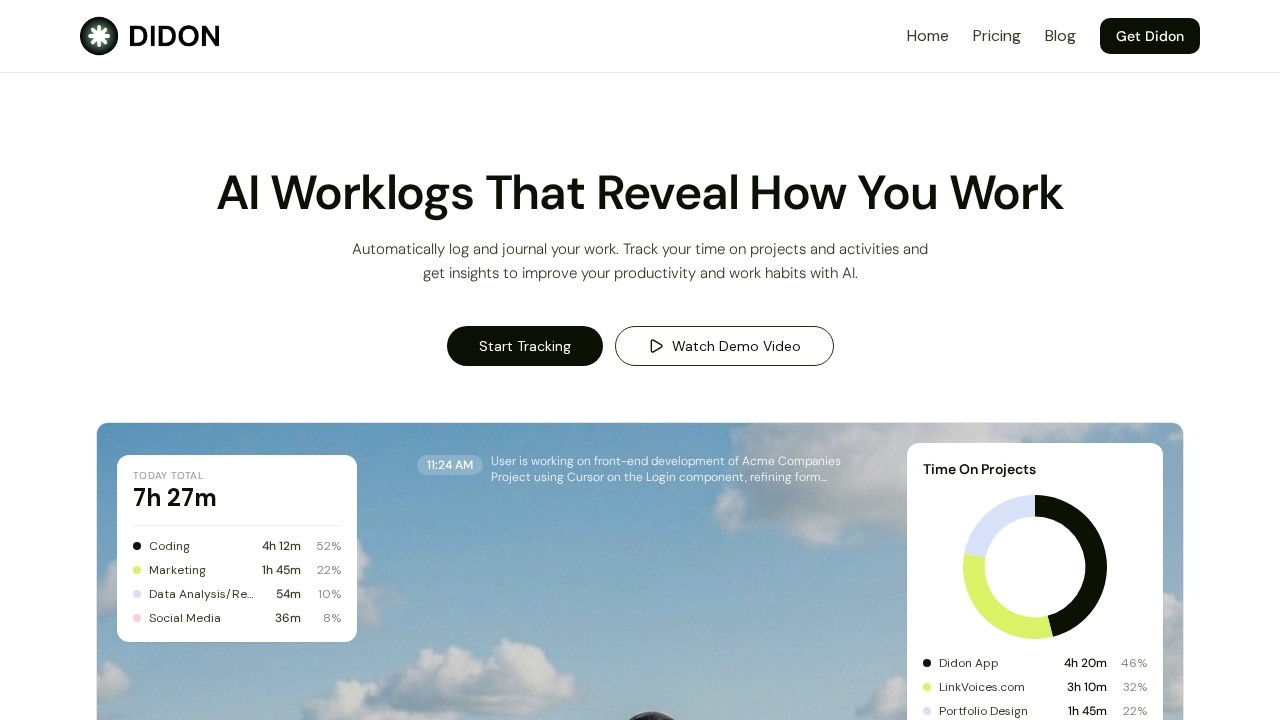
Track time across multiple client projects (e.g., Didon App, LinkVoices.com, Portfolio Design) and generate accurate billing reports.
Software development
Automatically log coding sessions, including specific tasks like refactoring dashboard widgets or refining form validation.
Marketing
Monitor time spent on social media, content creation, and launch posts for campaigns or side projects.
Data analysis
Capture time spent on research and analysis tasks, with breakdowns by activity (e.g., Data Analysis/Research at 54m).
Client reporting
Export daily work logs to CSV for transparent client billing and internal reporting.
Personal productivity
Ask your work journal questions like "What did I do last week?" to review past performance and optimize habits.
Core Features
Automatic time tracking
The app runs quietly in the background, capturing a screenshot every 30 seconds to understand your activities without manual input.
Local AI analysis
A local LLM (Qwen-3-VL:2b) processes all screen data on your device, so your sensitive data and screenshots never leave your Mac.
Detailed task detection
The AI detects windows, file names, apps, and specific tasks you're working on, like "Refactoring dashboard widgets for Client Blog UI in Cursor."
Context configuration
You define project names and activity categories (e.g., Coding, Social Media, Content Creation) so the AI accurately categorizes your work.
Activity breakdown
Get a visual breakdown of your day by activity type, such as Coding (4h 12m), Marketing (1h 45m), and Data Analysis/Research (54m).
Export daily work logs
Generate detailed daily logs automatically and export them to CSV for client billing, internal reporting, or personal analysis.
Ask your work journal
Pose natural language questions to your work logs for instant insights, like "How much time did I spend on coding this week?"
Auto-launch and auto-pause
Starts with your system so tracking begins from the first minute, and pauses automatically when your Mac sleeps to avoid idle time.
Target users
Didon is designed for professionals who want to understand and improve their work habits without manual time tracking. This includes freelancers tracking billable hours, developers monitoring coding sessions, marketers analyzing campaign time, and anyone who needs accurate daily work logs for reporting or productivity optimization.How to use Didon?
- Set up context: Define your projects (e.g., MyPortfolio.com, Acme Website) and activity categories (e.g., Coding, Social Media) in the app's configuration.
- Start background monitoring: The app runs quietly, capturing screenshots every 30 seconds to analyze your screen activity.
- Review your logs: Access your structured work journal with activity breakdowns by project and time spent (e.g., Coding 4h 12m, Marketing 1h 45m).
- Ask questions: Use natural language to query your work logs, like "What did I work on yesterday?"
- Export reports: Generate daily logs and export them to CSV for client billing or personal analysis.
Effect review
Didon delivers on its promise of automatic, privacy-first time tracking with minimal user effort. The local AI analysis is a standout feature, ensuring sensitive data stays on your Mac while still providing detailed task detection and categorization. The activity breakdowns and exportable logs are practical for freelancers and teams needing accurate billing or productivity insights. However, the tool is Mac-only and relies on screenshots every 30 seconds, which may feel intrusive to some users. Overall, it's a solid choice for anyone seeking a hands-off way to log and analyze their workday.Frequently Asked Questions
How does Didon automatically track my time?
Can I see a summary of my day with Didon?
What kind of insights does Didon provide?
Is my data private and secure with Didon?
Does Didon work across multiple devices?
Didon - AI Tool Detail
Didon is an AI productivity tool by Didon that offers automatic time tracking, generates workday logs and journals, and provides insights into how you spend your time.
Category:Personal Assistant
Visit Link:https://www.didon.app/
Tags:time tracking、productivity insights、work journal automation