
CubeOne
AI slide maker by CubeOne for turning prompts or PowerPoint files into editable slides, with drag-and-drop, one-click beautification, and seamless switching between PowerPoint and Canva.
What is CubeOne?
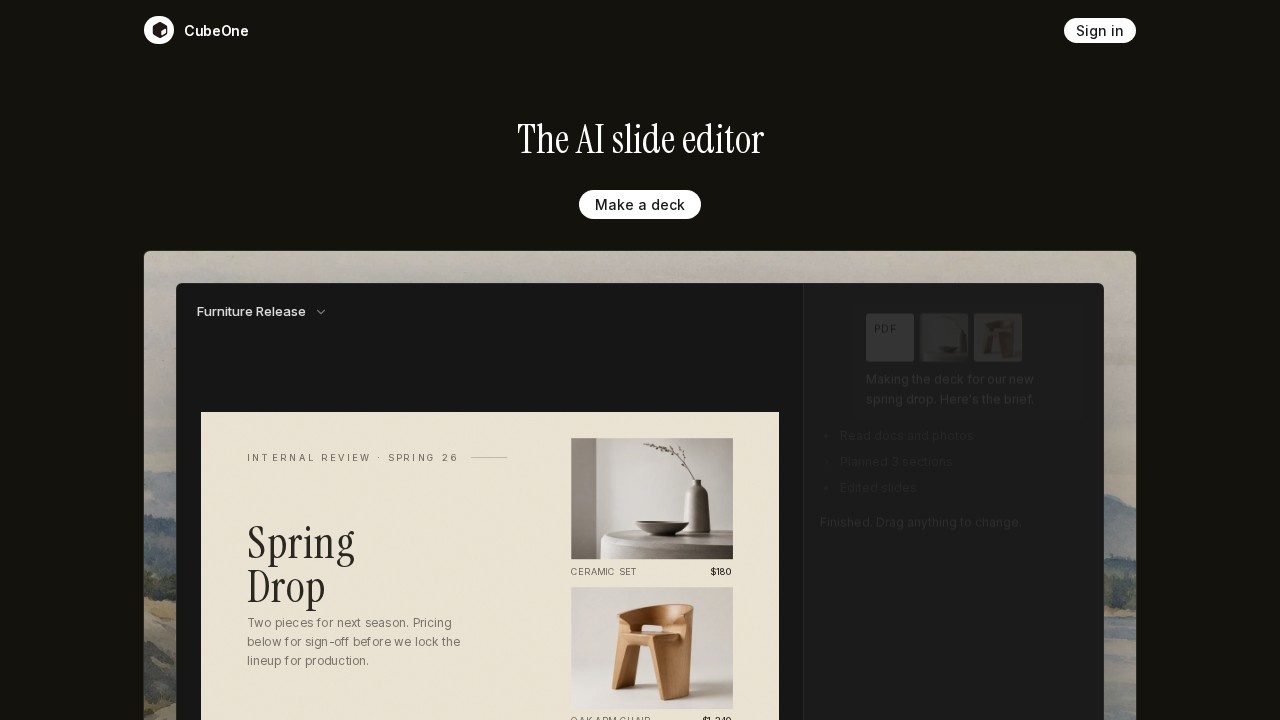
CubeOne is an AI slide maker that turns a text prompt or an existing PowerPoint (.pptx) file into fully designed, editable slides in seconds. Every element—text, image, and shape—is a native, draggable object you can freely move, restyle, and rework, just like in PowerPoint or Canva. It combines powerful AI generation with full freeform editing, so you never have to choose between automation and control. You can export back to PowerPoint or move into Canva anytime, with nothing locked in.Application scenarios
Product launch decks
Quickly generate a slide deck for a furniture release, complete with pricing and product details.
Internal review presentations
Create slides for team sign-offs, like reviewing seasonal product lineups.
Design mood boards
Use freeform drag-and-drop to arrange images, text, and shapes for visual inspiration.
Marketing pitches
Build polished slides with one-click beautification from rough drafts.
Sales reports
Generate data-driven slides with charts and key metrics, like revenue growth and market share.
Educational materials
Create study slides on topics like plant studies, with text and imagery placed exactly where needed.
Core Features
Prompt or import
Start from a sentence describing your deck, or drop in a PowerPoint (.pptx) file, and CubeOne builds the deck with every slide editable.
Freeform editing
Drag any text, image, or shape anywhere on the slide—no locked elements, just native objects you can move and restyle.
Beautify in one click
Add rough content, then hit Beautify to have AI redesign it into a finished, polished slide instantly.
Ask to edit
Just describe what you want different (e.g., change a title or color), and CubeOne handles the rest without design skills.
Generate inside a region
Draw a region on your slide and describe what you want (title, chart, image, bullets), and it generates exactly in that space.
Export to PowerPoint or Canva
Move your deck back into PowerPoint or into Canva anytime, with nothing ever locked in.
Target users
CubeOne is built for professionals who need to create and edit slide decks quickly—product managers, marketers, sales teams, designers, and educators. Anyone who wants AI-powered generation without sacrificing the flexibility of native editing in PowerPoint or Canva will benefit.How to use CubeOne?
- Open CubeOne and describe the deck you need, or import an existing PowerPoint (.pptx) file.
- Let CubeOne generate designed, fully editable slides in seconds.
- Drag any element freely on the slide, or use the "Ask to edit" feature to make changes by describing what you want.
- Add rough content and hit Beautify to polish the slide in one click.
- Draw a region on the slide and generate specific elements (titles, charts, images) inside that space.
- Export your finished deck back to PowerPoint or move it into Canva as needed.
Effect review
CubeOne delivers on its core promise: AI-generated slides that remain fully editable, avoiding the locked output typical of other AI slide tools. The combination of drag-and-drop freeform editing, one-click beautification, and region-based generation makes it practical for both quick drafts and polished final decks. While the website doesn’t cite specific user feedback or awards, the feature set clearly addresses a common pain point—balancing AI speed with manual control. For anyone tired of flat images or code-based outputs, CubeOne offers a genuine alternative that feels like working in familiar tools, but with smarter AI built in.Frequently Asked Questions
What is CubeOne?
How does the AI slide creation work?
Can I edit the slides after generation?
Does CubeOne integrate with other tools?
Is CubeOne free to use?
What file formats are supported for import?
CubeOne - AI Tool Detail
AI slide maker by CubeOne for turning prompts or PowerPoint files into editable slides, with drag-and-drop, one-click beautification, and seamless switching between PowerPoint and Canva.
Category:PPT generation
Visit Link:https://www.getcube.one/
Tags:AI slide maker、presentation generator、PowerPoint to slides、Canva integration、drag-and-drop design