
Seedream
AI image generator and photo editor by Seedream, offering high-fidelity outputs, consistent character generation, and sharp typography for creating and editing visuals.
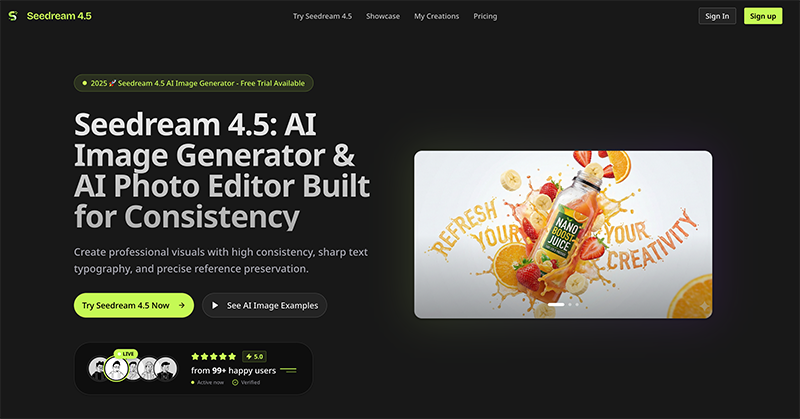
What is Seedream?
Seedream 4.5 is a new-generation AI image generation and photo editing model developed by ByteDance Seed. It is built for creating professional visuals with high consistency, sharp text typography, and precise reference preservation. Users can generate images from text descriptions, edit existing photos, and maintain character identity across multiple images. The tool supports tasks like poster creation, brand visuals, and high-fidelity photo retouching, all through a simple interface.Application scenarios
Poster, Logo & Brand Visuals (Dense Text Layout)
Create poster-style key visuals with readable small text, deliberate layout, and typography-focused composition—ideal for ads, event posters, landing pages, and brand kits.
Consistent Characters & Subject Identity (Multi-Image)
Lock onto the main subject across multiple reference images to maintain character continuity, product identity, and key visual details from one image to the next.
High-Fidelity Photo Editing (Retouch + Preserve Details)
Maximize retention of facial details, lighting, color tone, and texture while making edits—great for pro retouching workflows.
Text-to-Image Generation
Generate visuals from scratch by entering a text description.
Image Editing
Upload an image and use natural language to request edits without complex menus or layers.
Reference-Based Generation
Use uploaded images as references for new creations, preserving details and subject identity.
Multi-Image Creation
Generate multiple images while maintaining visual consistency across a full campaign or series.
Core Features
Text-to-Image Generation
Enter a text description (up to 5000 characters) and generate AI visuals with selectable models (Seedream 4.0 Standard or Seedream 4.5 Pro · HQ).
Image Upload & Editing
Upload PNG, JPG, or WebP images (max 10MB) and edit them using natural language commands.
High-Consistency Outputs
Generate cohesive visuals across a campaign with consistent identity, stable details, and fewer "random" changes between versions.
Sharp Text Typography
Render readable small text and deliberate typography in dense text layouts for professional design output.
Subject Locking
Reliably identify and lock onto the main subject across multiple reference images for character continuity.
Detail Preservation
Preserve facial details, lighting, color tone, and texture with high fidelity during editing.
Aspect Ratio & Credit Cost Controls
Set aspect ratio and view credit cost before generating images.
Ultra-fast Generation
AI-powered generation with high quality and speed.
Target users
Seedream 4.5 is designed for professional creators—graphic designers, marketers, brand managers, and photographers—who need speed and consistency without wrestling with complex toolchains. It suits anyone creating posters, logos, brand kits, or retouching photos, especially those who want to use plain English to request edits and iterate quickly.How to use Seedream?
- Visit the official Seedream 4.5 website.
- Select a mode on the left: Text-to-Image or Image Edit.
- Choose a model (Seedream 4.0 Standard or Seedream 4.5 Pro · HQ).
- For text-to-image: Describe your idea in the prompt box (up to 5000 characters), set aspect ratio and credit cost, then click "Generate with AI".
- For image editing: Upload an image (PNG, JPG, or WebP, max 10MB), then use natural language to describe changes.
- Export or iterate on the generated visuals directly.
Pricing and free trial
A free trial is available. The website states "Free Trial Available" and mentions a credit cost system (e.g., "Credit Cost 10 credits" per generation), but specific pricing tiers or subscription costs are not provided in the text.Effect review
Seedream 4.5 delivers on its promise of high consistency and professional output, with over 99 happy users noted as active. The tool’s ability to lock onto subjects across multiple images and preserve fine details during editing sets it apart from many AI generators that produce random variations. Its dense text rendering is a standout for design-heavy tasks like posters and brand kits, which often trip up other models. For creators who need reliable, campaign-ready visuals without manual retouching in complex software, Seedream 4.5 offers a practical and efficient alternative. The free trial allows users to test its capabilities before committing to credits.Frequently Asked Questions
What is Seedream?
Can Seedream generate images with consistent characters?
Does Seedream support text or typography in images?
Is Seedream free to use?
What file formats does Seedream support for output?
Can I edit existing photos with Seedream?
Seedream - AI Tool Detail
AI image generator and photo editor by Seedream, offering high-fidelity outputs, consistent character generation, and sharp typography for creating and editing visuals.
Category:Image generation
Visit Link:https://seedream4-5.com/
Tags:AI image generator、photo editor、consistent character generation、typography tool、high-fidelity outputs