
What is Quady3D?
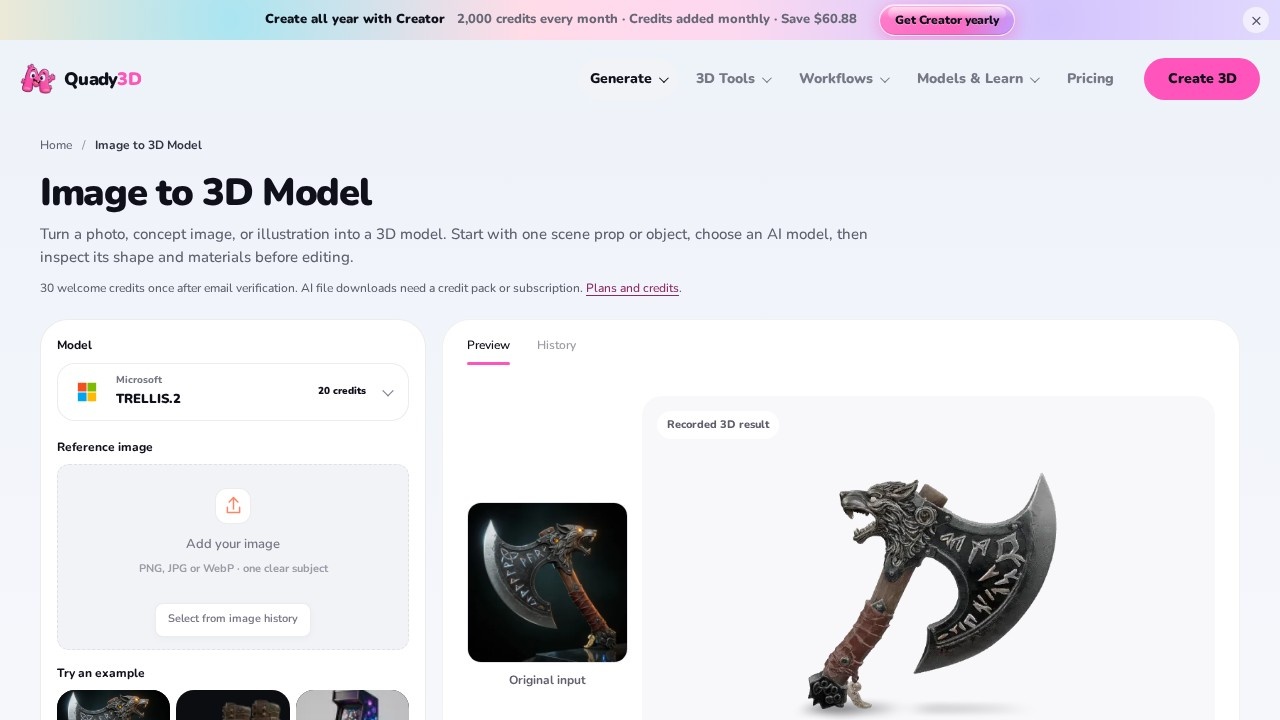
Quady3D is an image-to-3D converter. You upload a single PNG, JPG or WebP image and it generates a downloadable 3D model. The tool puts a large roster of third-party generation models behind one interface — Microsoft TRELLIS.2, Tripo H3.1 and P2, Tencent Hunyuan3D and ARCPixal3D, ByteDance Seed3D 2.0, Hyper3D Rodin 2.5, Meshy 7.1, Hi3D 3.0 and OpenAI GPT-6 Astra — so you can trade credits for speed, detail or a specific output format. Generation runs on a credit system, each job returns GLB files, and every result can be rotated in a 3D preview before you download it.
Application scenarios
Game and prop prototyping
Turn a concept image or reference photo into a textured GLB you can inspect from every side before committing to a full asset build.
Character work
The anime knight example shows a 2D character illustration converted into a textured model with cape and armor intact.
Product visualization
The blue backpack example converts an AI-generated reference image into a model that keeps the front pocket and top handle.
Environment set dressing
Props like treasure chests, arcade cabinets and fantasy axes start as a single image and come back as textured geometry.
Draft-stage look development
The Hunyuan3D 2 Mini tier produces lightweight draft models from one image for quick shape checks.
Rigging and animation prep
Meshy 7.1 adds topology, rigging and animation on top of 4K texture output.
Scene or object experiments
GPT-6 Astra targets experimental object or scene generation for teams willing to spend the credits.
Core Features
Broad model selection
Choose from more than a dozen generation models, each with its own credit cost, strength and output format, all from one upload.
Per-model control panels
Adjust mesh resolution, texture size, face count, topology, subdivision level or geometry style depending on which model you pick.
Resolution settings
Render at 512, 1024 or 1536, with texture size options at Standard, 4096 and Advanced.
3D preview and inspection
Rotate each generated model to check hidden sides, thin parts and texture seams before downloading.
GLB downloads
Save the file your job returns, including PBR GLB and 4K-textured variants on supported models.
Image history
Reuse earlier uploads from a saved image history instead of re-uploading the same reference.
Example inputs
Load a ready-made reference image — a fantasy axe, leather boots or an arcade cabinet — to test a model without sourcing your own picture.
Loadable example gallery
Open saved models such as the treasure chest (Meshy 7.1) or blue backpack (Rodin 2.5 Fast) directly in the 3D viewer, or download them straight away.
PBR material support
Models including Hunyuan3D 3.0, Rodin 2.5 and ARCPixal3D output PBR materials and clean quad topology.
Fast-preview tier
Rodin 2.5 Fast returns a lighter mesh from 10 credits when you only need a quick shape check.
Target users
- 3D artists and generalists who want a fast first pass on a model before detailing it by hand.
- Indie game developers producing props and characters on a small budget.
- Concept and character designers who need to see a 2D illustration from multiple angles.
- Product and e-commerce teams turning reference images into viewable models.
- Hobbyists and students learning 3D pipelines without a modeling suite.
- Technical teams comparing model outputs — the roster covers Microsoft, Tencent, ByteDance, Tripo, Meshy, Hyper3D, HiTEM3D and OpenAI in one place.
How to use Quady3D?
- Open the image-to-3D page at quady3d.com/image-to-3d.
- Upload one clear image — PNG, JPG or WebP — with a single subject fully in frame. Sharp input with the whole object visible gives the model the best chance at clean geometry.
- Pick a model from the roster and set its options: resolution, texture size, mesh detail or face count depending on what that model exposes.
- Generate. The default generate action costs 20 credits; individual models list their own starting costs.
- Inspect the result in the 3D preview. Rotate the model to check the inferred back, thin parts and texture seams.
- Download the files the job returns, or save the result and revisit it from your history.
The site also publishes a full step-by-step guide for the workflow.
Pricing and free trial
Quady3D runs on credits, priced per model rather than as a flat subscription. The page lists starting costs:
- Hyper3D Rodin 2.5 Fast — from 10 credits
- Tencent Hunyuan3D 2 Mini — from 12 credits
- Microsoft TRELLIS.2 — from 20 credits
- Tencent Hunyuan3D 3.1 Rapid — from 23 credits
- Tripo H3.1 and Tencent ARCPixal3D — from 30 credits
- ByteDance Seed3D 2.0 — from 35 credits
- Tencent Hunyuan3D 3.1 Pro — from 38 credits
- Hyper3D Rodin 2.5 — from 40 credits
- Tencent Hunyuan3D 3.0 — from 63 credits
- Tripo P2 — from 110 credits
- Meshy 7.1 — from 120 credits
- Hi3D 3.0 — from 210 credits
- OpenAI GPT-6 Astra — from 800 credits
The standard generate button charges 20 credits. The page does not publish a credit-to-currency rate or a free trial allowance, so check the site for current credit packs before committing to a large job.
Effect review
The credit ladder tells you most of what you need to know. Cheap tiers — Rodin 2.5 Fast at 10 credits, Hunyuan3D 2 Mini at 12 — are explicitly framed as fast previews and lightweight drafts, which makes them the right place to start before spending 120 credits on Meshy 7.1 or 210 on Hi3D 3.0. The three published examples show what the upper tiers deliver: a treasure chest with carved wood and colorful gems, an anime knight with a teal cape and silver armor, and a backpack that preserves its front pocket and top handle. Those results point to solid texture fidelity on hard-surface props and stylized characters. What separates Quady3D from a single-model converter is the comparison surface — one upload, many engines, side-by-side inspection in the viewer. For teams that need a usable GLB quickly, the combination of resolution control up to 1536, 4K texture options and PBR output covers the practical basics. Budget-conscious users should note that quality scales directly with credits, and that the
Quady3D - AI Tool Detail
Quady3D is an image-to-3D converter that turns uploaded PNG, JPG, or WebP images into 3D models. Users can select an AI model, preview results, and download generated files, making it useful for rapid
Category:3D Modelling/Rendering
Visit Link:https://quady3d.com/image-to-3d