
qbrin
Enterprise AI search by Qbrin that transforms emails, files, Slack messages, and tickets into cited, grounded answers with a strict cited-or-abstain policy and zero false accepts.
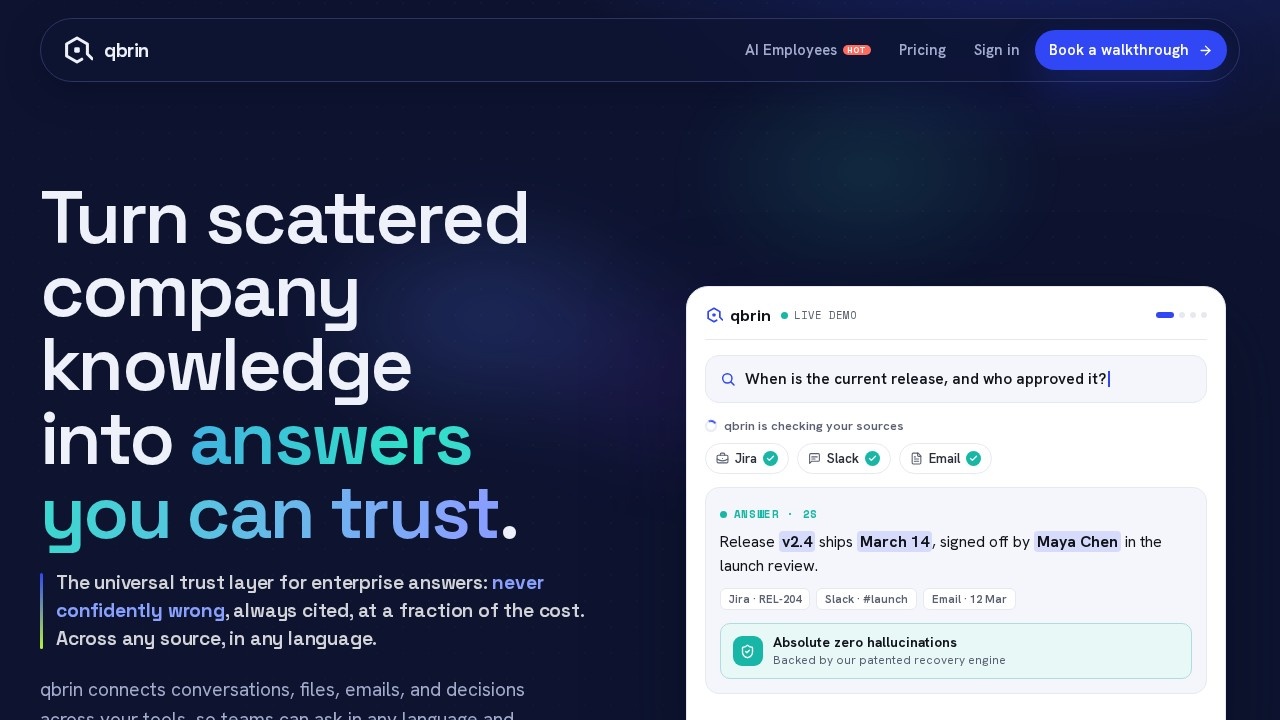
What is qbrin?
qbrin is an enterprise AI search tool that transforms internal data—emails, files, Slack messages, and tickets—into cited, grounded answers. It enforces a strict cited-or-abstain policy, meaning it only responds when it can back up its answer with a source, and it guarantees zero false accepts. Users ask natural-language questions and get concise, source-linked replies pulled from their company’s documents and communications.Application scenarios
Employee onboarding
A new hire asks “How do I get my dev environment set up?” and qbrin reads the onboarding handbook, checks Slack channels, and returns a step-by-step guide with file references.
Legal compliance
A team member asks “Can I share our deck with a vendor?” and qbrin scans the NDA policy and legal decisions to answer with a conditional approval and template instructions.
Sales preparation
A rep asks “Prep me for the Acme renewal call” and qbrin pulls the relevant email thread and QBR notes to summarize the renewal amount, open tickets, and owner.
Customer briefing
A manager asks “Brief me on Northwind before 2pm” and qbrin reads 214 emails and checks invoices to deliver a health score, renewal timeline, and overdue payment details.
Document search
Users can query specific files like `eng-handbook.pdf` or `nda-policy.docx` and get answers directly from those documents.
Cross-platform knowledge retrieval
qbrin searches across Slack messages, CRM records, invoices, and other enterprise systems in one query.
Core Features
Cited-or-abstain policy
qbrin only answers when it can cite a source, and it never fabricates information (zero false accepts).
Multi-source search
It reads emails, files (PDFs, docs), Slack messages, tickets, CRM data, and invoices to generate answers.
Grounded answers
Every response includes direct citations to the original document or conversation, like `eng-handbook.pdf` or `QBR notes`.
Natural-language queries
Users ask questions in plain English (e.g., “Prep me for the Acme renewal call”) and get structured, relevant answers.
Real-time data retrieval
qbrin can scan hundreds of emails and check live invoices to provide up-to-date information.
Context-aware summaries
It pulls talking points, action items, and key numbers (e.g., “Renewal at $48k, two open tickets”) from multiple sources.
Set up in minutes
The website emphasizes quick deployment, with a setup process that integrates with existing enterprise tools like Okta.
Target users
Enterprise teams across sales, legal, onboarding, and customer success who need instant, trustworthy answers from scattered internal data. Ideal for managers, sales reps, legal counsel, and new hires who want to skip manual searching across emails, Slack, and documents.How to use qbrin?
Users sign up via the official website, connect their enterprise tools (email, Slack, file storage, CRM), and then ask natural-language questions in the search interface. Answers appear with source citations. Setup is claimed to take minutes, and the full guide is linked on the site.Effect review
qbrin’s feature set is tightly focused on solving a real pain point: the time wasted hunting for information across siloed enterprise tools. The cited-or-abstain policy is a standout—it builds trust by eliminating hallucinated answers, a common problem in AI search. The examples show it can handle complex, multi-source queries (e.g., pulling from 214 emails plus invoices) and deliver concise, actionable summaries. For teams drowning in Slack threads, docs, and tickets, qbrin looks like a practical, high-confidence solution that prioritizes accuracy over breadth.Frequently Asked Questions
What is Qbrin?
How does Qbrin ensure answer accuracy?
What data sources does Qbrin support?
Is Qbrin secure for enterprise use?
Can Qbrin integrate with existing tools?
How does Qbrin handle ambiguous queries?
qbrin - AI Tool Detail
Enterprise AI search by Qbrin that transforms emails, files, Slack messages, and tickets into cited, grounded answers with a strict cited-or-abstain policy and zero false accepts.
Category:AI Search
Visit Link:https://qbrin.com/
Tags:enterprise AI search、grounded answers、cited-or-abstain、zero false accepts、knowledge retrieval