
KissAI
KissAI is a free browser-based AI kiss generator that turns one couple photo or two individual photos into romantic kiss images. Choose from 13 kiss scenes and create kiss photos or videos up to 30 se
What is KissAI?
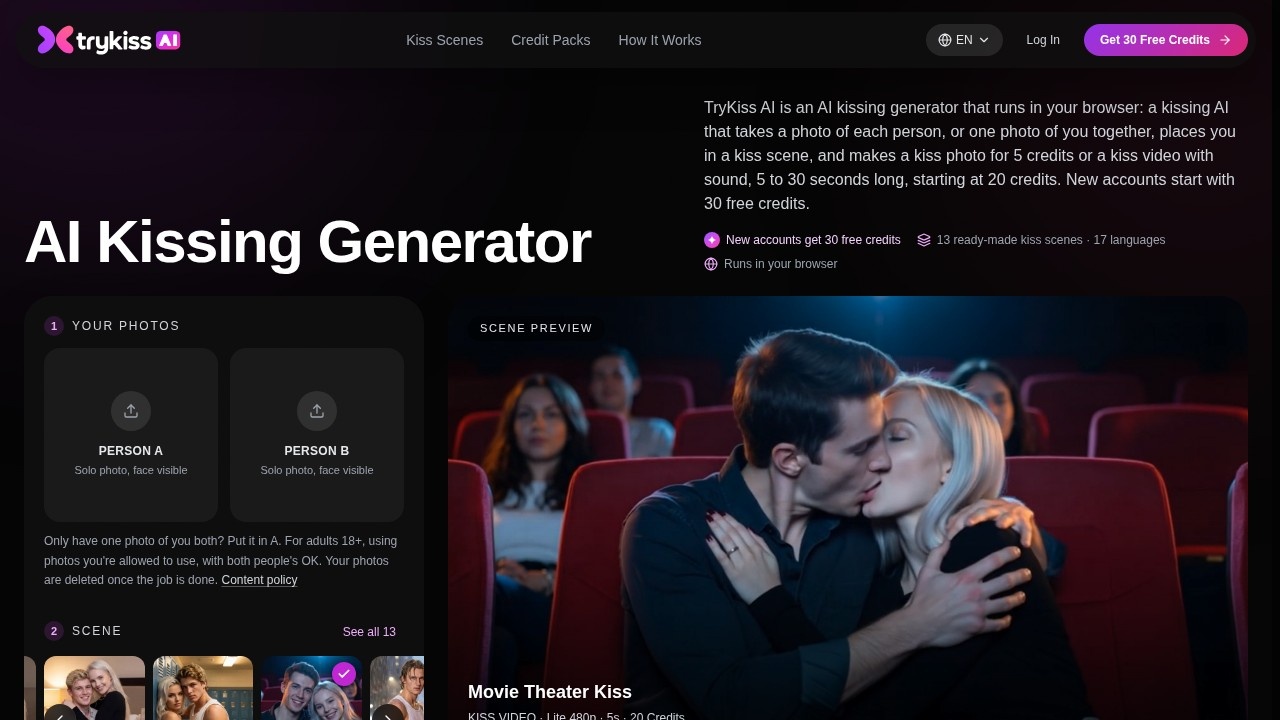
KissAI (TryKiss AI) is a browser-based AI kiss generator that turns ordinary photos into romantic kiss scenes. You upload either one couple photo or two individual solo photos, pick a scene, and the tool places both people face to face inside that setting. It produces two outputs from the same photos: a still kiss photo and a kiss video with sound. No app install is needed — everything runs in the browser on a phone or computer.
Application scenarios
Couple portraits
Turn a single photo of the two of you, or two separate solo shots, into a romantic kiss image without a photographer or a set.
Gift and greeting content
A still kiss photo works as a card, a wallpaper, or a keepsake for an anniversary or a partner's birthday.
Social sharing and stories
The kiss video plays the moment with sound, ready to send to a partner or post as a story.
Long-distance relationships
Two people who cannot be in the same room can still appear together in a shared scene.
Scene experimentation
Preview a rainy city street, a snowy northern-lights night, or a movie theater and see which one suits your photos before spending more.
Novelty and fun content
A quick, low-cost way to generate playful romantic imagery for personal use.
Core Features
13 ready-made kiss scenes
Each scene sets the place, the light, and the pose for you, so there is no prompt to write. Named scenes include Movie Theater Kiss, Northern Lights Kiss, Rainy Street Kiss, Gym Locker Room Kiss, Sunset Water Kiss, Office Desk Kiss, Elevator Kiss, Subway Train Kiss, Dinner Date Kiss, and Lap Embrace.
Two ways to upload
Provide one clear solo photo for Person A and one for Person B, or upload a single photo that already shows the two of you together.
Photo-first workflow
A 5-credit kiss photo lets you check that both faces look right before committing to a video run.
AI kiss video generation
Run the same photos and scene as a moving clip with sound, up to 30 seconds long, delivered in a few minutes.
Sound in video output
Kiss videos include audio, so the output plays as a finished clip rather than a silent loop.
Browser-only access
The generator runs in the browser on phone or computer with nothing to install.
Direct downloads
Finished photos and clips download straight to your device.
Still-image editing style
The kiss photo captures the moment a breath before the kiss, face to face, and doubles as wallpaper or printed-card material.
Target users
- Couples and partners who want a romantic image or clip built from photos they already have.
- Long-distance couples who want to appear in the same scene together.
- Social media creators who need short, emotional video content for stories and posts.
- Gift-seekers looking for a personalized anniversary, birthday, or Valentine's item.
- Casual users testing AI photo tools who want a guided, prompt-free experience rather than an empty text box.
How to use KissAI?
- Open https://www.trykissai.com/ in your browser and create an account by verifying your email or signing in with Google.
- Upload your photos — either one solo photo of each person or a single photo showing both of you.
- Choose one of the 13 kiss scenes from the gallery.
- Generate a kiss photo for 5 credits and review how both faces look in the scene.
- If the still looks right, run the same photos as a kiss video, starting at 20 credits.
- Download the finished photo or clip directly to your device.
Pricing and free trial
KissAI uses a credit system, and the site states the rates clearly:
- Free entry: New accounts receive 30 credits after email verification or Google sign-in, valid for 30 days.
- Kiss photo: 5 credits for a still image.
- Kiss video: from 20 credits, up to 30 seconds with sound. The site shows a Lite option (480p, 5 seconds) at 20 credits.
- What the free credits cover: The 30 free credits are enough for one video, plus change for stills.
Because a photo costs a quarter of the video price, the cheapest route is always to test the still first and only spend on the clip once the faces look right.
Effect review
The pricing design says a lot about how KissAI expects to be used: stills cost 5 credits and clips start at 20, which pushes users toward a check-then-commit loop rather than blind spending. That structure makes practical sense for photo-based generation, where the main risk is a face that does not match, not a scene that fails to render. The scene library covers a useful spread of moods — rain-soaked streets, dark theaters, snowy northern skies, offices, elevators, and subway cars — so most users will find a setting that fits their photos without writing a single word of prompt. The 30-second ceiling with sound puts the video output in shareable-story territory rather than long-form. The main trade-off to plan around is resolution and length on the cheaper tier, which is why previewing at 5 credits before committing is the sensible default. For couples, gifts, and short social clips, the feature set is focused and complete; anyone wanting heavy cinematic output should confirm scene and format limits on the official site first.
Frequently Asked Questions
What is KissAI?
Is KissAI free to use?
How do I create a kiss photo with KissAI?
What kiss scenes are available?
Can KissAI create videos?
Do I need to install anything to use KissAI?
KissAI - AI Tool Detail
KissAI is a free browser-based AI kiss generator that turns one couple photo or two individual photos into romantic kiss images. Choose from 13 kiss scenes and create kiss photos or videos up to 30 se
Category:Image generation
Visit Link:https://www.trykissai.com/
Tags:AI Kiss Generator、Photo to Kiss、Romantic AI、Couple Photo、AI Video Generator