
MCP 2000
Browser-based generative drum machine and sampler by MCP 2000 for creating rhythmic patterns and sampling sounds.
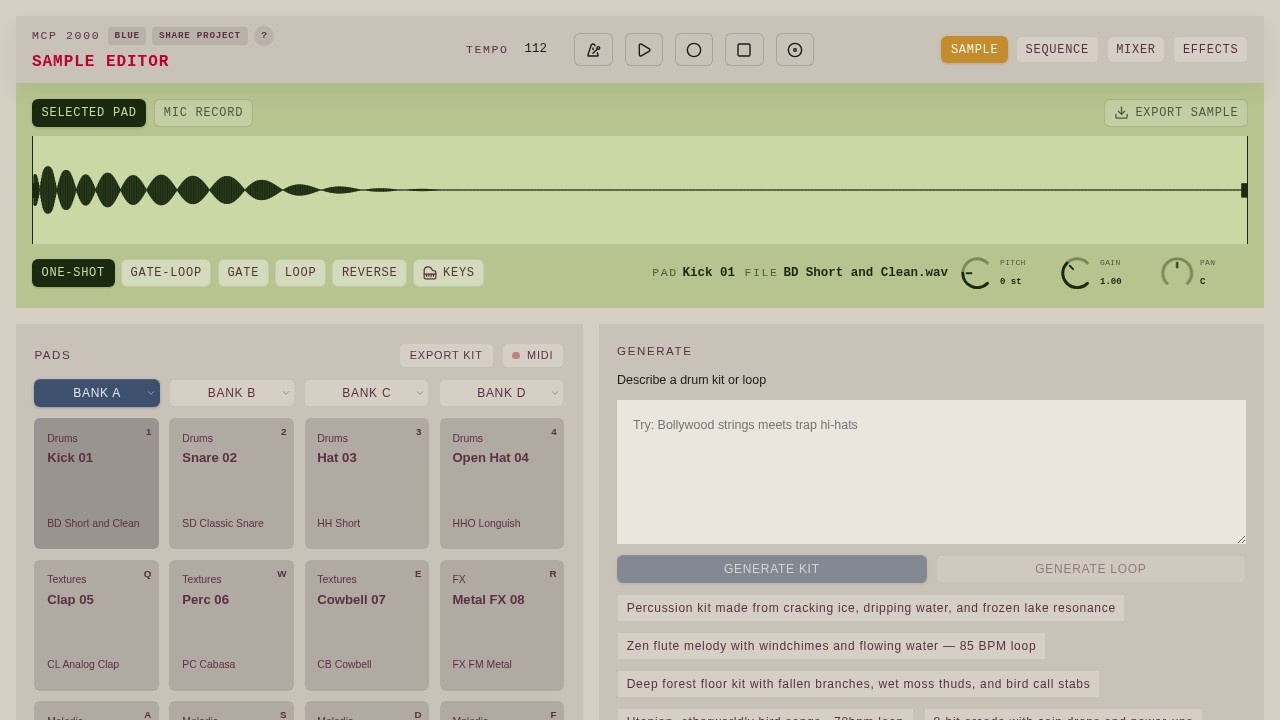
What is MCP 2000?
MCP 2000 is a browser-based generative drum machine and sampler. It lets you create rhythmic patterns and sample sounds directly in your web browser. You can generate drum kits and loops by describing them in text, or build them manually using the onboard sample editor. It’s a free, open-source tool built by Bruce Blay.Application scenarios
Music production
Quickly generate custom drum kits and loops for tracks, beats, or sound design projects.
Sound design
Use the sample editor to manipulate and export individual samples, including one-shot, gate, and loop modes.
Live performance
Switch between four banks (A–D) of pads to trigger different sounds on the fly.
Creative experimentation
Describe abstract concepts like “deep forest floor kit with fallen branches” to get unexpected, organic percussion.
Game audio
Generate 8-bit arcade-style kits with coin drops and power-ups for indie game soundtracks.
Ambient composition
Create loops like “Zen flute melody with windchimes and flowing water” for meditation or background music.
Core Features
Text-based kit generation
Type a description of a drum kit (e.g., “Percussion kit made from cracking ice, dripping water, and frozen lake resonance”) and MCP 2000 generates the corresponding sounds.
Text-based loop generation
Describe a loop (e.g., “Utopian, otherworldly bird songs — 78bpm loop”) and the tool creates a complete rhythmic pattern.
Sample editor
Load, trim, and adjust samples with controls for pitch (in semitones), gain, and pan.
Pad-based sequencing
Assign sounds to 16 pads across four banks (A, B, C, D) for hands-on pattern building.
Export options
Export individual samples, full kits, or MIDI data for use in other DAWs or samplers.
Built-in sample library
Comes pre-loaded with 16 categorized sounds (Kick, Snare, Hat, Clap, Perc, Cowbell, Metal FX, Toms, Rim, Ride, Crash, Blip, Shaker, FX) for immediate use.
Mic record
Record your own sounds directly into the sampler using a microphone.
Target users
Music producers, beatmakers, sound designers, and game audio creators who want a fast, browser-based way to generate and manipulate drum sounds. It’s also useful for live performers and anyone experimenting with generative music or text-to-sound workflows.How to use MCP 2000?
Open the website at https://www.mcp2000.com/ in your browser. You can start by selecting a pad, then either choose a sample from the built-in library or record your own via the Mic Record button. Use the Sample Editor to adjust pitch, gain, and pan. To generate new sounds, type a description into the “Describe a drum kit or loop” field and click Generate Kit or Generate Loop. Export your finished kit, samples, or MIDI using the Export buttons.Effect review
MCP 2000 delivers exactly what it promises: a fast, browser-based generative drum machine. The text-to-kit and text-to-loop features are genuinely creative, turning abstract descriptions into usable percussion. The built-in sample library is solid for quick start, and the mic record option adds flexibility. While there’s no mention of user reviews or awards, the tool feels polished and responsive for a free, open-source project. It’s a practical choice for anyone who needs fresh drum sounds without leaving the browser.Frequently Asked Questions
What is MCP 2000?
Do I need to install anything to use MCP 2000?
Can I import my own sounds into MCP 2000?
Is MCP 2000 free to use?
What makes MCP 2000 generative?
Can I export my creations from MCP 2000?
MCP 2000 - AI Tool Detail
Browser-based generative drum machine and sampler by MCP 2000 for creating rhythmic patterns and sampling sounds.
Category:Music generation
Visit Link:https://www.mcp2000.com/
Tags:AI drum machine、generative rhythms、browser sampler、beat making、audio production