Lovart
Lovart by Lovart is an advanced design agent that turns creative ideas into polished visuals. It supports moodboards, brand identity, posters, illustrations, and product design, helping designers brea
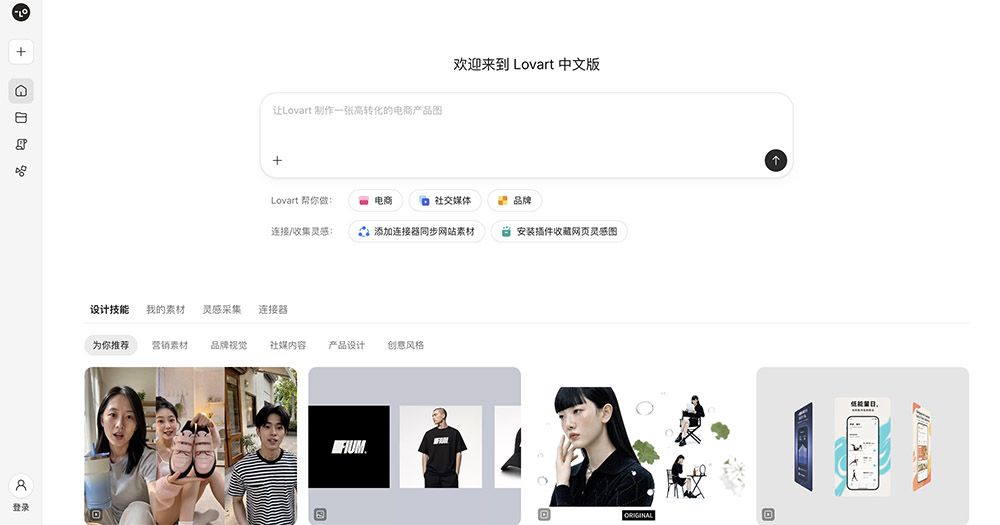
What is Lovart?
Lovart is an AI-powered design agent that handles the heavy lifting between a rough creative idea and a finished visual. Instead of acting as a simple image generator, it positions itself as a more complete design partner—one that can take a moodboard, a brand direction, or a loose concept and turn it into polished, usable assets.
The tool is built around the idea that designers don't just need images; they need coherent visual systems. Whether you're working on a poster, a brand identity, or a product shot, Lovart tries to bridge the gap between inspiration and execution.
Application scenarios
Lovart covers several distinct design workflows, which makes it more versatile than a single-purpose generator:
Moodboards
If you're in the early stages of a project and need to explore visual directions, Lovart can take your reference points and turn them into a cohesive board that communicates the vibe before any final design work begins.
Brand identity
Instead of manually iterating on logos, color palettes, and typography, Lovart can generate a consistent set of brand assets from a brief. This is useful for quick client presentations or internal exploration.
Posters and marketing visuals
For social media graphics, event posters, or promotional material, the tool can produce finished layouts that don't look like generic AI output.
Illustrations
If you need custom illustrations but don't want to commission an artist for every single asset, Lovart can generate styles that match your project's tone.
Product design
For physical or digital products, it can help visualize concepts, packaging, or UI directions before you commit to a full design process.
Main features
Based on the tool's positioning, the core strengths are:
Concept-to-visual workflow
Lovart doesn't just generate an image from a text prompt. It takes a broader creative direction—like a moodboard or a style reference—and applies it consistently across multiple outputs.
Multi-format output
It handles different design categories (posters, brand assets, illustrations) within one platform, so you don't need to switch between specialized tools.
Design coherence
The main selling point is consistency. Instead of getting random variations, you get a set of visuals that feel like they belong to the same project.
Iterative refinement
As a design agent, it's meant to work with you—you provide feedback, it adjusts, and you move closer to a final result without starting from scratch each time.
Target users
Lovart is built for working designers and creative professionals who need speed without sacrificing quality. If you're a freelancer juggling multiple client projects, an in-house designer who needs to explore directions quickly, or a small team that lacks a dedicated illustrator, this tool fits.
It's also useful for non-designers who still need to produce decent visuals—marketers, founders, or content creators who want brand-consistent graphics without hiring a full design team. But the workflow is clearly designed with design professionals in mind, not just casual users.
How to use Lovart?
The general flow is straightforward:
- Set your direction: Start with a moodboard, a style reference, or a written brief that describes the visual language you want.
- Choose your output type: Select whether you need a poster, brand identity, illustration, or product visual.
- Generate and review: Lovart produces a set of options based on your direction. Review them, pick the closest match, and refine.
- Iterate: Give feedback on what works and what doesn't. The agent adjusts the output until you land on something that feels right.
- Export and use: Once you're happy, you take the finished visuals into your actual design workflow—whether that's a client deck, a production file, or a social media calendar.
The exact interface will depend on the platform, but the core idea is that you're guiding an agent, not micromanaging every pixel.
---Bottom line: Lovart is a solid option if you're tired of starting from a blank canvas or wrestling with generic AI image generators that don't understand design context. It's not a replacement for a senior designer's judgment, but it's a strong assistant for turning rough ideas into presentable work—fast.
Frequently Asked Questions
What can Lovart be used for?
How does Lovart help with brand identity design?
Can Lovart generate illustrations?
Is Lovart suitable for product design?
Does Lovart require design experience to use?
How does Lovart turn creative ideas into visuals?
Lovart - AI Tool Detail
Lovart by Lovart is an advanced design agent that turns creative ideas into polished visuals. It supports moodboards, brand identity, posters, illustrations, and product design, helping designers brea
Category:Graphic Design
Visit Link:https://lovart.cgref.cn/s/qmnom25e29
Tags:AI design agent、moodboard generator、brand identity design、poster maker、illustration tool