
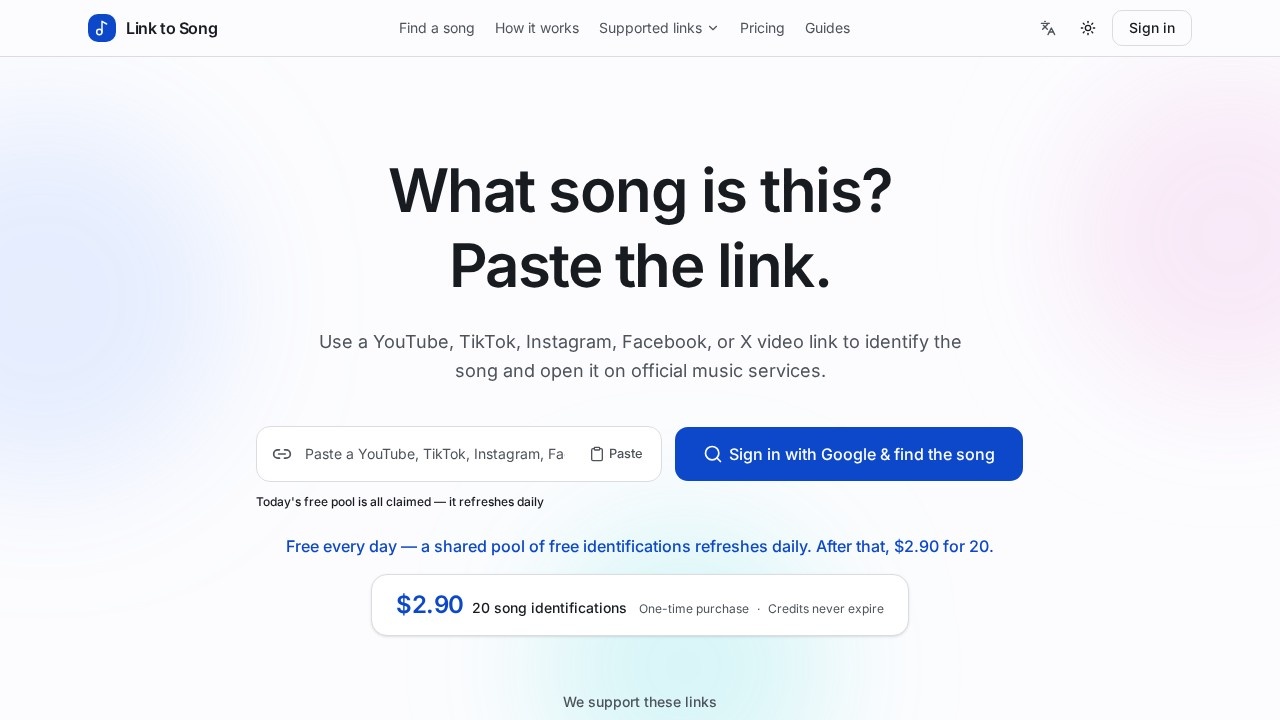
What is Song Finder?
Song Finder is a web tool that identifies the music playing in a social video. You paste a public video link from YouTube, TikTok, Instagram, Facebook, or X, and the tool returns the song title, artist, artwork, and official listening links. It runs in the browser, so there is no app to install, no microphone to enable, and no video file to download. The site presents it as a focused song finder for video links — not a smart link page, link aggregator, or link-in-bio product.
Application scenarios
Casual music discovery
You hear a clip in a TikTok or Reels video and want the track name without digging through comments.
Playlist building
You collect a batch of video links and pull official Spotify, Deezer, or YouTube links for each match.
Content research
Social media managers and creators identify the music used in reference videos before choosing their own audio.
Quiet or shared environments
Because no microphone or playback is required, you can identify a track from a link even when you cannot play it aloud.
Journalism and fact-checking
Verify what song plays in a posted video before citing or describing it.
Cross-platform use
The same workflow covers five platforms, so you do not need a separate tool per network.
Core Features
Five supported platforms
Paste a public video URL from YouTube, TikTok, Instagram, Facebook, or X and identify the music inside it.
Paste, don't upload
Start from the original video link instead of downloading and re-uploading a file.
ACRCloud audio recognition
The public link is sent to ACRCloud, which scans the video's audio to recognize the song.
Complete result set
A successful match returns song title, artist, artwork, and listening links.
Official listening links
Results point to licensed destinations such as Spotify, Deezer, and YouTube; when the catalog has no match, you get search links instead.
No microphone needed
Identification works from a link rather than from recording your surroundings.
No audio download
Song Finder identifies the track and points you to official services — it does not deliver extracted audio.
Credit-safe failures
Only a successful match uses one credit. No matches, invalid links, extraction errors, system errors, and provider outages cost nothing.
Credits never expire
Purchased identifications stay in your account for whenever you need them.
One-time purchase model
A single credit pack, with no subscription.
Target users
- Everyday listeners who want a fast answer to "what song is this?" from a link they already have.
- Content creators and social media managers sourcing or verifying audio for posts.
- Playlist curators and music fans converting video links into official streaming links.
- Researchers, journalists, and moderators who need to confirm a track in a posted video.
- Occasional users who prefer a pay-once credit pack over a recurring subscription.
How to use Song Finder?
- Open the site and find the social video link field.
- Paste the public YouTube, TikTok, Instagram, Facebook, or X video URL.
- Submit it — the tool sends the link to ACRCloud, which scans the video's audio.
- Read the result: song title, artist, artwork, and listening links, or search links when no catalog match exists.
- Use one credit per successful match; failed lookups cost nothing.
Keep in mind that private, deleted, region-blocked, or non-video pages may fail. If a link does not resolve, try a public video URL instead.
Pricing and free trial
Song Finder runs on a free daily pool of identifications that refreshes each day. Once that shared pool is used up, you can buy a pack for $2.90, which covers 20 song identifications.
- $2.90 — 20 song identifications: One-time purchase, no subscription, and credits never expire.
- Free tier: A shared pool of free identifications refreshes daily.
- Credit rules: Only a successful song match consumes one credit; failures do not.
Effect review
Song Finder keeps its scope narrow and its mechanics transparent. The link-in, song-out workflow fits how people actually encounter music now — inside short videos they cannot easily search by ear. Two details stand out for practical use: the no-credit-on-failure rule removes the anxiety of wasting paid identifications on broken or region-blocked links, and credits that never expire suit users who only need a handful of lookups per month rather than a subscription. The result format — title, artist, artwork, and licensed listening links — is exactly what a listener needs to move from curiosity to playback. The main constraint is coverage: only public video links from five platforms work, and private, deleted, or region-blocked pages may fail. For anyone who regularly runs into "what song is this?" from a social link, that trade-off is a reasonable one.
Frequently Asked Questions
What is Song Finder?
Is Song Finder free?
How does Song Finder work?
Which platforms are supported?
Do I need to download an app?
What happens when the free daily uses run out?
Song Finder - AI Tool Detail
Song Finder is a web tool that identifies songs from YouTube, TikTok, Instagram, Facebook, or X video links. It offers free daily uses from a shared pool, then costs $2.90 for 20 uses. No app needed.
Category:AI Search
Visit Link:https://linktosong.com/