

Midjourney
MidjourneySref.com offers a library of 1,710 unique sref codes with 6,840 prompts and AI video examples across V7, V6, and Niji versions. It provides prompt tools, guides, and style references for cre
What is Midjourney?
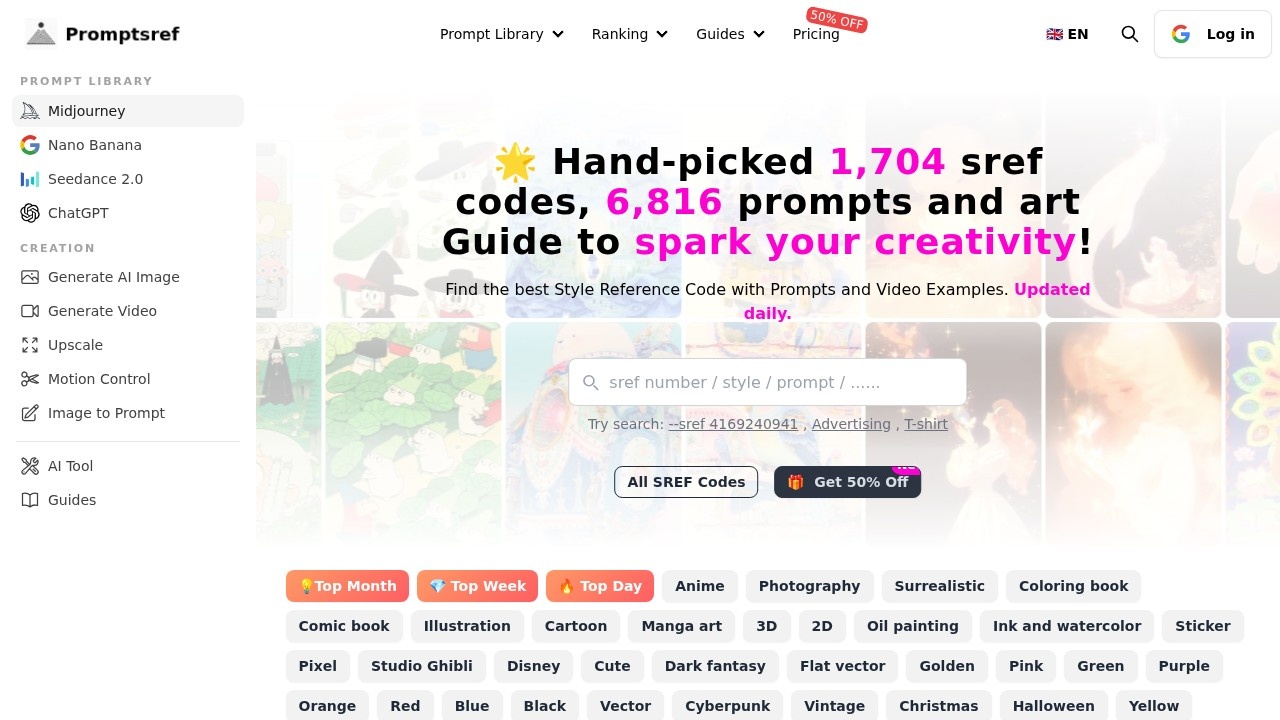
MidjourneySref.com is a curated library of 1,710 unique style reference (sref) codes, each paired with up to 6,840 prompts and AI video examples across Midjourney versions V7, V6, and Niji. It helps users quickly find and apply specific artistic styles—like anime, surrealism, or Studio Ghibli—by browsing pre-made codes or searching directly. The site updates daily with new sref codes and prompts, making it a practical resource for generating consistent, stylized AI art without trial-and-error.
Application scenarios
Artistic style exploration
Browse hundreds of sref codes to instantly apply distinct aesthetics (e.g., cyberpunk, watercolor, flat vector) to your AI images.
Video creation
Use the included "Seedance 2.0 Prompts" and "Nano Banana Pro Prompts" to generate AI video examples with consistent style references.
Advertising design
Search for codes tagged with "Advertising" or "T-shirt" to quickly generate product mockups or ad visuals in a specific look.
Content creation
Find prompts and codes for popular styles like "Disney," "Comic book," or "Minimalism" to create social media graphics or thumbnails.
Animation storyboarding
Leverage "Anime," "Manga art," and "3D2D" codes to produce consistent character and scene styles for short films or storyboards.
Poster and print design
Use "Poster design," "Vintage," or "Golden" style references to generate artwork for posters, flyers, or merchandise.
Educational projects
Experiment with "Children's book," "Coloring book," or "Pixel" styles to create engaging learning materials or illustrations.
Core Features
1,710 hand-picked sref codes
Each code is curated and paired with up to 6,840 prompts, covering V7, V6, and Niji versions for broad compatibility.
Daily updates
New sref codes and prompts are added every day, keeping the library fresh with trending styles.
Search by style or code
Users can search directly by sref number (e.g., `--sref 4169240941`) or browse by category tags like "Anime," "Cyberpunk," "Studio Ghibli," or "Flat vector."
Video example prompts
Dedicated sections for "Seedance 2.0 Prompts" and "Nano Banana Pro Prompts" let users generate AI video with consistent style references.
Color palette preview
Each sref code displays a 5-color palette (e.g., `#FCEBD3`, `#5179A6`) so users can see the dominant tones before applying the code.
Premium-only sref codes
A "Get ALL Premium-Only SREF" option unlocks additional exclusive codes beyond the free library.
Trending filters
Sort codes by "Top Day," "Top Week," or "Top Month" to find the most popular styles quickly.
Check Prompt button
Each sref code includes a "Check Prompt" link to view the full prompt used with that style reference.
Target users
Graphic designers, AI artists, content creators, advertisers, animators, and hobbyists who want to quickly apply consistent, professional-grade artistic styles to their Midjourney images and videos without manually tweaking parameters. The library is also useful for educators teaching AI art techniques or students exploring style transfer.
How to use Midjourney?
- Visit MidjourneySref.com and browse the sref code library by category or use the search bar (e.g.,
--sref 4169240941). - Click on any sref code to view its color palette, associated prompts, and "Check Prompt" link.
- Copy the sref code and paste it into your Midjourney prompt (e.g.,
--sref 1234294421) to apply that style. - For video generation, use the "Seedance 2.0 Prompts" or "Nano Banana Pro Prompts" sections with the sref code.
- Unlock premium-only sref codes by taking advantage of the "50% OFF" offer for full access.
Pricing and free trial
The site offers a 50% OFF promotion on premium access, which unlocks all premium-only sref codes. A free tier exists with a limited set of sref codes (visible without purchase), while the "Get ALL Premium-Only SREF" button indicates paid access to the full library. No specific monthly or yearly prices are listed on the page.
Effect review
MidjourneySref.com delivers exactly what it promises: a massive, organized collection of style reference codes that save users hours of trial-and-error. The daily updates and trending filters ensure the library stays relevant, while the color palette previews and "Check Prompt" links add practical transparency. The inclusion of video prompts (Seedance 2.0, Nano Banana Pro) extends its utility beyond static images. For anyone regularly using Midjourney, this is a straightforward productivity booster—though the premium paywall may limit full access for casual users. The site’s clean, tag-based navigation makes it easy to find a style for any project, from advertising to anime.
Frequently Asked Questions
What is a sref code in Midjourney?
How many prompts and codes are available on MidjourneySref.com?
Does MidjourneySref.com support different Midjourney versions?
What additional resources does MidjourneySref.com provide?
Are the sref codes on MidjourneySref.com free to use?
Midjourney - AI Tool Detail
MidjourneySref.com offers a library of 1,710 unique sref codes with 6,840 prompts and AI video examples across V7, V6, and Niji versions. It provides prompt tools, guides, and style references for cre
Category:prompt
Visit Link:https://midjourneysref.com/
Tags:midjourney sref codes、AI image prompts、style reference library、AI art tools、niji styles