
AIStart is your personal AI Launchpad: favorite the tools you use often, then open them in one click from the Launchpad on the home page.
Open Launchpad
GPT
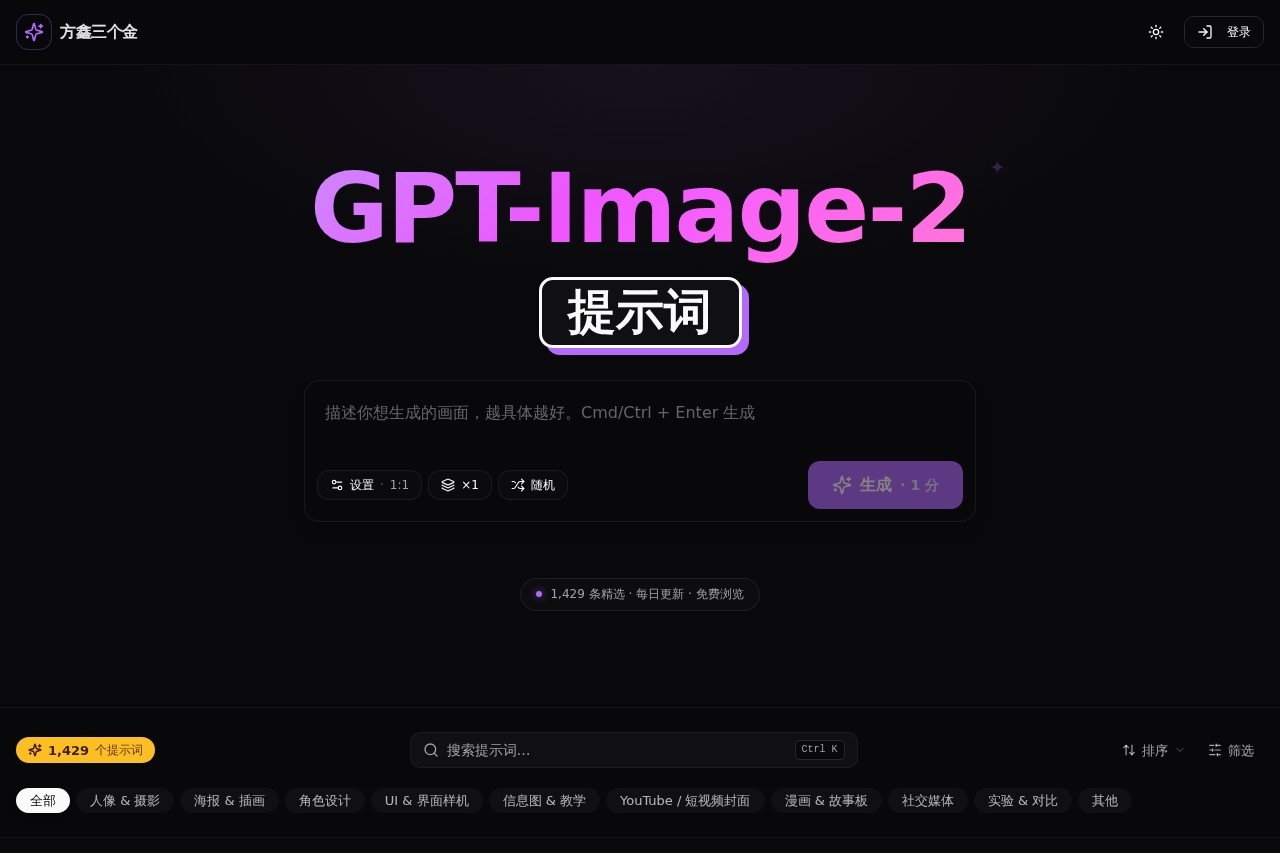
GPT by image2.fun offers 1000+ curated GPT-Image-2 prompts updated daily, covering portrait photography, posters, UI mockups, infographics, and character design. Free to browse, copy, and save.
Screenshot
What is GPT?
GPT by image2.fun is a curated prompt library for GPT-Image-2, offering over 1,429 hand-picked prompts that are updated daily. Users browse, copy, and save prompts to generate images across various styles and formats. It's a free resource designed to streamline AI image creation without needing to write prompts from scratch. The platform focuses on practical, ready-to-use inspiration for portrait photography, posters, UI mockups, infographics, and character design.
Application scenarios
- Portrait photography: Generate 9:16 vertical portraits with magazine-style, Korean idol, or film photography aesthetics.
- Poster & illustration: Create vertical posters for new Chinese ink wash landscapes, sci-fi mecha girls, or fantasy city designs.
- UI & interface mockups: Produce JSON parameterized templates for consistent design prototyping.
- Infographics & education: Generate explanatory diagrams for scientific concepts like "reverse propagation" or anatomical charts for deep-sea fish.
- YouTube / short video covers: Design vertical video thumbnails for platforms like TikTok or YouTube Shorts.
- Character design: Build fictional characters with detailed world-building, such as "Special Executive Officer of Divine Layer 37 District."
- Social media & advertising: Redesign product ads from a professional designer's perspective or create game battle posters.
Main features
- Prompt library: Access 1,429 curated prompts sorted by category (portrait, poster, UI, infographic, etc.) with a search function and keyboard shortcut (Ctrl K).
- Daily updates: New prompts are added regularly to keep the library fresh and relevant.
- Free browsing: All prompts are freely viewable, copyable, and saveable without any paywall.
- Category filtering: Filter prompts by type: portrait & photography, poster & illustration, character design, UI & interface mockups, infographics & education, YouTube/short video covers, comic & storyboard, social media, experimental & comparison, and other.
- Random generation: A "random generate" button for spontaneous inspiration.
- Direct image generation: Click "Generate now" to create an image using your chosen prompt or write your own.
- Prompt examples: Real-world prompts like "9:16 vertical — magazine-style portrait" or "new Chinese ink wash mountain-water poster" provide immediate, actionable templates.
Target users
Content creators, graphic designers, social media managers, educators, and AI art enthusiasts who need quick, high-quality image prompts for GPT-Image-2. It's especially useful for those who want to skip prompt engineering and jump straight to generating professional-looking visuals for posters, portraits, infographics, or UI mockups.
How to use GPT?
- Visit https://image2.fun and browse the prompt library.
2. Use the search bar (Ctrl K) or category filters to find a prompt that fits your needs.
3. Click a prompt to copy it, or write your own.
4. Log in to your account and click "Generate now" to create your image with GPT-Image-2.
5. Save or export the generated image as needed.
Effect review
The platform delivers exactly what it promises: a massive, organized collection of ready-to-use prompts that save time and spark creativity. The daily updates ensure you're never stuck with stale ideas, and the category breakdown makes it easy to find prompts for specific use cases like portrait photography or infographic design. While the site doesn't show user ratings or quality metrics for individual prompts, the sheer volume and variety—from "Korean idol portraits" to "reverse propagation diagrams"—suggest a broad, practical utility. For anyone using GPT-Image-2 regularly, this is a valuable resource to keep bookmarked.
Frequently Asked Questions
What is GPT by image2.fun?
Is GPT by image2.fun free to use?
How often are new prompts added?
What types of prompts are available?
Do I need an account to access the prompts?
Can I use the prompts for commercial projects?
Alternative tools to GPT

RunningHub
A cloud-based ComfyUI AI platform for image and video creation, featuring over 7,000 preset nodes.
StackMate
AI image generation tool supporting multiple styles and scenarios. Create diverse visuals with advanced artificial intelligence technology.

Stable Diffusion
Open-source AI image generation model supporting local deployment and secondary development.

Meta AI
Use Meta AI Assistant to create AI-generated images for free and get answers to any questions.
Local Banana
AI painting prompt library offering vast free prompts to help users quickly generate high-quality AI images.

Toast TusiArt
An AI painting model sharing community and online image generation platform, offering free model execution online.
GPT - AI Tool Detail
GPT by image2.fun offers 1000+ curated GPT-Image-2 prompts updated daily, covering portrait photography, posters, UI mockups, infographics, and character design. Free to browse, copy, and save.
Category:Image generation
Visit Link:https://image2.fun/
Tags:GPT prompts、image generation、design inspiration、AI art